









Navigating Security: Choosing The Right Portable CCTV Camera For Your Needs

Published on: 29 January 2024 Last Updated on: 30 January 2024
Portable CCTV Camera

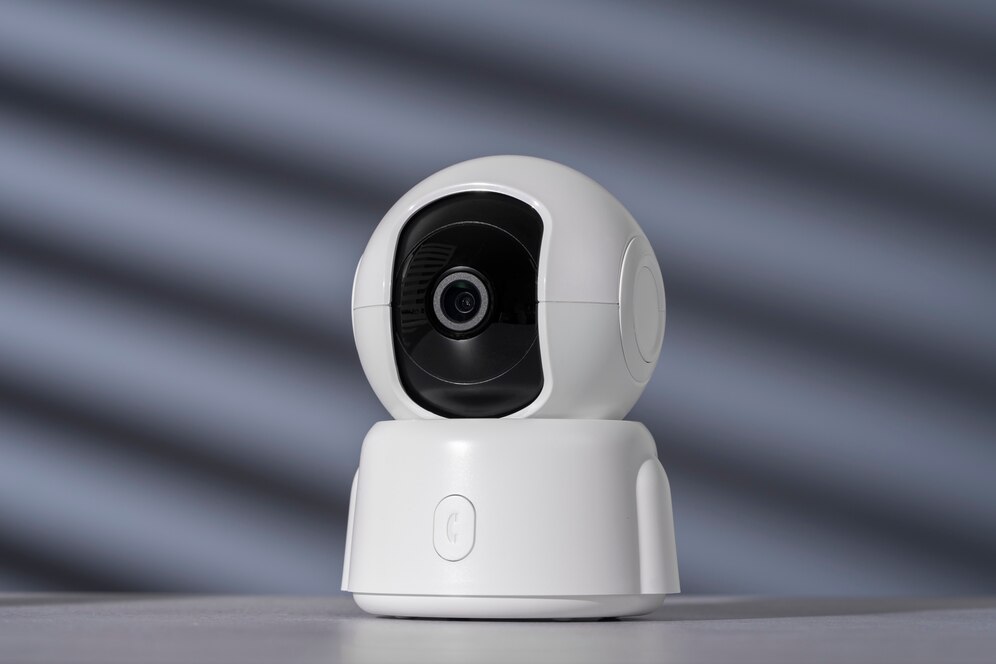
Closed-circuit television (CCTV) cameras that are portable have become indispensable for keeping an eye on and protecting a variety of locations.

The correct portable CCTV camera must be chosen for outdoor activities, business, or personal use to provide the best performance and satisfy particular security requirements.

This article will explore key factors to consider when choosing a portable CCTV camera, helping you navigate the plethora of available options.

1. Intended Use and Environment: Define Your Needs

Clearly defining your intended usage and the location of the portable CCTV camera is the first step toward choosing the best one. Certain qualities are needed in different scenarios. 

A small, inside camera can be plenty for home security, but an outdoor activity could require a tough, weatherproof gadget. A clear idea of where and how you want to use the camera will help you make decisions.

2. Resolution and Image Quality: Clarity Matters

The quality of a CCTV camera’s photos and videos is determined by its resolution. Sharper details from higher-resolution cameras facilitate the identification of faces, license plates, and other important elements. 

Look for cameras with a minimum resolution of 1080p; for more precise monitoring needs, go for higher resolutions like 4K. One thing that cannot be compromised when it comes to security is image quality.

3. Battery Life and Power Source: Ensure Reliability

Because portable CCTV cameras run on batteries, battery life is an important factor to consider. Extended periods of monitoring and fewer recharges are associated with longer battery life. 

Please consider how simple it is to replace or recharge the batteries. While certain cameras use replaceable batteries, others utilize rechargeable ones. Select a camera based on your needs, tastes, and the usefulness of the intended usage.

4. Wireless Connectivity: Embrace Convenience

A revolutionary development in the field of portable CCTV cameras is wireless communication. Seek out cameras that support Wi-Fi or Bluetooth, as these features let you use a smartphone or tablet to monitor and operate the camera from a distance. 

This feature improves convenience by enabling real-time monitoring without requiring a direct physical connection. It also makes it simple to retrieve videos for sharing or critique.

5. Storage Options: Balance Capacity and Convenience

 movable CCTV camera

Think about the storage capacities that the movable CCTV camera provides. The majority of cameras record video on memory cards or internal storage. Determine the camera’s storage and whether it works with various memory cards. 

To further secure your video, some cameras additionally include cloud storage alternatives. Select a camera based on your required storage and how long you want to keep recordings.

6. Night Vision Capability: Enhance 24/7 Security

A portable CCTV camera with night vision capability is necessary for thorough surveillance, particularly in low light. The camera can take crisp pictures and films in the dark with the help of infrared (IR) LEDs or other cutting-edge night vision technologies. Examine the effectiveness and range of the night vision feature to make sure it satisfies the needs of your particular use case.

7. Motion Detection and Alerts: Stay Proactive

Motion detection is an essential component that causes the camera to begin recording when movement is detected inside its range of view. You can receive real-time updates and notifications on your linked device from cameras with motion detection capabilities. This proactive feature is particularly helpful for keeping an eye on unexpected activity in certain regions or for home security.

8. Weather Resistance and Durability: Adaptability Matters

Consider the weather resistance and general durability of the portable CCTV camera if you intend to use it outside or in difficult conditions. Seek for cameras with proper Ingress Protection (IP) ratings, which reflect how resistant they are to water and dust. 

The longevity and dependability of the camera are increased by its sturdy construction, which makes it resistant to a range of weather conditions and environmental influences.

9. Ease of Installation and Use: Simplify Setup

Install portable CCTV camera

Select a portable CCTV camera that is user-friendly and simple to set up. Certain cameras are packaged with flexible adapters or magnetic mounts for easy and quick installation. The user experience is further improved with intuitive mobile apps or user interfaces. Select a camera based on its compatibility with your technical expertise and ease of setup and use.

10. Brand Reputation and Reviews: Validate Reliability

Examine the brand’s reputation and consumer feedback before deciding on a choice. Positive reviews for well-known brands increase the likelihood of dependable, high-quality products being delivered. 

Consider what customers say about the camera’s functionality, robustness, and customer service. You may make an informed selection using this information, which can offer insightful information.

Choose the Right Portable CCTV Camera

It’s important to carefully analyze your unique needs and the characteristics that meet them when selecting the best portable CCTV camera. Your intended camera usage will depend on several factors, including wireless connectivity, durability, image resolution, and battery life. 

By carefully weighing these factors and keeping up with emerging technology, you can choose a portable CCTV camera that improves security protocols and gives you peace of mind in various situations.

Read Also:

Content Rally wrapped around an online publication where you can publish your own intellectuals. It is a publishing platform designed to make great stories by content creators. This is your era, your place to be online. So come forward share your views, thoughts and ideas via Content Rally.

View all posts

Leave a Reply

Your email address will not be published. Required fields are marked *

Related

Improve Your Internet Privacy

5 Tips to Improve Your Internet Privacy

Have you ever faced a cybersecurity breach or a severe hacking attempt? What was the most overwhelming feeling following the occurrence? Indeed, whenever something of such sort happens, we feel that our privacy got breached. We begin to realize that there’s no more confidentiality left, and someone else is in command of our personal affairs. The truth is that’s when we discover the true worth of maintaining our privacy. The reality, as it seems, is that individuals or companies may face a cybersecurity breach irrespective of what they do. It is simply because the technology and security systems have progressed, threats have advanced too. Somehow, those attempting such manipulation always find a way to defeat the security measures and protocols. One way to combat or at least minimize such a level of a breach is to pay extreme care to personal security. At an individual level and as an organization’s employee, a person can somewhat tackle the threat with some steps. These include being cautious when using a public computer and avoiding sharing personal information online. Another measure is to gain advanced cybersecurity expertise. In other words, you may earn a postgraduate degree in cybersecurity to defend against threats. In doing so, you will learn in detail about cyber law and security and how they apply in today’s digital age. You will also study digital forensics, focusing on the investigation of data on the devices. Only a Cyber Security Masters or Bachelors degree can provide the opportunity to earn discreet knowledge on the subject. While you do so, why not learn about some essential tips to safeguard your internet privacy? Let’s begin. 1. Be Wary of the Websites You Visit: The first rule to maintain your privacy is to be conscious of your browsing habits. It is essential to be mindful of the sites you visit not to fall into any trouble unknowingly. When we talk about websites, we generally think that avoiding them is too convenient, while this isn’t entirely true. Substandard websites or those that have ransom-ware or harmful downloadable programs in them do appear in disguise. Further, they may have engaging content, such as a compelling catch-line to lure the potential victims. Pointing them out and avoiding them is the key to keeping your privacy intact. 2. Draw Limitations on Social Media: Social media can have the most profound impact on your privacy, so we need to be careful about it. It seems just so tempting to jump on the bandwagon and share our two cents on a trendy topic. But, if you want your privacy to remain, you will need to draw out some limitations on the usage. When we say restrictions, we don’t mean that you shouldn’t engage with your acquaintances or engage with potential customers. Instead, what we mean is that you should be careful about what you post. Don’t hand out your personal information or data that could harm you in the longer run. 3. Ensure Privacy Checks Exist: Your steps for privacy should be of paramount importance to you as these guarantee confidentiality. To ensure that, it has to be conscious and constant effort to avoid facing a predicament. Besides being alert, one needs to place sufficient privacy checks, depending on their individual or organizational needs. Especially at an organization level, you will need to ensure that your employees follow online safety protocols. Each resource will need to make decisions and execute plans as per the company directives. Every individual needs to be aware of the steps to take in data theft or online breach. 4. Install Sufficient Software: It would be best to have specific programs on your computer to safeguard your crucial information from all privacy breaching attempts. Let’s try to understand it from a larger perspective. When you are securing your house, you install ample security devices and systems. The primary reason is to rule out any intrusion. Similarly, you need to install sufficient software on your machine to avoid any invasion. It includes anti-virus, anti-ransomware, and anti-spam programs that can safeguard your computer. But remember that you have adequate memory in the machine to keep running everything smoothly. Also, all programs must have complete synergy to produce the effect needed. 5. Secure Every Device: When we strive to maintain privacy, we primarily focus on securing our computer, laptop, or tablet. In doing so, we sometimes overlook our smartphones, and that’s where the problem begins. If we ponder it, it is our cell phone we use the most, so greater care is needed there. The biggest potential threat in terms of privacy when using a mobile phone is an app. Sometimes, we need an app urgently so that we can download the required program in seconds. However, it is essential to make all the devices secure to maintain comprehensive privacy. Final Thoughts: Attaining online privacy seems like an uphill task in today’s digital era. In a fast-paced world where businesses have intense competition, it is always hard to be alert about privacy. The existing threats of data breaches make it even more difficult to ensure security. But a few steps for online privacy can go a long way in ascertaining productivity and progress. So let us act wisely! Read Also: 8 VPN Facts – You Should Know About Top 10 Cybersecurity Features That Are A Must-Have In An Ecommerce Store What are the things you need to know while choosing Antivirus Software? Five Tips to Make Sure Your Security Software Is Actually Secure

READ MOREDetails
your IP has been temporarily blocked

Your IP Has Been Temporarily Blocked – How To Unblock It?

Although it doesn't happen often, the "your IP has been temporarily blocked" warning will keep you from visiting a website. The error could show if you've attempted to log in too frequently or if you've broken the site's terms of service by uploading prohibited information, for example. Therefore, to learn how to prevent this issue from happening again, read this guide post till the end. Here, you will learn ten different ways to fix this issue. How To Fix The “Your IP Has Been Temporarily Blocked” Issue? To prevent the “your IP has been temporarily blocked” error from happening again, here are the steps you can take: 1. Just Wait A website frequently temporarily blocks IP addresses. For instance, if you tried to log in too many times using invalid credentials, you may be barred or banned for 24 hours before being allowed to try again. You can either wait a day or see the website's terms of service for details now only. 2. Use VPN Websites may restrict your IP address as a result of a country ban, as was already indicated. Use a VPN to conceal your IP address in order to get around such a limitation. You will be able to access the website since it will seem as though you are visiting from somewhere else. Free VPNs are available, however commercial services are more likely to ensure that your IP address is hidden. You will be able to view the website that has blocked your access after you sign up for a VPN. Check out our list of the top 10 VPN service providers if you're unclear about how to choose a VPN service. 3. Properly Configure Your Network And Mail Servers Incorrectly placed letters or digits might potentially be the reason your IP address is blocked. Your network and mail server need to be configured correctly because of this. Contact the blacklist to get your name taken off of it. 4. Connect To A Different Wi-Fi Network You should also think about joining a fresh Wi-Fi network. A new IP address is generated while joining a Wi-Fi network. This may be a short workaround to enable you to view the website to which access has been limited. 5. Check If They Blacklisted Your IP Image Source: thryv.com Many websites are members of IP address blacklists that are open to the public. These lists are frequently gathered from well-known spammers, and banning the addresses can assist website owners to keep unwanted visitors away and stop spam abuse.  However, it's possible that one of these blacklists listed your IP address by mistake. The good news here is that you can check your IP Address on a website called WhatIsMyIPAddress.com. If it shows up on their lists after entering your IP address is automatically detected, the website will notify you. 6. Update Your OS If your computer hasn't received any updates in a while, malware might infect it and restrict your IP address. You may improve your computer's usefulness and security by upgrading it. If you use a Windows computer, here’s what you should know: First, go to Settings. Here, choose Update & Security. Then click on Windows Updates to see whether any updates are available for installation. If you use a Mac computer, then here’s what you should do: First, open System Preferences. Then, select the App Store. Finally, select Show Updates. Wait a day after the upgrade is complete before attempting to access the website that has restricted you. 7. Try Detecting Malware The problem regarding “why your IP has been banned” can stem from various malware that might have entered your system. This error is typically shown when your IP address has been compromised and your system is now transmitting spam, or even launching DoS attacks in the background. Therefore, you should scan your computer using antivirus software. To get the best internet security, I recommend using premium antivirus software that always runs in the background. Here, if you're using Windows, follow the steps explained below: First, click on Start and type "Security".  When Windows Security appears in the search results, click on it.  After selecting Virus & threat protection, do a Quick scan. 8. Change To A New IP Address If you want to, you can shift to a new IP address by temporarily changing it using your VPN software. Do this if your IP has been banned. To do so on a Windows computer, follow the steps below: First, open the Control Panel by searching for it on the Search bar from the Start menu. Then, click on Network and Internet. Here, click on Network Connections. Now, you will get a list of all the network adapters you have paired with. Select the one you are using and want to change its IP. To do so on an Apple computer, follow the steps below: Navigate to System Preferences. Here, open Network. Now, click on Advanced Button. Then, click on the TCP/ICP menu. Here, you need to add a new TCP/IP configuration. To do so, click on the + sign here. Then, select Manual and enter the new IP address. 9. Use Proxy Servers That Are Free If you don't want to spend money on a VPN, you can use a free proxy server. A proxy server is a server that stands between an internet user's request and the website or page they are trying to access. Your IP address is concealed by the proxy, enhancing your privacy and independence. Keep in mind, though, that a lot of websites and services are aware of proxy servers and will ban the IP addresses of public proxy servers. You will be informed that "the owner of this website has blacklisted your IP address" if they catch you. Remember that you should never browse with proxy servers when providing personal information. 10. Blame The Webmaster If you searched the terms of service of the website for information on why your IP address was blocked but couldn't find anything, you may contact the webmaster — particularly if it's a tiny website that interacts with its users frequently. If your IP address is being blocked, the webmaster can tell you why it’s being restricted and how to fix it. Frequently Asked Questions (FAQs): People using the internet have asked various questions similar to “why is my IP address blocked” and “unblock IP address”. Here are my answers to their queries: Q1. Why Did Instagram Block My IP Address? Ans: Instagram might have blocked your IP address because they might have blacklisted your IP address. This can happen because you might have posted content that might have violated their terms and conditions. If this is not the case, then you might have a problem with your Internet Service Provider (ISP). Q2. How Long Does An IP Ban Last? Ans: On Instagram, an IP ban might last anywhere between 24 hours to 48 hours. This depends on the severity of your actions. If it's pretty severe, then Instagram might block you permanently. Q3. Why Did Cloudflare Block My IP Address? Ans: Sometimes, many of the websites that we visit can contain harmful malicious content in them. If Cloudflare detects this, it can block your IP address from accessing that website. Unblock Your IP Now! There are various reasons why you might see the “your IP has been temporarily blocked” error. It can be because your IP has been blocked by the website, or there are various problems with your ISP. To fix this issue, you can either wait for some time or use VPN software to change your IP. In addition, you can also use free proxy servers, or contact the webmaster if you wish to. If you have any similar questions regarding this that you would like an answer to, you can reach out to me by commenting down below! Read Also: 5 Tips to Improve Your Internet Privacy Will The Internet Become A Commodity? Top 7 Torrent Applications with VPN Support

READ MOREDetails
PKI In Cybersecurity

PKI in Cybersecurity: What Is It, Importance, Applications, And More

Cybersecurity is one of the most sought-after academic disciplines in colleges and universities. In today’s world, since there are a lot of cyber-attacks, the importance of implementing proper cybersecurity measures has become mandatory. In this tech-driven day and age, the trend of using Public Key Infrastructure, or PKI, is on the rise. A tech person would easily understand what PKI means, but an average Joe would not know a thing about it. In this article, we are going to delve deep into knowing the basics of Public Key Infrastructure. There are many tools like Keyfactor that provide Cyber Security certifications. So, without wasting any further time, let us take a brief look at what PKI actually is. What Does The Term PKI Mean? In simple words, PKI is the term that focuses on everything that establishes and runs public key encryption. Public Key Infrastructure is one of the most common types of Internet encryption that deals with Cybersecurity. It is actually installed on all web browsers to ensure that the traffic of the website is coming from a secure place. Organizations also use PKI to secure their internal communications. The whole concept of PKI revolves around cryptography; it ensures that proper security is provided to websites. Keep in mind that these keys are not a part of the process of encryption; they just help to authenticate the true identity of the parties or devices. They are just certificate givers. What Are PKI Certificates? PKI certificates are nothing but online documents that work like digital passports. They are basically given to websites or entities that want to join the PKI-secured conversation. PKI certificates are not just random authentications, as they can contain a significant amount of data. One of the top important pieces of information that a certificate includes is the website’s or entity’s public key; the certificate is only the medium through which the key is shared. Then comes the part of authentication. Here, the certificate comes with an attestation from a reliable source that the entity or website is who they declare to be. Let us look at some of the key elements of PKI certificates to get a better understanding. 1. Registration Authority – The registration authority is the single most important element in the Public Key Certificate. It confirms the identities of those asking for digital certificates. 2. Certificate Authority – The certificate authority signs the entities with its public key and issues digital certificates. 3. Certificate Policy – This certificate policy outlines all the PKI procedures; it helps outsiders judge the authenticity of the website. 4. Certificate Database – The Database stores the metadata and certificates until the license expires. Now that you know the basis of PKI and PKI certificates, let us take a look at the uses of PKI. Different Types Of Public Key Infrastructure (PKI)? Basically, PKI (public key infrastructure) includes a system consisting of technologies, policies, and procedures. With the help of PKI, you can create, manage, and use public keys and digital certificates. Generally, PKI falls under the basics of cybersecurity. Actually, it helps systems to secure communication and data transfer. Additionally, it also helps the system to establish user identity, services, and devices. The following are the ways through which PKIs help you ensure cybersecurity in your organization: 1. Digital Certificates Basically, these are electronic data structures that bind a user or any entity to their public keys. In fact, you can use digital certificates if you want to establish a secure connection between private systems and public web pages. Some examples of such systems are internal Wi-Fis, VPNs, wiki pages, etc. 2. Encryption You need a cryptographic key if you want to authenticate devices or people. This helps in securing the network system when someone is trying to communicate with the network. 3. Digital Signatures It will be easier to verify whether certain electronic documents are authentic or not with the help of digital signatures. Hence, when you are dealing with contracts, legal paperwork, and other records, digital signatures can help you a lot. 4. Data Protection With a variety of features for protection, PKI helps to protect data and ensure accountability. This will help in verifying transactions. 5. Controlled Access You can verify and establish the identity of various entities in the network. Hence, this ensures limited access to resources and network systems. What Are The Uses Of Public Key Infrastructure? I am sure you have heard the term SSL before; it is the most common PKI implementation. But PKI is not just limited to SSL. There are a ton of other uses of PKI as well. Securing Local Networks. Email Encryption. Securing IOT Devices. Securing Internal Communications. Signing Documents. Giving Recovery Key for Encrypted Hard Drives. I hope by now you have understood the uses of PKI, so let us take a look at some of the risks that you may face if you do not execute PKI properly. What Are The Dangers Of Poor PKI Implementation? The thing is, having PKI does not ensure total security, but IT and Security Professionals take PKI very seriously because they are well aware of the risks. Some of the common risks that you may face due to poor PKI implementation are: More encryption increases operational costs Most business organizationslack the proper infrastructure to Implement PKI Unsecured websites undermine trust. Final Thoughts: There you have it. Above was pretty much everything that you needed to know about PKI, aka Public Key Infrastructure. Basically, you can use PKIs to manage and control public keys. Here, your goal is to encrypt these public keys to protect the network. This ensures secure data transfer and communication on the Internet. I hope you have found this article informative and educational. If you have some further queries in regard to PKI, kindly comment them down below. Read Also: Would Your Ecommerce Website Pass the Cybersecurity Test? Here are 3 Things You Could Be Doing Wrong 6 Benefits of Microsoft 365 Security Five Tips to Make Sure Your Security Software Is Actually Secure Why You Need A Secure Wifi Connection In Shared Space

READ MOREDetails