


Hey there! Remember I mentioned about Blooket? Well, I am here to talk about a very important segment of it.
In today’s digital classroom, you need to keep students engaged. This is more important than ever. That’s where Blooket Host comes in.
Blooket is an exciting educational game platform. It allows teachers to transform quizzes into interactive sessions.
Additionally, it creates unique and competitive learning experiences that students actually enjoy.
As a Blooket Host, the teacher or organizer creates or selects a quiz. Then, he/she launches it for students to participate in live.
Whether you’re teaching in person or online, Blooket is a great way to enhance participation. Also, you will be able to keep students engaged.
It’s especially effective in U.S. classrooms, where digital learning tools are becoming more popular.
What Does The Blooket Host Actually Need To Do?
In Blooket, the “host” is the person who sets up and runs the game, and that’s usually a teacher.
However, sometimes students can take on this role too! As the host, you get to pick the questions, choose the game mode, and help everyone play through the game.
Blooket is perfect for classroom settings. This is because it encourages active learning through:
- Fun quizzes
- Games
Plus, it’s super flexible with different game styles. This makes it easy to align with various teaching goals.
How To Become A Blooket Host: A Step By Step Guide
Now, in order to host a game carefully and efficiently, you must pay good attention to these steps. Let’s check these out:
1. Pick Your Questions
The first thing you need to do when hosting a game on Blooket is to choose a set of questions.
You have the option to create your own set. Additionally, you can also browse the platform’s extensive collection. It has over 20 million sets!
These cover a wide range of topics. So you’re sure to find something that fits your needs.
Just head over to “My Sets” or “Discover” on the dashboard to get started.
2. Choose a Game Mode
Blooket offers a variety of fun game modes like:
- Monster Brawl
- Gold Quest
- Crypto Hack
And the best part? You will find out that each with its own twist on gameplay.
For example, in Gold Quest, students earn gold by answering questions. Additionally, in Tower Defense, they defend against challenges by answering correctly.
Each mode provides a unique way for students to engage with the material.
3. Launch the Game Session
Once you’ve picked a game mode, hit the “Host” button. Here, you can set the rules.
Also, you can set the time limits based on what you want to achieve. Additionally, you have to keep in mind what your students can handle.
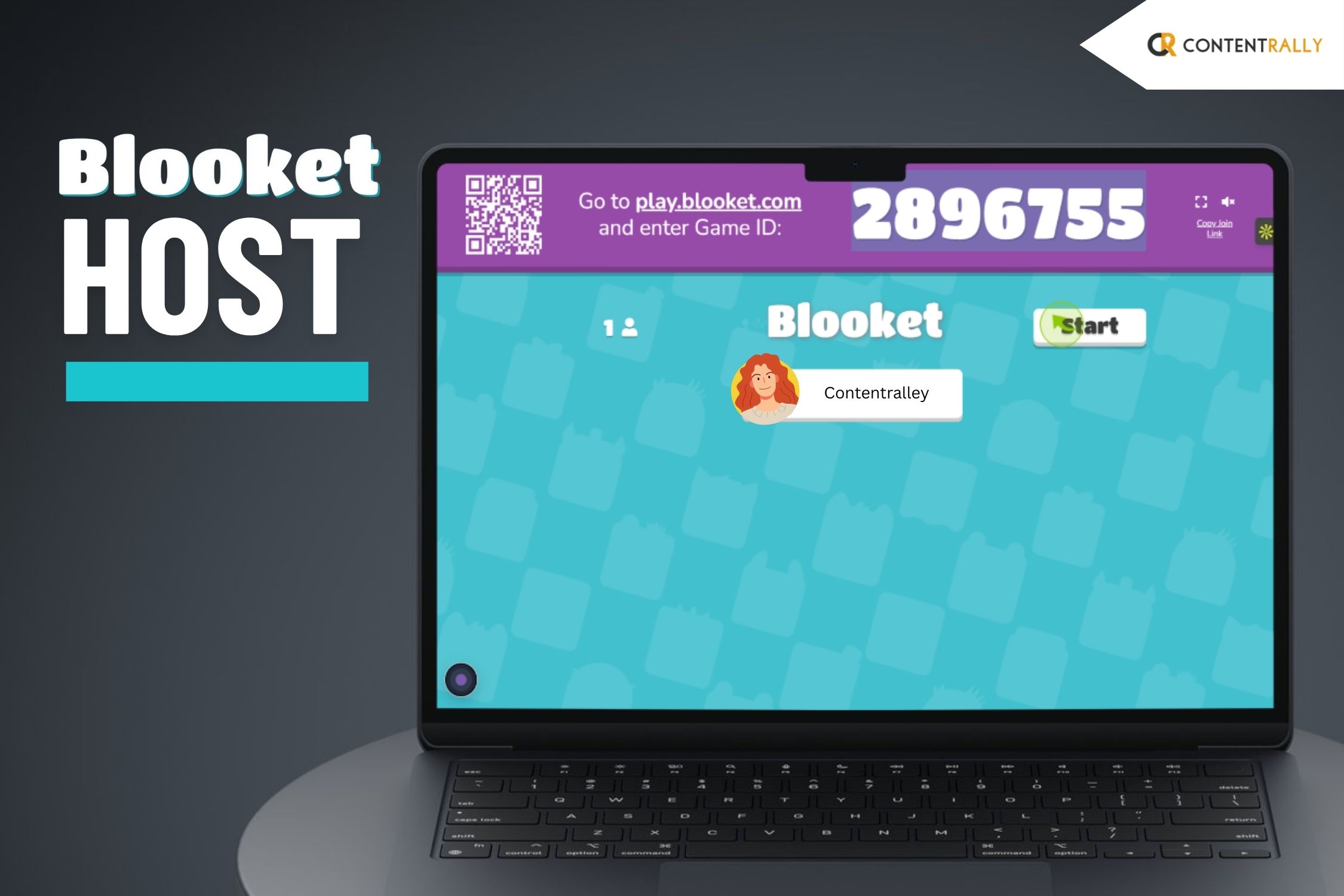
When you’re ready, click “Host Now”. This will generate a game code. Share this code with your students so they can join in on their devices.
4. Invite Students to Join
Students can jump into the game right away. They just have to enter the game code at play.blooket.com.
They don’t need to create an account to play. But signing up gives them the chance to track their progress. Additionally, this will help them to access more features.
For online classes, they can also join by scanning a QR code. Alo, they can use a shared link.
This makes it super easy for everyone to get involved.
5. Start the Game
I suppose by now, all your students have joined. Now, you simply click “Start” to kick off the game.
During the session, students will answer questions. Additionally, they will compete based on the game mode you’ve chosen.
You can monitor their performance in real-time. This helps you see how each student is doing.
Also, you will be able to identify where they might need a little extra support.
How Can You Create And Use Question Sets In Blooket?
As a host, you will have complete control over what you wish to present to your students.
1. Customize Questions:
You have the freedom to create your own question sets from the ground up.
This customization helps you tailor questions to align with your students’ learning goals.
Whether you’re teaching math, history, or science, you can design fun and engaging questions that reinforce key concepts.
2. Importing Question Sets:
If you’re already using Quizlet for quizzes, Blooket makes it easy to bring those question sets over.
Additionally, you can do this with just a few clicks. Then you can import your existing questions into Blooket.
After that, you can turn them into interactive games for your students in no time.
3. Blooket’s Library:
If you’re pressed for time or just need some fresh ideas, check out Blooket’s library of pre-made question sets.
It’s a great resource for inspiration and can give you new ways to approach topics in class.
How Can A Blooket Host Games On The Platform?
Blooket is a great tool for making learning fun and engaging in the classroom through exciting games.
1. Choose a Game Mode:
Blooket offers different game modes to suit various learning styles. You can pick from fun options like Gold Quest.
This is where students race to collect gold. You can also check out Tower Defense. This one challenges them to protect their towers while learning.
There’s also Cafe Mode. It’s my favorite. Here, students run a virtual cafe. They answer questions to serve customers.
For those who enjoy competition, Battle Royale is an excellent choice. Blooket keeps students entertained and allows them to change the game based on the topic.
2. Set Up a Live Game:
It’s easy to host a live game. Just select the game mode and your question set.
Then create a Game ID. Share this ID with your students, and they can join the game on their devices by entering the code on the Blooket website.
This setup encourages active participation as students compete with each other in real-time.
3. Assign Homework:
Blooket isn’t just for live play; you can also use it for homework. You can assign a game for students to play at their own pace, making it a fun way to review class concepts outside of school hours.
This approach allows for flexible learning and makes studying enjoyable for students.
What Are The Additional Features Available for The Blooket Host?
You thought that’s it? Well, seems like you’re wrong! There are many more features that you will enjoy as a host. Let’s check these out:
1. Personalizing Your Games:
You have the flexibility to adjust the number of questions. Additionally, you can decide on how long the game lasts.
In addition, you can also fix the difficulty level to match what your class needs.
2. Insights and Feedback:
Once the game wraps up, you’ll get in-depth reports. It will detail each student’s performance.
This includes what answers they got right. Also, it also shows you how long they spent on each question.
Additionally, it will also include the overall results. So, this will help you fine-tune your future lessons.
3. Homework Feature:
Blooket is also great for homework! You can set up games for students to tackle outside of class.
Additionally, you can also give them a chance to review material or practice extra.
What Are The Benefits Of Using Blooket Host Across Grade Levels?
Blooket is a fun learning tool for students of all ages. Additionally, it helps teachers engage students across different grade levels.
1. Elementary School Students
Blooket works well for young learners. It turns basic concepts into fun games.
Game modes like Cafe Mode and Gold Quest are popular among this age group.
These games help students practice basic math skills. In addition, they also work on other skills like reading and general knowledge.
2. Middle School Students
For middle school students who like competition, Blooket offers exciting game modes like Tower Defense and Battle Royale.
These strategic games promote critical thinking and problem-solving. They motivate students to explore content and learn effectively.
3. High School Students
High school students need advanced thinking skills. So, Blooket supports their learning by providing games on complex topics in:
- Math
- Science
- History
- Literature
High school teachers can even use Blooket for SAT lessons. Additionally, this adds fun to important study material.
The Dynamics And Importance Of The Blooket Host Explained
So, if you are an educator, I strongly suggest that you use Blooket in your classroom.
Trust me, it can change how students learn. Additionally, Blooket helps teachers make lessons fun and memorable.
You can use Blooket to create a learning engaging and motivating.
In addition, you can also create an effective learning environment that your students will enjoy.
The role of the Blooket host is even more important because the host is the one organizing and conducting the tests.