What Is The Role Of The Blooket Host In The Learning Journey? Read This Blog And Get The Answer, As Well As Many Tips!!!

by

06 January 2026

Education

Blooket Host

Hey there! Remember I mentioned about Blooket? Well, I am here to talk about a very important segment of it.  

In today’s digital classroom, you need to keep students engaged. This is more important than ever. That’s where Blooket Host comes in.  

Blooket is an exciting educational game platform. It allows teachers to transform quizzes into interactive sessions. 

Additionally, it creates unique and competitive learning experiences that students actually enjoy. 

As a Blooket Host, the teacher or organizer creates or selects a quiz. Then, he/she launches it for students to participate in live.  

Whether you’re teaching in person or online, Blooket is a great way to enhance participation. Also, you will be able to keep students engaged.  

It’s especially effective in U.S. classrooms, where digital learning tools are becoming more popular. 

What Does The Blooket Host Actually Need To Do? 

In Blooket, the "host" is the person who sets up and runs the game, and that’s usually a teacher.  

However, sometimes students can take on this role too! As the host, you get to pick the questions, choose the game mode, and help everyone play through the game.  

Blooket is perfect for classroom settings. This is because it encourages active learning through:  

  • Fun quizzes 
  • Games  

Plus, it’s super flexible with different game styles. This makes it easy to align with various teaching goals. 

How To Become A Blooket Host: A Step By Step Guide 

Now, in order to host a game carefully and efficiently, you must pay good attention to these steps. Let’s check these out: 

1. Pick Your Questions 

The first thing you need to do when hosting a game on Blooket is to choose a set of questions.  

You have the option to create your own set. Additionally, you can also browse the platform’s extensive collection. It has over 20 million sets!  

These cover a wide range of topics. So you’re sure to find something that fits your needs.  

Just head over to “My Sets” or “Discover” on the dashboard to get started. 

2. Choose a Game Mode 

Blooket offers a variety of fun game modes like:  

  • Monster Brawl 
  • Gold Quest  
  • Crypto Hack 

And the best part? You will find out that each with its own twist on gameplay.  

For example, in Gold Quest, students earn gold by answering questions. Additionally, in Tower Defense, they defend against challenges by answering correctly.  

Each mode provides a unique way for students to engage with the material. 

3. Launch the Game Session

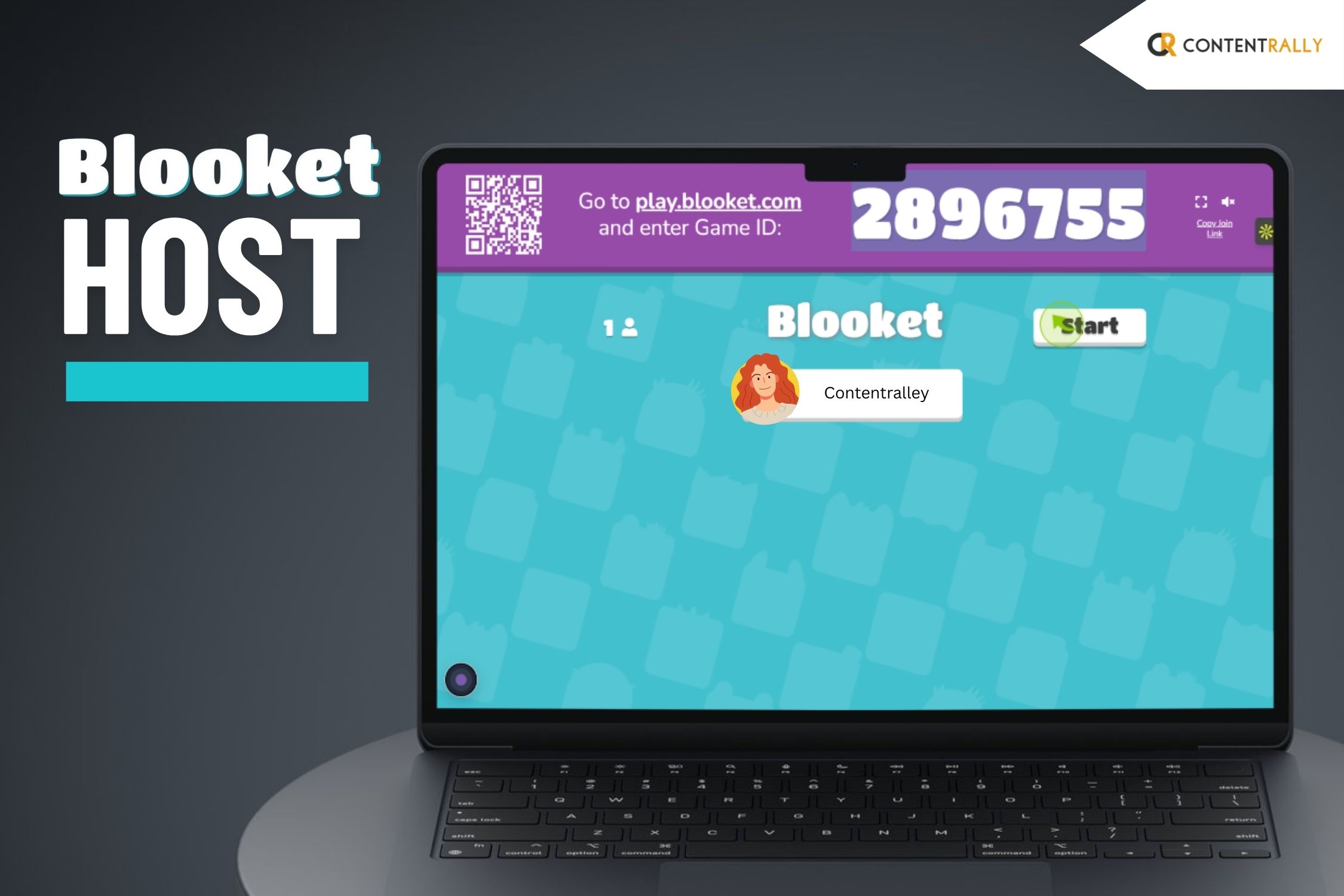
Once you’ve picked a game mode, hit the “Host” button. Here, you can set the rules. 

Also, you can set the time limits based on what you want to achieve. Additionally, you have to keep in mind what your students can handle.  

When you’re ready, click “Host Now”. This will generate a game code. Share this code with your students so they can join in on their devices. 

4. Invite Students to Join 

Students can jump into the game right away. They just have to enter the game code at play.blooket.com.  

They don’t need to create an account to play. But signing up gives them the chance to track their progress. Additionally, this will help them to access more features.  

For online classes, they can also join by scanning a QR code. Alo, they can use a shared link. 

This makes it super easy for everyone to get involved. 

5. Start the Game

I suppose by now, all your students have joined. Now, you simply click “Start” to kick off the game.  

During the session, students will answer questions. Additionally, they will compete based on the game mode you've chosen.  

You can monitor their performance in real-time. This helps you see how each student is doing. 

Also, you will be able to identify where they might need a little extra support.  

How Can You Create And Use Question Sets In Blooket? 

As a host, you will have complete control over what you wish to present to your students.  

1. Customize Questions:  

You have the freedom to create your own question sets from the ground up.  

This customization helps you tailor questions to align with your students' learning goals.  

Whether you're teaching math, history, or science, you can design fun and engaging questions that reinforce key concepts. 

2. Importing Question Sets:  

If you're already using Quizlet for quizzes, Blooket makes it easy to bring those question sets over.  

Additionally, you can do this with just a few clicks. Then you can import your existing questions into Blooket. 

After that, you can turn them into interactive games for your students in no time. 

3. Blooket’s Library:  

If you’re pressed for time or just need some fresh ideas, check out Blooket's library of pre-made question sets.  

It’s a great resource for inspiration and can give you new ways to approach topics in class. 

How Can A Blooket Host Games On The Platform? 

Blooket is a great tool for making learning fun and engaging in the classroom through exciting games. 

1. Choose a Game Mode:

Blooket offers different game modes to suit various learning styles. You can pick from fun options like Gold Quest. 

This is where students race to collect gold. You can also check out Tower Defense. This one challenges them to protect their towers while learning.  

There’s also Cafe Mode. It's my favorite. Here, students run a virtual cafe. They answer questions to serve customers.  

For those who enjoy competition, Battle Royale is an excellent choice. Blooket keeps students entertained and allows them to change the game based on the topic. 

2. Set Up a Live Game:  

It’s easy to host a live game. Just select the game mode and your question set. 

Then create a Game ID. Share this ID with your students, and they can join the game on their devices by entering the code on the Blooket website.  

This setup encourages active participation as students compete with each other in real-time. 

3. Assign Homework:  

Blooket isn’t just for live play; you can also use it for homework. You can assign a game for students to play at their own pace, making it a fun way to review class concepts outside of school hours.  

This approach allows for flexible learning and makes studying enjoyable for students. 

What Are The Additional Features Available for The Blooket Host? 

You thought that’s it? Well, seems like you're wrong! There are many more features that you will enjoy as a host. Let’s check these out: 

1. Personalizing Your Games:  

You have the flexibility to adjust the number of questions. Additionally, you can decide on how long the game lasts. 

In addition, you can also fix the difficulty level to match what your class needs. 

2. Insights and Feedback:  

Once the game wraps up, you’ll get in-depth reports. It will detail each student's performance.  

This includes what answers they got right. Also, it also shows you how long they spent on each question. 

Additionally, it will also include the overall results. So, this will help you fine-tune your future lessons. 

3. Homework Feature:  

Blooket is also great for homework! You can set up games for students to tackle outside of class. 

Additionally, you can also give them a chance to review material or practice extra. 

What Are The Benefits Of Using Blooket Host Across Grade Levels? 

Blooket is a fun learning tool for students of all ages. Additionally, it helps teachers engage students across different grade levels. 

1. Elementary School Students   

Blooket works well for young learners. It turns basic concepts into fun games.  

Game modes like Cafe Mode and Gold Quest are popular among this age group.  

These games help students practice basic math skills. In addition, they also work on other skills like reading and general knowledge.   

2. Middle School Students   

For middle school students who like competition, Blooket offers exciting game modes like Tower Defense and Battle Royale.  

These strategic games promote critical thinking and problem-solving. They motivate students to explore content and learn effectively.   

3. High School Students   

High school students need advanced thinking skills. So, Blooket supports their learning by providing games on complex topics in:  

  • Math 
  • Science  
  • History  
  • Literature  

High school teachers can even use Blooket for SAT lessons. Additionally, this adds fun to important study material.   

The Dynamics And Importance Of The Blooket Host Explained 

So, if you are an educator, I strongly suggest that you use Blooket in your classroom. 

Trust me, it can change how students learn. Additionally, Blooket helps teachers make lessons fun and memorable.  

You can use Blooket to create a learning engaging and motivating.  

In addition, you can also create an effective learning environment that your students will enjoy. 

The role of the Blooket host is even more important because the host is the one organizing and conducting the tests.

Barsha is a seasoned digital marketing writer with a focus on SEO, content marketing, and conversion-driven copy. With 8+ years of experience in crafting high-performing content for startups, agencies, and established brands, Barsha brings strategic insight and storytelling together to drive online growth. When not writing, Barsha spends time obsessing over conspiracy theories, the latest Google algorithm changes, and content trends.

View all posts

Leave a Reply

Your email address will not be published. Required fields are marked *

Related

iCloud GU

What Is The Growing Hype Of iCloud GU All About? How Has It Changed The System For Teachers And Learners? 

Education is changing rapidly, so it's important to use modern technology to support effective learning.   Galgotias University has adopted iCloud GU, a cloud-based system for managing schools.   This shows that the university recognizes the value of this system. As schools move away from outdated practices, iCloud GU offers a complete solution for managing education.   What Is iCloud GU? GU iCloud, or Galgotias University iCloud, is a cloud-based education management system.   Wait! Are you assuming that this is just like any other cloud storage? I must say, you are quite mistaken!  In fact, I can assure you that it goes beyond traditional cloud storage. It provides easy access to important resources for students and teachers.   Additionally, it also encourages collaboration among users. I am sure you will agree that it contributes to better learning and growth.   This innovative cloud space highlights Galgotias University’s dedication. It has really created a successful future for its students.  What Are The Key Features Of iCloud GU? GU iCloud provides a variety of features that help students and teachers access, collaborate, and share academic resources easily across devices. Here are the main features:  1. Online Admission:    GU iCloud allows students to give an efficient application for online for admission online.  Additionally, you will also be able to upload documents. Also, you will be able to pay fees and track their application status easily.  2. Online Learning:    Students can attend live lectures and access recorded videos, e-books, assignments, quizzes, and other learning materials through GU iCloud.   They can also communicate with teachers and classmates using chat, forums, and video calls.  3. Online Assessment:    GU iCloud supports online exams and assignment submissions while providing timely feedback and grades.   So now, if you are a student, you will be able to efficiently track your academic progress.  In addition, you can also keep an eye out for your attendance as well as performance reports.  4. Online Campus:    Students can access various campus services through GU iCloud.   So, this makes it easy to take part in extracurricular activities. In addition, you will also be able to socialize with fellow students.  5. Online Administration:    Faculty and staff can manage academic and administrative tasks efficiently, including course planning, schedule setting, attendance tracking, student records, fee collection, and payroll processing.   GU iCloud also generates reports and analytics to help improve education quality.  What Are The Steps To Follow To Get Started On iCloud GU?  Here, I will help you with a step-by-step guide on how you can access the iCloud GU. Take notes:  Firstly, you have to access the login page of GU iCloud. All you have to do is open your browser and navigate to the official login page.   Once you have entered the login page, you have to enter your username. Then, you also have to add your password in the allocated fields.   Now, you click the login button.  Then, you have to choose your role. This means you must acknowledge whether you will use this site as a teacher or as a student.  Additionally, you have to click Proceed. Now you can explore and navigate through the dashboard.   What Are Some Added Tips To Make The Most Of iCloud GU?  To maximize your learning and teaching experience with GU iCloud, it is important to follow a few key tips.   First, you must ensure that your credentials are secure. You can do this by keeping your username and password confidential. Also, I suggest that you refrain from sharing them with others.   Additionally, you should regularly update your profile information to keep it current. I suggest that you upload a profile picture. This will enhance your presence.   Frequent checks of your dashboard are also essential. This will help you stay informed about important:   Announcements  Messages  Notifications   Also, you must take the time to explore all available features and services on GU iCloud. This will help you to customize your use of these tools to best meet your needs.   Your feedback is valuable, so don’t hesitate to share honest thoughts, suggestions, and complaints to aid in the continuous improvement of GU iCloud.   Now, what to do if you encounter any technical issues or challenges while using the platform? I think it is important that you report them promptly.   Lastly, remember to utilize GU iCloud to stay connected with your peers and faculty. Also, this will keep you connected to the broader university community.  What Are The Advanced Features Of GU iCloud? These are the top features that make this platform a winner. Also, these features are truly proven to make learning and teaching more efficient:  1. Improved Connectivity and Collaboration    GU iCloud goes beyond simple cloud storage. It enhances collaboration among students.   Additionally, it has chat forums and video conferencing. So, the students can easily connect.  In addition, they will also be able to share ideas. This will help them to work together on challenges.   Also, this not only enriches their learning experience. Rather, it also helps build a strong academic community.  2. Integration of Extracurricular Activities    A standout feature of GU iCloud is how it integrates extracurricular activities into the online campus.   So now, students can engage in sports and clubs without the additional guilt of overscheduling their studies.  In fact, they will also be able to participate in various events. Also, this will help them balance their academic and personal growth.  3. Streamlined Fee Management    GU iCloud simplifies fee payment. How? Well, they just allow students to pay online securely.   In addition, it offers real-time updates on transactions. So, this makes it easy for students to keep track.  In fact, it also allows the administration to monitor financial activities.  4. Smart Analytics for Improvement    The platform includes smart analytics tools that help faculty and administrators generate detailed reports about education.   This data-driven approach enables continuous improvement.  Additionally, I think it also ensures the university can adapt to continuous changes.  Also, it surely enhances the quality of education based on real insights.  5. User-Friendly Customization    GU iCloud features a user-friendly interface. This allows students and faculty customize their dashboards to fit their preferences.   In addition, you can easily add or remove widgets. This will help you to access the features that matter most to them.  6. Integration with Campus Systems    GU iCloud works seamlessly with existing campus systems. This helps them to create a connected digital environment.   Additionally, this integration keeps data synchronized across different platforms.  So, in a way, it is improving overall efficiency in both academic and administrative tasks.  7. Mobile Access for Learning on the Go    Understanding the need for flexibility, GU iCloud is available on mobile devices.   Additionally, the students and faculty can access resources. Also, they can engage in discussions seamlessly.   In fact, they can also stay connected while on the move. So, I feel like this functionality supports a dynamic learning atmosphere.  The Functionality Of iCloud GU Explained  In conclusion, iCloud GU is a leading solution in education, providing a web-based system for Galgotias University.   This cloud-based education management system, powered by iCloudEMS, improves the learning experience with features like online admission and learning.  Additionally, you will get detailed assessments and effortless campus services.  Also, the practices of administration and student-focused education are commendable.   In addition, there are the efficient features of:  Faculty support  Efficient management  Quality improvement  iCloud GU shows Galgotias University’s commitment to using technology to enhance education.

READ MOREDetails
Strategies For Effective Math Note-Taking In IB Mathematics

Strategies For Effective Math Note-Taking In IB Mathematics

IB Mathematics is a challenging and comprehensive program that is designed to prepare students for further studies in mathematics and related fields. The program is divided into two levels, Mathematics Standard Level (SL) and Mathematics Higher Level (HL), and covers a range of topics in pure mathematics, statistics, and calculus. The Mathematics SL course includes topics such as algebra, geometry, trigonometry, and probability. The Mathematics HL course includes these topics as well as more advanced topics such as calculus, differential equations, and complex numbers. IB Mathematics: A Pathway To Student Enlightenment In addition to learning mathematical concepts and procedures, students in the IB Mathematics program are also expected to develop their critical thinking, problem-solving, and communication skills. They are required to engage in inquiry-based learning, which involves investigating and exploring mathematical problems and concepts independently. Assessment in IB Mathematics includes both internal and external assessments. Internal assessments are completed by students throughout the course and include tasks such as investigations and explorations. External assessments include written examinations that are administered at the end of the course. IB Mathematics provides students with a rigorous and comprehensive education in mathematics that prepares them for further studies and careers in mathematics, science, engineering, economics, and other related fields. Tips To Efficiently Take Notes In IB Mathematics Note-taking is an essential part of IB Mathematics as it helps students to organize and remember key concepts, procedures, and examples. Here are some tips on effective note-taking in IB Mathematics: Use headings and subheadings: Use headings and subheadings to organize your notes by topic or subtopic. This will make it easier to review your notes and find specific information later. One of the biggest perks of using headings as well as subheadings is that they help differentiate one point from another.  Write down key definitions and formulas: Write down important definitions and formulas as they are introduced in class. Make sure to label them clearly and highlight them for easy reference. Pointing out major formulas help you go through important discussions when you are running out of time.  Include examples: Include examples and worked-out problems in your notes. This will help you understand how to apply concepts and procedures in practice. Remember how our answers would get specific and more focused when we included real-life examples? That’s the case here, too.  Construct diagrams and graphs: Draw diagrams and graphs to illustrate mathematical concepts and relationships. This math enrichment process can help you visualize the material and remember it better. You might also try including some relevant tables and charts to bring out the best of your study notes. Utilize symbols and abbreviations: Use symbols and abbreviations to save time and space in your notes. For example, use “sin” for sine and “cos” for cosine. Simultaneously, don’t forget to learn the meanings of these symbols. Otherwise, you would not be able to figure out what it stands for.  Review and summarize: After class, review your notes and summarize the key points. This will help you reinforce your understanding of the material and identify any areas that you need to focus on. Done taking down the notes? Make sure to leisurely stroll your eyes once throughout the summary.  Organize your notes: Keep your notes in a well-organized binder or notebook. This will make it easier to find and review your notes when studying for exams or completing assignments. Even if you are in a hurry, you can access your notes easily by following this tip.  Note-Taking And Its Associated Benefits Effective note-taking can help students to better understand and remember IB Mathematics concepts and procedures. By using headings and subheadings, writing down key definitions and formulas, including examples, drawing diagrams and graphs, using symbols and abbreviations, reviewing and summarizing, and keeping your notes organized, you can become a more successful IB Mathematics student. Note-taking is an important part of studying for IB Math, and it can be a valuable tool for helping students to pass the course. Here are some ways that note-taking can help students to succeed in IB Math: Organization: Note-taking can help students to organize their thoughts and ideas about a particular topic, making it easier to study and review the material later on. Active learning: Taking notes requires students to engage with the material actively, which can help them to better understand the concepts and retain the information more effectively. Reviewing: Notes can serve as a useful resource for reviewing material covered in class or in readings. By reviewing their notes regularly, students can reinforce their understanding of the material and identify any areas where they need additional help. Test preparation:  Notes can also be a helpful resource for test preparation. By reviewing their notes before a test, students can refresh their memory of the material and feel more confident about their ability to perform well on the exam. Personalized learning: Note-taking allows students to create their own personalized study guides that reflect their individual learning needs and preferences. The Bottom Line In summary, note-taking can be a powerful tool for helping students to pass IB Math. By promoting organization, active learning, review, test preparation, and personalized learning, note-taking can help students to better understand and retain the material, ultimately leading to greater success in the course. When students are passionate about taking notes, they are more likely to be engaged and attentive in class, which can lead to better understanding and retention of the material. Passionate note-takers also tend to take more detailed and organized notes, which can help them to better review and remember the material later on. Furthermore, having a passion for note-taking can also inspire students to explore the material more deeply and to take ownership of their learning. This can lead to more active and self-directed learning, which is an important skill for success in IB Math. Ultimately, having a passion for note-taking can help students to achieve greater success in IB Math by fostering a love of learning, promoting engagement and attentiveness in class, facilitating better understanding and retention of the material, and encouraging active and self-directed learning. Read Also: Benefits of Internship Programs Mass communication students: (All You Need to Study at Home) Top Five Tips on How to Succeed in University

READ MOREDetails
Qiuzziz

What Is Quizziz? Everything You Need To Know About This AI Tool!

Are you searching for an AI platform that can help you learn about your subjects and memorize that efficiently? If so, then you must have heard about Qiuzziz. There are a few effective ways to quickly remember your lessons. However, among all of them, Qiuzziz is the most effective one. To help you quickly comprehend the material, longer texts are broken up into manageable questions that you can read to quickly comprehend the material. If you have been searching for more information about this platform, you do not have to look any further. In this article, I will be focusing on Qiuzziz, the platform that you need to excel in your studies. So, keep reading this blog till the end to learn more… What Is Qiuzziz? Image Source: quizizz.com Quizizz is a unique learning platform that utilizes gamification in order to make content that is engaging and immersive. Any device, whether in person or remotely, is available to participants for live and asynchronous learning. Students participate in fun, competitive quizzes and interactive presentations with gamification features, while teachers and trainers receive immediate data and feedback. An Indian company based in Bangalore, the Silicon Valley of India, Qiuzziz is a completely web-based device. It is compatible with any platform, including Chrome apps, iOS, Android, and browsers. You can choose from a variety of pre-made learning tests or create your own. Join as an educator, pick a test, and afterward utilize the code to give your understudies admittance to a virtual homeroom, you can do it all with the help of this platform. According to the platform, they are “on a mission to motivate every student.” more than ten million people, mainly students, use this tool to grow. Founded in the year 2015 by two young guys named Deepak and Ankit, “Quizizz supports millions of students in over 100 countries and has offices in Bangalore and Santa Monica, California.” How Can You Teach With Quizizz? Image Source: selectedreads.com Quizizz can be used in a variety of classroom settings. While interactive lessons encourage more in-depth learning, straight-up quiz-show-style assessments can help students recall facts and prepare for traditional tests. For a speedy survey of content, make or snatch and alter a current test to measure where understudies need extra guidance. For more profound learning, go with an illustration that integrates recordings, sound, pictures, and questions that will assist messes with understanding ideas and give instructors and guardians valuable criticism to illuminate and change guidance. While instructors and teachers can make tests or examples without any preparation, there's likewise a convenient information base with lots of existing tests and illustrations that can be snatched and altered on a case-by-case basis. Not all are excellent, but rather you can really look at the quantity of plays to perceive how famous everyone is. It is simple to modify and personalize instruction using results from the post-quiz and lesson reports. Students' responses to each question can be viewed by teachers, who can then use that data to determine which students require individual or small-group reinforcement and which need to be retaught or readjusted. Teachers could invite different students each week to create sharable reviews of the week's content because Quizizz makes creating quizzes and lessons pretty simple. How Does Qiuzzis Work? Image Source: support.quizizz.com The tool Qiuzziz is free. It can help students improve their vocabulary. so that children can learn to comprehend increasingly difficult concepts written in English. This application costs nothing at all. It has distinct instructions for various students. The computer will make quizzes for you after you enter all of the lecture-related data into this platform. You must respond to each and every question there. You should put them into practice on a regular basis to achieve better results. After each test, the results are displayed. Consequently, you will be able to comprehend your place in the learning process fully.  “Qiuzziz is a learning platform with various tools that make learning fun. Students are more likely to participate and retain information when given this opportunity,” as per sources. In case you are wondering how it can help the students, here is the deal. Through quizzes, undergraduates can acquire new course-related terminology. It's not just for individuals who need to work on their jargon. In any case, you can use it for a different subject test. You'll gain a better understanding of your topic as a result. It will produce questions connected with your theme utilizing a man-made intelligence-based calculation. Utilizing the currently available prepaid test can save you time. Subjects Available At Qiuzziz Now that you know what Qiuzziz is, it is time for you to learn about the subjects that this platform will help you learn. Here is a list of all the subjects that you will be able to learn with the help of this AI platform: English Social Studies Science Languages Humanities Health Maths Education in the Arts Computers Various Modes Available At Quizziz! Image Source: support.quizizz.com Here are some of the things that you need to know about this platform. Check out these modes of making learning fun with the help of Quizziz: ModeWhat Is It?Assigned ModeThis is the mode that is set for assigning homework to the students. You can set a due date for your understudies here as well as booking the interactive discussion. Each student should take the quiz and complete it before the due date. As they do so, they will get their results once they submit their assignments. You can evaluate the performance as a whole by logging into your account.Class ModeThis is the mode that is set for assigning homework to the students. You can set a due date for your understudies here as well as book the interactive discussion. Each student should take the quiz and complete it before the due date. As they do so, they will get their results once they submit their assignments. You can evaluate the performance as a whole by logging into your account. What Is The Pricing Of Quizizz? If you are interested to use this platform to learn more every day and want the same for your children, you must be wondering about the pricing of the tool. Well, to understand the price of Quizizz, you need to know about the plans of the same. Take a look at the chart: PlansBasicSchoolsDistrictsOpen Library AccessLimitedAvailableAvailableUnlimited Storage20 activity limitAvailableAvailableTeleport from 30M+ teacher-created activitiesLimitedAvailableAvailableAll Question TypesLimitedAvailableAvailableImage & Video SearchLimitedAvailableAvailableImport from Google DriveAvailableAvailableAvailableGamified Learning ElementsAvailableAvailableAvailableMake activities PrivateNot AvailableAvailableAvailable These are just a few of the many services that are available in the three plans that Quizizz provides to the users. When it comes to the pricing of the same, here are the things that you need to know about: The Standard pricing starts at $19.00 per month. The Premier pricing starts at $48.00 per month. Based on your needs, you can choose the plan and the pricing to enjoy all the services of this tool. Frequently Asked Questions (FAQs) Now that you are almost at the end of this blog, you might be feeling like you know it all. However, I would advise you to look at the following questions that readers often ask about Quizizz before you leave. 1. Where Is The Headquarters Of Quizizz Located? The headquarters of Quizizz is located in Santa Monica, California, United States. 2. What Are Some Alternative Platforms For Quizizz? There are some alternatives to Quizizz that you need to know about. They are: Mentimeter Crowdpurr Slido Quizlet Blackboard Learn 3. Can You Install Quizizz On Your Phone? Yes. you can easily install the platform on your smartphone. Quizizz is available for download and installation on both iOS as well as Android platforms. So just install it and learn as you are on the go! Wrapping It Up! Qiuzziz can be used by students to test a variety of subjects. You can demonstrate your mastery of the most important climbing routes or cooking methods. One that assesses your experience with a few overall dim gaming networks might exist! In case you were searching for information related to Qiuzziz, I hope that this article has been of help to you. If there are any other queries related to the same, feel free to let me know. All that you need to do is scroll down till you reach the bottom of the page. And then put in your suggestions and queries in the comment box below. And I will be there to answer them all for you as soon as possible. Read Also: How To Impress A Recruiter If You Are Still A Student? 5 Reasons Students Need Technology In The Classroom Never Forget French: 7 Ways To Memorize Vocabulary Quickly Mass communication students: (All You Need to Study at Home)

READ MOREDetails