







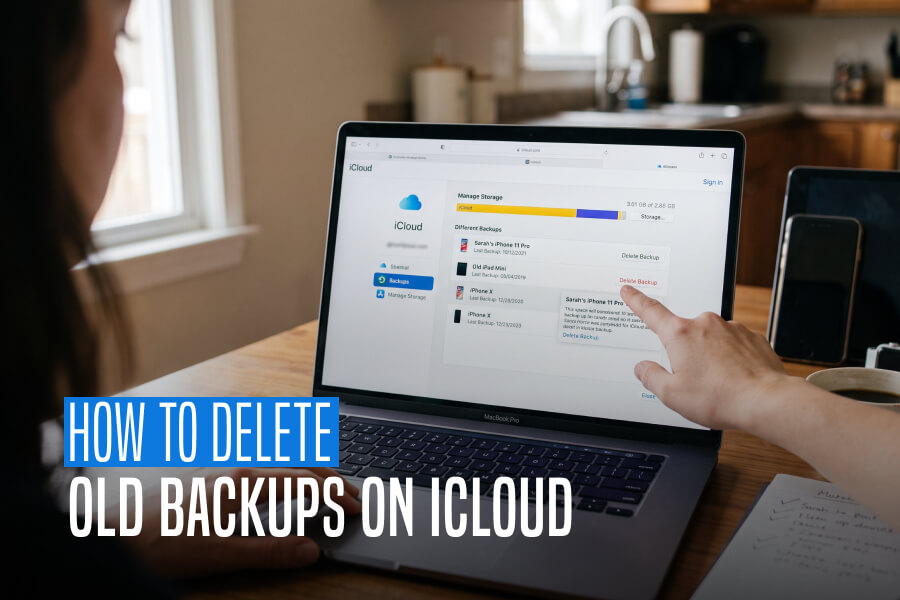
Clearing The Cloud: My Step-By-Step Audit Of How To Delete Old Backups On iCloud

by

23 September 2026

Technology

how to delete old backups on icloud

Every time a new software update rolls out or I upgrade to a fresh device, I fall into the same digital trap. I trust my smartphone to manage its own cloud storage.

For years, I have blindly trusted my iPhone to manage its own cloud storage, where I figured Apple’s system was smart enough to keep things clean behind the scenes.

Then the dreaded “iCloud Storage Is Full” alert popped up, freezing my phone updates and pausing my photo syncs. 

When I went to investigate, expecting to see a massive archive of photos, I found a completely different culprit. 

My cloud space was being held hostage by ghost backups, which were leftover data from other devices I had no clue about. 

An iPhone I sold three years ago, an old iPad that does not even turn on anymore, and redundant save states from devices I have not touched in years.

Most online guides make clearing this out sound like an advanced computer science project, filled with intimidating technical menus. 

To see how to clear this digital clutter safely without accidentally wiping anything important, I sat down and audited my entire account.

Reclaiming your cloud storage is actually incredibly straightforward once you know where to look. 

If you want to know how to delete old backups on iCloud without the headache, here is the exact, user-friendly roadmap I used to clean out my account. Besides this, I will guide you through the real reasons why your storage fills up so fast.

Why Do Old Device Backups Just Sit There? 

Before we learn how to delete old backups on iCloud, we need to understand why they sit there. 

The biggest reason our storage fills up with old files is a very common human emotion, which is fear. When we upgrade to a new phone, we are terrified of losing our precious photos, old text conversations, and settings. 

Since we want to ensure that everything transfers safely over to the new device, we back up absolutely everything. 

The catch is that Apple’s ecosystem builds a completely separate and isolated storage container for every single device you own. When you switch to a new iPhone, the system copies your data into a brand-new container. 

However, it leaves the old one sitting there frozen in time. Moreover, Apple never automatically deletes your old device profiles. That is because it does not want to risk destroying your historical data if you ever need it again.

As a result, that old backup sits in your account for years, quietly eating up gigabytes of your shared space.

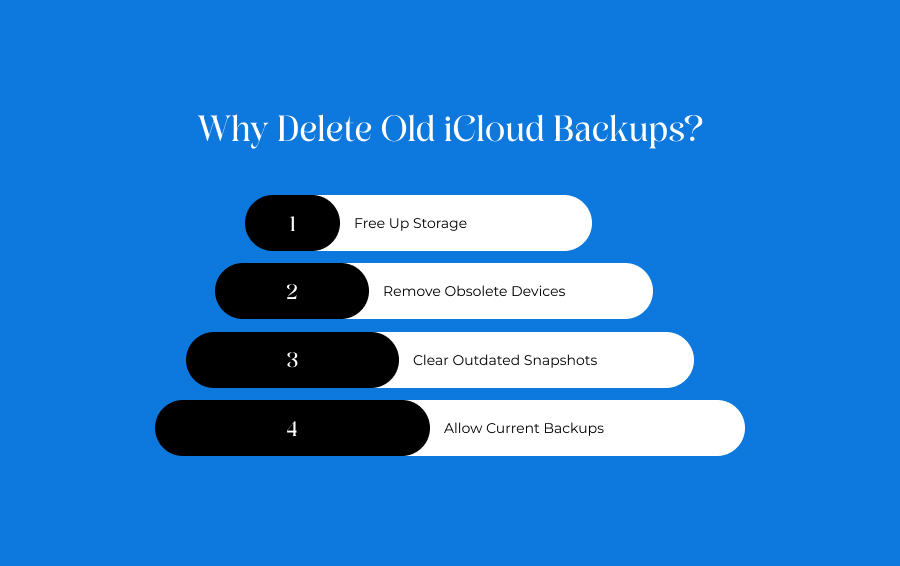
Why Delete Old iCloud Backups? 
Why Delete Old iCloud Backups

Cleaning out these digital filing cabinets does more than just make your storage menu look neat. 

If you are on the fence about purging your history, several immediate operational perks show why it is worth taking two minutes to do so. 

Free Up Storage

The most immediate benefit is a massive cash-saving return of your space. 

Old backups routinely occupy 5GB to 15GB of data per device. Clearing out even one or two legacy profiles can instantly empty your storage bar.

This gives your cloud freedom back without forcing you to upgrade to a higher monthly payment tier. 

Remove Obsolete Devices

Your account dashboard should only show what you actively use. Deleting legacy containers strips out the clutter of tech you no longer own. 

Thus, it ensures that your storage metrics are tracking your actual current life instead of your digital past.

Clear Outdated Snapshots

When a phone updates its software, it sometimes creates temporary, massive "snapshots" of your system to protect your data during the install. 

Once your new software is running smoothly, these old snapshots serve zero purpose and simply waste shared space until you manually wipe them out.

Allow Current Backups

When your cloud space hits its absolute maximum limit, Apple blocks your active, daily phone from saving your current photos, texts, and security settings. 

Deleting the old junk opens up the pipeline. So, your primary phone can safely run its automated nightly safety saves again.

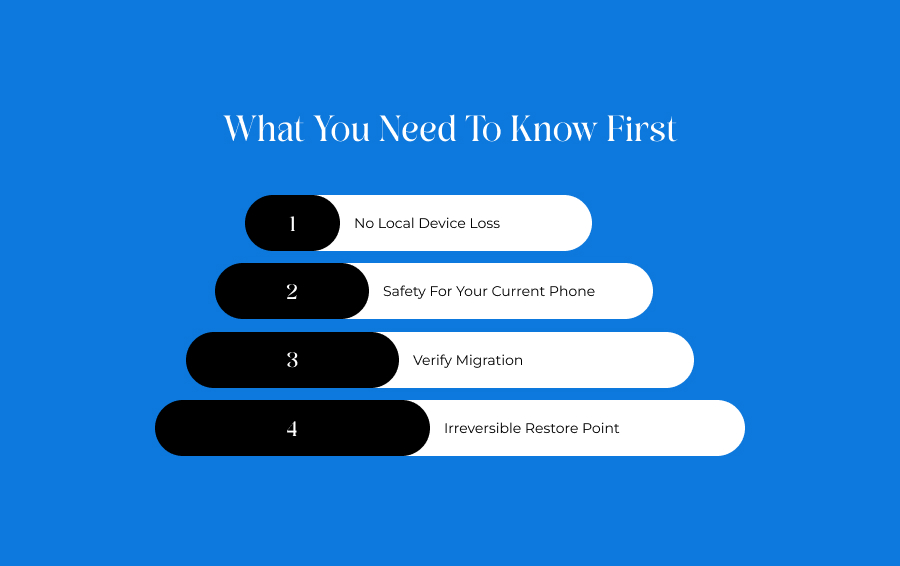
What You Need To Know First
What You Need To Know First

Before you start to click on the delete button, it is completely natural to feel a bit nervous. 

To give you total peace of mind, let us look at the hard safety boundaries of how Apple handles data destruction. 

No Local Device Loss

Deleting a backup from the cloud will absolutely never erase everything on the physical phone you are currently holding.

Your local photos, active text messages, downloaded apps, and contacts remain entirely safe and untouched on your physical device.

Safety For Your Current Phone

Every single device profile is completely isolated from the others. 

Wiping out the file container for an old, sold iPhone 11 has a zero percent chance of disrupting or deleting the current profile belonging to your active iPhone 15 or 16.

Verify Migration

Before you pull the trigger on an old backup, always double-check your current phone to ensure your data migration was 100% successful. 

Open your current photo gallery, check your contacts list, and make sure your important files are physically present on your new device.

Irreversible Restore Point

You must remember that hitting the final delete button is a permanent action. 

Once you purge a legacy device profile from Apple's servers, Apple support cannot recover that specific historical restore point.

Clearing The Clutter: How To Delete Old Backups On iCloud

You do not need a computer or a complicated tech setup to fix your storage crisis. You can manage your full account layout across any screen that you have available.

Brief Overview Of iOS

Your profile infrastructure fully centralizes the cleanup process on any mobile Apple device.

By stepping past general app configurations and opening your core profile metrics, you can audit your entire device history within a few taps.

The sequential steps to disable and erase old profiles vary slightly depending on your screen layout.

Target PlatformCore Navigation Shortcut PathTarget Action Button
On iPhoneSettings -> Your Name -> iCloud -> Manage Account Storage -> BackupsTap Old Device -> Turn Off & Delete
On iPadSettings -> Your Name -> iCloud -> Manage Account Storage -> BackupsTap Old Device -> Turn Off & Delete
On MacApple Menu -> System Settings -> Apple ID -> iCloud -> ManageSelect Backups -> Click the Minus / Delete icon
iCloud for WindowsOpen iCloud App -> Click Storage Bar -> Select Backups ModuleHighlight Old Profile -> Click Delete

On iPhone

First, open the Settings app and tap your name at the very top of the screen. 

Tap iCloud, then select Manage Account Storage right underneath the colorful bar. 

Scroll down, tap the folder labeled Backups, and select the old device you want to remove. 

Finally, scroll to the absolute bottom of the page and tap the red Turn Off & Delete button.

On iPad

The process for the iPad is similar to that of the iPhone. 

At first, you have to open your Settings app and tap your profile name at the top of the left-hand sidebar menu. Move to the right side of the screen, tap iCloud, and open Manage Account Storage. 

Select the Backups index folder, tap your legacy tablet profile from the list, and select the final Turn Off & Delete command.

On Mac

If you have a Mac, you first have to click the Apple logo in the top-left corner of your desktop monitor and launch System Settings. 

Then, click your Apple ID name at the top of the sidebar. 

Following this, navigate into the iCloud window and click the Manage button sitting next to your storage metric bar.

After this, click Backups from the left column, highlight your ghost file, and click the minus or delete button.

iCloud For Windows

Launch the official iCloud for Windows desktop application and log in to your primary Apple account. 

Click the main color-coded storage indicator bar at the bottom of the window. Then select the Backups menu module from the list.

Finally, you have to click the obsolete device profile you want to delete and confirm the action.

Saving Your Files Without Using iCloud

Saving Your Files Without Using iCloud

You may want to keep your cloud space completely empty without losing your historical records. For that, you can switch to a local physical backup system instead. 

Plug your iPhone directly into a Mac or a Windows PC using a standard charging cable. That way, you can open Finder (on Mac) or iTunes (on Windows).

Furthermore, you can choose to save a full backup of your phone directly to your computer's local hard drive.

This alternative method keeps your historical data completely safe on your own physical computer. 

Consequently, you get to turn off iCloud backups entirely. 

Thus, you keep your free 5GB cloud space reserved exclusively for your essential daily contacts and calendar updates.

Get Your Space Back

Taking control of your cloud storage doesn't have to be intimidating. 

We shouldn't let the fear of losing data trick us into paying for storage tiers we don't actually need. 

Once you realize your old, sold devices leave behind massive ghost profiles, spend less than two minutes clicking to clean them out.

Run a quick audit of your account, purge the files for hardware you no longer own, and turn off backup permissions for useless apps. 

In this way, you can keep your digital life perfectly organized on your own terms.

Sohini is a MarTech and business writer with over two years of experience creating and editing content in the digital marketing space. She has a strong interest in emerging digital trends, marketing strategies, and the evolving relationship between technology and business growth. Alongside writing, she also works on guest posting strategies, carefully aligning sponsored content with niche relevance to help maintain strong organic visibility and audience engagement. Outside of work, Sohini enjoys reading, exploring internet subcultures, and endlessly scrolling through Reddit, Pinterest, and Substack looking for new ideas and trends.

View all posts

Leave a Reply

Your email address will not be published. Required fields are marked *

Related

Kodomogumi.net - Top Stories & Trend Analysis

Kodomogumi.net – Top Stories & Trend Analysis: Get All The Latest News In 2026

If we are working in the digital marketing industry, we all have one thing that is the same, regardless of our position.   We all must keep up with current trends. This is important because today's popular topics may not be relevant tomorrow.   Additionally, it's essential for professionals and creators. In fact, it is equally important for anyone curious to pay attention to the evolving Internet.   Kodomogumi.net - top stories & trend analysis provides clear insights into these trends. In addition, it helps us understand the digital landscape.   In this blog, I will examine how it serves as a valuable tool for trend analysis.   Additionally, we will look at the main features of the site. Also, we will see how it simplifies complex topics.  Then, I will list out who should read it.   By the end of this post, you will see why this platform is more than just another news aggregator. Rather, it reflects our digital world.   What Is Kodomogumi.net?   It is a platform that tracks and analyzes stories from across the Internet.   Additionally, it can gather information from various sources like   News Sites  Forums   Blogs  Therefore, this provides a real-time view of what people are interested in.   However, it goes further by explaining why certain stories become popular.   Also, it identifies trending content and breaks down factors such as:   Audience Interest  Attitudes  In fact, it also explains the spread across different media.   The site focuses on delivering information in a clear and accessible way.   This is one of those platforms that avoids complicated language. So, it presents data simply.  Therefore, it makes the fast-paced world of digital trends easy to understand for everyone.   It covers a wide range of topics, including:  Technology  Entertainment   Gaming  Lifestyle   Culture  So, it gives a complete view of online conversations and ideas.   What Are The Key Features Of Kodomogumi.Net? This website excels in its commitment to enhancing user experience through the strategic use of technology.  Therefore, this results in a highly effective resource for trend analysis.  1. Simplified And Accessible Content    One of the primary strengths of this platform is its ability to simplify complex topics.   If you read about a recent advancement in artificial intelligence here, you will understand all the nuances instantly.   Additionally, it also talks about the updates in cybersecurity policies. You will also get access to the principles of viral marketing.  Basically, Kodomogumi.net presents information clearly and concisely.   The aim is to align the readers' understanding with three core philosophies of conductivity.  Additionally, it ensures that individuals from varying technical backgrounds can grasp the essential concepts and their implications.   You will mostly find the articles written in short paragraphs and clear headings. In addition, the writer also uses a straightforward tone.   So, all of these together ensure that the content remains easily digestible and engaging.  2. Data-Driven Insights    The analyses provided by this website are firmly rooted in data.   The writers often utilize advanced algorithms.   Therefore, the site scans various digital sources to collect data. This includes metrics like:   Post Shares  Comments   Click Volumes From Search Engines   Rather than merely stating that a topic is trending, it delves into the factors driving that popularity.   This analytical approach helps users identify patterns. In addition, it helps you to understand user behaviors.  Therefore, we can say that it offers a comprehensive view of the trends' life cycles.   Also, this information is invaluable for professionals when making informed decisions.  3. Real-Time Updates    In the fast-paced realm of digital media, trends can rise and fall within hours. Kodomogumi.net stays ahead by delivering the most current information available.   This quick responsiveness not only helps journalists uncover breaking stories but also provides marketers with insights on optimal campaign timing.  In addition, it keeps readers updated on the latest developments as they unfold.   What Are The Different Content Categories Found In Kodomogumi.Net? Kodomogumi.net - top stories & trend analysis gives us some really good insights on a variety of topics.   Let’s look at the different content categories on this website:  1. Technology  In this category, you will find all the latest news about any new gadget or app that has appeared in the market.   Additionally, you will also get to know about all the internet norms. You will get first-hand reviews and quick updates about any new software in the market.   I recently read an article here about Strawman's attack on human internet rights. Must say it was a good and informative read.   2. Entertainment  Current Insights in Entertainment and Culture  Movie and Music Updates   Stay informed with the latest reports on movies, music, and online pop culture trends.   3. Gaming Reports   Game Clarion focuses on new game releases, esports events, and trends within the gaming community, providing detailed coverage for enthusiasts.   4. Exploring Digital Lifestyle Trends   Lifestyle Insight delves into digital habits, consumer behavior, and the latest creative trends that shape our interactions and preferences.   What Are The Various Benefits Of Kodomogumi.Net For Marketers And Businesses? Kodomogumi.Net offers valuable insights for marketers, enabling them to:   1. Identify Emerging Opportunities   Brands can gain a competitive edge by recognizing new topics.   Additionally, it is even better when they engage with topics that are just beginning to gain traction before they become mainstream.   2. Refine Content Strategy   It teaches marketers to analyze which types of content resonate with their audiences.  Therefore, marketers can enhance the effectiveness and appeal of their messaging.   3. Market Research Tools   The platform provides insights into consumer behavior and interests. These can inform product development.  Additionally, this can refine communication strategies.   4. Innovative Research Data   Business analysts can leverage the platform’s detailed, data-driven analysis to shift from a reactive to a proactive approach.  Therefore, this will help you to gain a better understanding of the market developments.  How Can Content Creators And Journalists Benefit From This Site? For content creators, staying ahead is essential. Kodomogumi.net - top stories & trend analysis will focus on what’s next.    1. Find Trends Before Others  Kodomogumi.net tracks trends in real-time. Therefore, this helps journalists discover stories as they begin to gain attention.   2. Enhance Story Backgrounds  This trend analysis provides valuable context for reporters. Additionally, it helps them explain not only what is happening but also why it matters.   3. Generate Creative Ideas  This platform helps us to observe trends.  Therefore, the creators can develop articles and movies. Additionally, they can even curate Facebook posts accordingly.   So, they will be taking their digital decisions based on data that is likely to engage their audience.  What Does The Future Look Like For Kodomogumi.net - Top Stories & Trend Analysis  As technology continues to evolve, our understanding of it also grows.   This website is well-positioned for expansion and improvements in its functionality.  Also, this will happen particularly in the realm of platform development.  1. Predictive Analysis    Leveraging AI capabilities, the system could predict which stories are likely to go viral by analyzing early reaction patterns.   This predictive capability would provide users with a significant advantage in planning their content and broader strategies.  2. Global Expansion    I suppose we all will agree that online conversations are increasingly crossing borders.  Therefore, the platform could enhance its tracking capabilities. This will help us to encompass a wider range of languages.  Additionally, we will be able to promote our brands across a wide number of regions.   Also, this would facilitate a comprehensive understanding of global digital trends.  3. Enhanced Integration    Future advancements may lead to better integration of the platform with various business and creative tools.  Additionally, this will also streamline workflows for professionals. Good for those who rely on it.  The platform's commitment to innovation ensures it will remain a valuable resource in the continuously evolving digital landscape.

READ MOREDetails
Virtual Data Rooms

The Power of Virtual Data Rooms for Real Estate Businesses

The data room software is a popular and versatile technology. It’s highly sought after by entrepreneurs for secure work environments in today's real estate industry. VDRs effectively automate and streamline numerous business processes, offering a secure platform for managing documents while fostering transparency among colleagues and employees. Their utilization ensures the utmost safety and efficiency in real estate operations. What is a VDR? Essentially, a VDR serves as a digital hub for storing business records, files, and other valuable items containing sensitive information. Prior to the emergence of VDRs, organizations predominantly relied on conventional file storage methods, which failed to provide the requisite level of security. Presently, VDRs encompass a range of features, including: Surprisingly enough, this software serves a purpose far beyond mere file storage. It also acts as a secure environment for sharing and exchanging sensitive information with others. This process is completely safeguarded through various tracking mechanisms that meticulously monitor every action taken within the VDRs. Should there be any unauthorized attempt or an individual trying to access restricted documents contrary to the security policy, the system promptly alerts you, ensuring the utmost security of your data. Among the remarkable attributes of VDRs is their capacity to facilitate comprehensive automation of operations. While this functionality was not initially inherent in the VDR concept, developers swiftly recognized the need to automate business processes in order to maintain a competitive edge. As a result, automation has become a standard feature across all data room services, significantly enhancing efficiency and productivity within the workplace. The impregnable fortress of VDRs makes breaching their defenses an incredibly daunting task. In fact, it can be argued that breaching a company's VDR is nearly impossible, as news reports rarely surface about such incidents. This remarkable level of protection is the result of the stringent security measures employed by VDR providers. In order to instill confidence in business owners regarding the exclusive use of VDRs for preserving sensitive company information, these providers actively strive to obtain independent certifications and gain recognition from governmental authorities. And so far, their efforts have proven successful. The integration of a virtual data room into your company's infrastructure is definitely worth considering. It holds the potential to deliver substantial time savings for your staff, allowing them to redirect their efforts toward more productive and critical tasks that contribute to the growth of your business. VDR in real estate transactions In the realm of real estate transactions, high-tech innovations such as VDRs have finally found their rightful place. Modern companies operating in this field face the constant need to adapt and automate tasks that were previously handled without the desired level of security and efficiency. Entrepreneurs from around the globe, particularly those in developed nations, are increasingly recognizing the significance of integrating VDRs right from the outset of their business endeavors. This holds true not only for the real estate sector but also for other industries that shape today's economic landscape, marked by the impact of economic crises. Even traditional businesses, which have been accustomed to more conventional approaches, are now contemplating the acquisition of this advanced technology that has gained immense popularity in recent times. Perhaps you're wondering, what sets digital data rooms apart from other corporate technologies available today. The answer lies in several key factors. Embracing this technology grants you the ability to streamline an extensive array of daily tasks, ensuring optimal efficiency in your operations. By implementing such improvements in your real estate business, you can have full confidence in the proper management of your financial endeavors. As enterprises endeavor to enhance efficiency and productivity, the significance of automating workplace tasks continues to grow. Automation facilitates cost reduction, heightened productivity, and enhanced precision. Furthermore, it minimizes the time expended on routine responsibilities, allowing employees to dedicate their efforts to more critical undertakings. By providing swifter and more reliable service, automation also contributes to improving customer satisfaction. The advent of these technologies has revolutionized interdepartmental communication within organizations. Recognizing the persistent challenge posed by communication issues in the wake of technological advancements, this solution has been purposefully engineered to address this concern across companies. It stands as the exclusive program that effectively tackles this challenge head-on. It comes as no surprise that businesses are actively seeking ways to enhance communication between departments, recognizing its potential to drive efficiency, collaboration, and productivity. By fostering improved communication, the prevalence of misunderstandings and miscommunications can be minimized, cultivating an environment of trust and cooperation. The utilization of this technology ensures meticulous organization and efficient indexing of documents, thereby enabling swift and seamless retrieval when urgent tasks arise. Document indexing stands as a vital tool for modern businesses, allowing them to maintain a well-structured and easily navigable repository of information. By associating documents with relevant keywords or tags, the process of locating specific files is greatly simplified. This, in turn, guarantees secure and systematic storage, preventing the loss or misplacement of important documents. Moreover, the accuracy of search results is significantly enhanced through indexing. Furthermore, this feature can serve as an impressive asset for crowdfunding campaigns, surprising investors with its efficiency and accessibility. When compared to traditional file storage, virtual data rooms stand out in numerous aspects, particularly in terms of security. The emphasis on security is fundamental in VDRs, and you can rest assured that reputable software developers prioritize this aspect to deliver an exceptional level of protection, surpassing what conventional methods can offer. Conclusion Real estate deals have reached a stage where automating these procedures and fostering investor confidence are absolutely crucial. The cutting-edge technologies we've explored today serve as prime illustrations of what you can swiftly integrate. Not only will you enjoy all the advantages outlined in this piece, but you'll also gain a few extra perks. Remember to reach out directly to the developer if you have specific needs, as they'll gladly accommodate and potentially establish conditions for your company's accelerated growth in a highly competitive market.

READ MOREDetails
Data Security

Data Security In The Cloud: Strategies For A Safe Migration

With the rising prevalence of cloud computing, businesses are increasingly looking to migrate their operations, applications, and data to the cloud. While cloud migration offers numerous advantages like scalability, flexibility, and reduced IT costs, it also introduces new challenges, especially when it comes to data security. Given the increasing frequency and sophistication of cyberattacks, ensuring data security during a cloud migration is paramount. In this post, we'll explore essential strategies for ensuring a secure migration to the cloud. By following these strategies, businesses can mitigate risks, maintain compliance, and guarantee the integrity of their data. The Advantage Of Cloud Storage Technology  Cloud storage technology has its own benefits, and due to this, the stakeholders are looking to get the best out of the technology and shifting from the present ecosystem to that of the cloud system. So, one needs to understand how cloud technology works. So, let's understand it here.  Accessibility And Redundancy  Accessibility of data is indeed one of the areas in which stakeholders work. Hence, to get the best data accessibility, one has to integrate rather than connect the local storage to that of the high-capacity network devices. The following infrastructure requires maintenance and service without any halt. Now, you can get the benefit only if you have a cloud system network in place. Data Redundancy is one of the issues that creates big trouble. But if you win over it, you eliminate storage problems. If redundancy affects your storage system, then the redundant data will eat up space.   Security Of Data  Like the redundancy of data, the security of the data has been one of the major concerns for the providers of cloud storage. Afterall, you are not going to ask someone for protection. Malicious elements steal amounts to millions of dollars. However, with cloud storage, data theft can be prevented. This is because data is stored in a distributed ledger across a wide network of computers in cloud storage technology. It diminishes the chances of hackers of malicious elements stealing data from the system.  Essential Strategies To Ensure Safe Migration To The Cloud  Cloud technology, indeed, has its own benefits. They are indeed great from the point of view of data security, which is a major threat today. However, we discuss some ways you can successfully move on to the cloud framework. 1. Conduct A Comprehensive Data Assessment Before initiating any migration, it's crucial to understand what data you have, where it resides, and how sensitive it is. This involves categorizing data based on its importance and sensitivity. Some data might be public and non-sensitive, while other datasets might contain personal or proprietary information. Consulting with a company such as DoiT International regarding your cloud migration strategies is likely a very smart move. Doing so can help mitigate risks associated with vulnerabilities and security and help ensure a proper migration takes place. 2. Choose The Right Cloud Service Provider Not all cloud service providers (CSPs) are created equal. Before selecting a CSP, conduct a thorough evaluation of its security measures, compliance certifications, and track record. Reputable providers should have established protocols for data encryption, regular security audits, and robust access controls. 3. Encrypt Data At Rest And In Transit Data encryption is fundamental when moving to the cloud. Make sure that your data gets the encryption, both while it’s stored (at rest) and as it’s being transferred (in transit).  Most CSPs offer encryption services, but it’s always a good idea to be familiar with the  encryption methods under practice. It  ensures that they align with industry best practices. 4. Implement Strong Access Controls Ensure that access to your data in the cloud gets the restriction from  personnel under authorization only. This involves setting up user authentication processes, managing user roles, and regularly reviewing and updating access permissions. Multi-factor authentication (MFA) is an added layer of security that should be employed to safeguard access further. 5. Regularly Backup Your Data While cloud platforms are  robust and redundant, it’s always wise to have a backup strategy in place.  Regular backups ensure that, in the event of any data loss or breach, you can restore the data quickly.  This not only protects your business operations but also builds trust among stakeholders. 6. Monitor And Audit Regularly Continuous monitoring and regular audits of your cloud environment can identify suspicious activities or potential vulnerabilities. Automated monitoring tools can provide real-time alerts for any unusual activity, and periodic audits can ensure compliance with security standards and protocols. 7. Educate Your Team Your employees play a critical role in data security. Ensure they are educated about the best practices for cloud security, the risks associated with data breaches, and the protocols to follow in the event of a security incident. A well-informed team is your first line of defense against potential threats. 8. Ensure Compliance With Regulations Different industries have varying regulations concerning data security. Whether it’s GDPR for European entities, HIPAA for healthcare in the US, or any other regulation, ensure that your cloud migration and subsequent operations remain compliant. This will safeguard your data and protect your business from potential legal repercussions. 9. Establish A Disaster Recovery Plan While every effort should be made to prevent security incidents, having a disaster recovery plan in place is equally crucial. This plan should outline the steps to be taken in the event of a breach or data loss, ensuring rapid response and minimizing potential damage. 10. Stay Updated The world of cybersecurity is ever-evolving, with new threats emerging regularly. Stay updated with the latest trends, threats, and best practices. Joining industry groups, attending webinars, or even setting up Google alerts for cloud security news can help you stay informed and prepared. Conclusion Migrating to the cloud offers a plethora of advantages for businesses in the modern era. However, ensuring data security during this migration is crucial. By implementing the strategies mentioned above, businesses can confidently move to the cloud, ensuring the safety and integrity of their data. Read Also: Best Data Recovery Software To Recover Deleted Files From Mac Process Mining and Data Privacy – Key Points to Remember Unlocking The Power Of Virtual Data Rooms: How Real Estate Businesses Can Benefit

READ MOREDetails