











Stripping The Billing Chains: The Developer’s Deep Dive Into WaveSpeed AI

wavespeed ai

The modern AI development pipeline is completely fractured by micro-transactions and software boundaries.

If an engineering team or a high-volume content studio wants to launch an automated multi-model pipeline, they are immediately forced into an expensive corporate trap.

They have to sign up for OpenAI to handle the text logic, and lease a subscription from Runway or Kling to process video layers. 

Besides that, they also have to pay separate API fees to miscellaneous tools for background removal or subtitle parsing. 

This infrastructure nightmare triggers intense subscription fatigue and locks you into rigid monthly spending. To solve this, a completely different operational approach has quietly taken over the tech space.

Instead of building another shiny retail app with a high-markup subscription, the team at WaveSpeed AI built a raw, high-performance infrastructure hub. 

It acts as a single, centralized REST API gateway that aggregates over 1,000 top-tier AI models under a unified billing ledger. 

This blueprint guide breaks down the developer-first architecture of the platform. Moreover, it evaluates its multi-model distribution matrix and the exact pay-as-you-go financial dynamics that allow studios to build without monthly overhead.

The Unified API Gateway: One Balance, Minimal Friction

The Unified API Gateway

The defining technical breakthrough of WaveSpeed AI is its radical reduction of API connection fatigue. 

In a traditional development environment, connecting your app to multiple machine learning providers requires managing dozens of separate client SDKs. 

Also, it requires rotation of distinct authentication tokens and dealing with inconsistent rate limits.  

The WaveSpeed Official GitHub Repository bypasses this friction entirely. 

Developers integrate a single, unified REST API key that hooks seamlessly into an OpenAI-compatible Chat Completions interface.

When you want your app to switch its background logic from a heavy language model to a photorealistic video outpainter, you do not change your code libraries. 

Instead, you simply change a single string parameter in your HTTP POST request. 

The platform handles the cloud routing and instantly calculates the cost against your unified token balance.

Technical Performance And Tooling Architecture
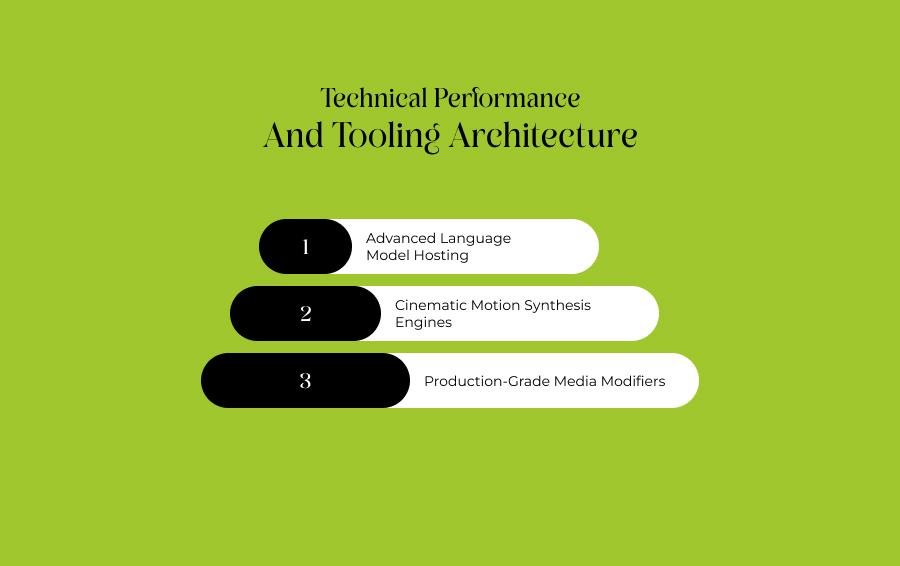
Technical Performance And Tooling Architecture

The operational layout divides its cloud infrastructure into specialized production pipelines tailored for rapid media generation. Besides that, they are also made for structural data modifications.

Advanced Language Model Hosting

For text processing and complex reasoning applications, the system hosts a multi-provider sheet. This framework includes premium engines like OpenAI GPT-5.5, Google Gemini 3, and Anthropic Claude.

Input and output tokens are tracked and priced completely separately. 

Consequently, software architectures can implement features like JSON mode, custom tool calls, and massive context windows up to 1 million tokens without performance chokeholds.

Cinematic Motion Synthesis Engines

The platform offers instant and serverless inference access to the most stable text-to-video and image-to-video architectures of the industry. 

This includes state-of-the-art models such as ByteDance’s Seedance 2.5 Turbo, Sora 2, and Wan 2.2

These engines support highly targeted param controls. These includes 4 to 15-second duration limits, variable aspect ratio adjustments, and seed-reproducible outputs. 

Thus, it makes them perfect for programmatic video generation loops. 

Production-Grade Media Modifiers 

Beyond raw generation, developers can tap into highly specialized utility modules to handle tedious post-production tasks.

  • Video Watermark Remover: An API engineered to automatically scrub away logos, captions, and hardcoded text from 10-minute files while completely preserving the underlying pixel quality.
  • AI Face Swap: A localized portrait transfer module that allows real-time video or image face mapping with zero cold-start latency.
  • Video Outpainter & Layer Decomposition: Utilities that expand the canvas boundaries of short clips or break apart video files into distinct editable structural layers.

Token Economics: True Pay-As-You-Go Demystified

The platform completely rejects mandatory monthly subscription plans. Instead, it runs on a transparent and pure pay-per-use model where your balance never expires.

Users top up their accounts and costs are calculated strictly on a per-run or per-token basis. 

Structural Cost Comparison Matrix

AI Model CategorySample Model InstanceAmortized Unit Price (USD)Core Production Advantage
Language ProcessingGoogle Gemini 3.1 Pro$2.00 per Million TokensHandles massive 1M context windows for deep code review.
Image SynthesisFlux Dev Ultra Fast$0.005 per imageLightning-fast generation yielding ~200 clean images per dollar.
Premium Video MotionOpenAI Sora 2$0.10 per Video SecondImpeccable cinematic physics with no minimum monthly commitments.
High-Speed AnimationWan 2.2 Ultra Fast$0.01 per Video SecondHighly optimized for mass variations, generating ~20 seconds per dollar.
Asset ModificationVideo Watermark Remover$0.05 per Successful RunInstantly strips logos and hard captions from complex video formats.

Production Strengths Vs. Operational Trade-Offs
Production Strengths Vs. Operational Trade-Offs

Deploying an open and multi-model hub requires balancing massive workflow agility against the distinct realities of running serverless cloud architecture. 

Why Developers Deploy WaveSpeed AI

The single greatest operational benefit is the absolute destruction of cold starts. 

On typical cloud GPU deployments, calling an infrequently used model requires waiting several minutes for the server container to warm up and load the weights.

The Technical Considerations

The WaveSpeed AI Models Directory bypasses this completely by keeping its 1000+ model pool continuously warm and ready for streaming inference. Moreover, this drops generation delays down to under two minutes for video files and under two seconds for complex images. 

Furthermore, new profiles receive an instant $1 test credit upon registration. Consequently, this allows teams to fully run model benchmarks without upfront financial friction

The Technical Considerations

However, technical project managers must understand that this platform is a raw API gateway and playground. Conversely, it is not a polished beginner design tool.

The user interface is lean, functional, and leans heavily toward configuration parameters instead of one-click consumer templates.   

Because the system aggregates raw outputs from over 30 external model providers, output quality can occasionally vary. That depends on how well you structure your prompt variables. 

Additionally, generated files are stored in the cloud for only a limited time window. This means your codebase must instantly download and save output files to your own secure buckets immediately following a completed run.

Taking Control Of Your Infrastructure Costs

Ultimately, utilizing the WaveSpeed AI Pricing Framework is an architectural pivot away from fragmented SaaS tool software blocks toward a streamlined, developer-first media utility. 

It succeeds because it changes how we pay for machine learning assets.

By treating elite models from ByteDance, Google, and OpenAI as pure utilities on a shared meter, it strips away the corporate subscription walls that kill innovation for independent developers and scaling ad studios alike.

If your workflow demands high-volume, automated visual variation, and you want to pay only for the exact tokens you actually burn, this unified endpoint serves as the ultimate infrastructure asset for the modern digital workspace.

Sohini is a MarTech and business writer with over two years of experience creating and editing content in the digital marketing space. She has a strong interest in emerging digital trends, marketing strategies, and the evolving relationship between technology and business growth. Alongside writing, she also works on guest posting strategies, carefully aligning sponsored content with niche relevance to help maintain strong organic visibility and audience engagement. Outside of work, Sohini enjoys reading, exploring internet subcultures, and endlessly scrolling through Reddit, Pinterest, and Substack looking for new ideas and trends.

View all posts

Leave a Reply

Your email address will not be published. Required fields are marked *

Related

Opus Clip AI

OpusClip AI In 2027: Features, Pricing, And Whether It Is Still Worth It

I remember those days well when turning a 60-minute podcast into a stack of scroll-stopping vertical clips used to take an entire afternoon.  Then, OpusClip bridged the gap and shortened those long afternoons into minutes.  Now, in the latter half of 2026, it has already established itself as a full short-form content engine. So, it has outgrown its reputation as a clipping tool. No wonder the platform reports more than 10 million users and over 172 million clips generated. Also, if I solely go by user count, it is the largest AI video repurposing tool. In this guide, I will discuss what OpusClip actually does in 2026, what it costs after accounting for its credit system, how it stacks up against competitors, and where it still falls short. In a nutshell, it will give you an idea of how it is going to stay relevant in 2027 as well.  What Is OpusClip? OpusClip is an AI-powered video repurposing platform that ingests the following types of long-form videos. A Podcast Webinar Livestream Interview  Then, it returns a set of short, captioned, vertically formatted clips ready for TikTok, Instagram Reels, and YouTube Shorts.  The company has raised roughly $79 million across five funding rounds, with backers including DCM Ventures, AIGrant, and SoftBank Vision Fund 2, and its most recent round valued the company at $215 million. How The Clipping Engine Works OpusClip AI now uses the fourth-generation model for its core engine.  The core engine can analyze transcripts, tonal shifts, and visual engagement cues to identify moments most likely to perform well as standalone clips.  Once the processing is done, each candidate clip is returned with a Virality Score, an auto-generated vertical crop, and animated captions already applied. ClipAnything: The 2026 Differentiator In 2026, the standout feature ClipAnything has is ClipAnything.  It is a multimodal system that goes beyond simple transcript scanning.  Rather than only detecting talking-head segments, it reads visual cues, audio sentiment, and facial expressions together. Also, you can prompt in plain language. For example, suppose you are asking it to find every product demo or every emotional story in a video.  ClipAnything can also pull clips directly from a public video URL rather than requiring a fresh upload. It is a major workflow shortcut for teams repurposing other creators' long-form content (with permission) or their own back catalog. The Key Features Of Opus Clip AI In 2026: The Promises For 2027 While AI vitality score has always been there, the 2025-2026 feature additions make OpusClip AI more relevant in 2027.  AI Virality Score Every clip OpusClip generates is scored from 0–100 (some sources describe the range as 0–99), predicting the likelihood of strong engagement. The engagement is based on the following factors. Hook Strength  Pacing Topic Transitions Patterns Drawn from Large Volumes of Previously Viral Clips.  As a creator, I treat it as a triage tool rather than a guarantee. Sorting the queue by score, editing only the top few clips by hand, and auto-publishing or discarding the rest. Generative B-Roll And Active Speaker Detection A 2025–2026 addition lets OpusClip insert AI-generated or stock B-roll to cover visual gaps or reinforce a point being made.  Active Speaker Detection, meanwhile, uses computer vision to keep the current speaker centered in frame. It also works in multi-person, landscape-shot conversations while reframing the footage into 9:16. Negative Prompting And Automation The 2026 version also supports negative prompting. So, as a user, I can now exclude specific segment types (introductions, audio checks, sponsor reads) from consideration.  For scaled operations, native Zapier and Make.com integrations allow rules like auto-publishing only clips that score above a chosen virality threshold. OpusClip Pricing Breakdown OpusClip's pricing looks simple on the surface. It has four tiers. However, the credit system underneath changes the real cost significantly depending on how much source footage you process. PlanMonthly PriceCredits (Minutes)Key Limitations / AdditionsFree$060/MonthWatermarked ExportsFiles Expire After 3 DaysNo EditorStarter$15/Month150/MonthNo WatermarkAnimated Captions in 20+ LanguagesMost Editing Locked Behind ProPro$29/Month (or $174/Year)(As of now, an Offer of $14.5 USD/Month is Going On.)300/Month (3,600/Year)Full EditorAll Aspect Ratios Social SchedulerAI B-Roll2-Seat Team WorkspaceBusinessCustomCustomPriority SupportUnlimited UsersAPI Access How Credits Actually Work One credit equals one minute of source video processed. It is not one minute of finished clip.  Uploading a 60-minute podcast spends 60 credits whether OpusClip returns 5 clips or 15, because billing is tied to what goes in, not what comes out.  This trips up new users who assume pricing scales with output volume rather than input length. Hidden Costs To Watch You will not find these details on the main pricing page.  Hidden Cost FactorsDetailsProject Expiry on CancellationCancel a subscription, and remaining projects disappear after 3 days, even with unused credits still on the account.Unpublished Refill PricingWhen a plan's credit allocation runs out, OpusClip sells refill packs through a dynamic calculator rather than a published price list.API Access GatingProgrammatic access is limited to the custom-priced Business tier, which several reviewers flag as expensive relative to competitors that offer API access on lower tiers.No Traditional Free TrialPaid-tier features (the editor, all aspect ratios, the scheduler) cannot be trialed.So, only the capped free plan is available before upgrading. Opus Clip AI Vs. Competitors OpusClip remains the category leader by user count, but 2026 has brought several credible, cheaper alternatives into the conversation. ToolEntry Paid PriceNotable AngleOpusClip$15/monthLargest User Base Virality ScoreClipAnything Multimodal DetectionVizard~$14.50/Month (Annual)Comparable PriceStronger Review Scores on G2 (4.7/5) and Trustpilot (4.7/5)quso.aiLower Mid-Tier PricingLarger Free Tier (75 vs. 60 Minutes)Social Scheduling on Every Paid PlanMunch Studio$38/Month (Essential)Better fit for Larger Teams $60/Month Premium includes Unlimited Team MembersSsembleFrom $7.50/MonthPositions Itself as Roughly a Quarter of OpusClip's Cost for a Comparable Core Workflow Where OpusClip Still Wins I can point to three advantages that competitors have not fully matched. The Virality Score as a genuinely useful triage signal. ClipAnything's broader range of detectable video genres, and native XML export to Premiere Pro and DaVinci Resolve for creators who want to finish clips in professional editing software.  For agencies processing 50-plus hours of footage monthly, the credit system is also purpose-built for that scale. Where It Falls Behind Independent testing and user reviews raise recurring complaints. There are cases of processing failures on longer uploads. Also, credit costs are hard to predict in advance, and caption polish is rated below newer competitor Submagic by some reviewers.  Trustpilot reviews also cite friction canceling subscriptions and, in some cases, accounts flagged as "suspicious" when testing the free plan. Is OpusClip Worth It In 2027? It’s a Strong Fit IfIt’s Not Suitable IfYou Publish 3+ Shorts Weekly from Long-Form Content.Your Monthly Footage Volume is Low,  Inflating Per-Minute Costs.You Want AI-Generated Priority Ranking instead of Manual Scrubbing.You Need API Access without Paying for a Custom Business Plan.You Need A Professional-Editor Handoff via XML Export.Your Team has 4+ Seats, Making Flat-Rate Rivals Cheaper. Choosing Opus Clip AI In 2027 OpusClip earns its position as the most recognized name in AI video clipping largely on the strength of two features, ClipAnything and the Virality Score. Thus, it reduces the manual review burden more effectively than most competitors currently manage.  However, the credit-based pricing model rewards careful planning. Knowing your monthly source-footage minutes before committing to a tier matters more than comparing headline feature lists.  For high-volume creators and agencies, the math tends to work.  For lighter, occasional use, cheaper or more transparently priced alternatives are worth testing first.

READ MOREDetails
Unlucid AI

Unlucid AI In 2027: What The Browser-Based “Uncensored” Creative Tool Actually Delivers

Unlucid AI is a free-to-start, browser-based platform for image generation, short video effects, and photo editing.  It is a low-friction tool, as it does not require downloads or a mandatory card on file.  Also, as a tool, it offers very few creative restrictions. That is why it wins over mainstream generators.  However, to be honest, "uncensored" and "free" are marketing hooks, not quality guarantees, and a growing body of independent testing in 2026 gives a clearer, more mixed picture than the homepage does. What Is Unlucid AI? As a web-based tool, Unlucid AI is built around four entry points. Video AI Effects AI Create Image Edit Image.  It positions itself as an "Uncensored AI Tools" platform. So, as a creator, when I feel boxed in, this is a go-to tool over the conventional generators. That nowhere places Unlucid AI as a rules-free zone.  However, the platform’s official terms still bar the following areas. Intimate Imagery Without Consent Depictions of Minors Impersonation Copyright or Trademark Infringement In practice, this studio is for prompt-based images and effect-driven clips, best suited to exploratory, personal, or social content rather than client deliverables. How Unlucid AI Works The workflow is short by design: StepActionDescription / Details1. Choose a WorkspacePick a modeSelect from available tools.Edit ImageCreate ImageEffects AIVideo AI2. Provide InputThrough upload or a promptEnter text descriptions to generate new images from scratch, or upload a source photo required for edits and video effects.3. Apply EnhancementsApply an Effect or EditChoose from short-clip animation presets, like: Dance, Zoom, Squish, Reveal, Smash.4. Process GenerationSpend GemsFinalise your request by spending currency from the platform's individual Gem credit system rather than a flat monthly fee.5. Quality and ComplianceManually Check the ResultReview the final output for proper usage rights, consent guidelines, and general platform compliance before sharing it publicly. Core Features Of Unlucid AI Unlucid's toolset splits into two still-image tools and two motion tools.  All four share the same prompt-or-upload logic and draw from the same Gem balance, but they differ sharply in how much control they actually give you. Create Image And Edit Image Create Image transforms a written prompt into a still image. So, it is useful for moodboards, social posts, and character ideas.  Edit Image handles smaller adjustments to an existing photo, including a change-clothing function documented in independent testing. Neither tool offers layered editing, pose locking, or a reusable asset library. So, users type a prompt, get a result, and either keep it or reroll. Video AI And Effects AI Video AI and Effects AI are kept as separate sections on the public site, though Unlucid gives limited detail on how their underlying generation controls differ.  Effects AI is the more approachable of the two. It applies named presets to an uploaded image rather than requiring a full video prompt.  By July 2026 alone, Unlucid had announced eight additional effects added to Effects AI. Also, the platform was promoting more than 15 video effects total, with independent tracking noting the effects library kept expanding. The current lineup runs to more than 15 video animation effects alongside a text-to-image generator and photo editing tools, all usable in-browser without an account required just to browse. Recent Product Activity Unlike a static tool, Unlucid has kept shipping through 2026.  The company's website continued to actively publish product updates as of July 2026, and editorial trackers describe it as a functioning platform. It has public pages for tutorials, pricing, and generation tools rather than an abandoned or dormant project.  That said, active shipping hasn't translated into heavier documentation. The company still publishes little in the way of formal benchmarks. So most of what is known about real output quality comes from third-party testing rather than official disclosures. Independent Testing: The Hit-Rate Problem The most useful new data point is not on Unlucid's own site. It is from reviewers who actually ran the free tier through a full pipeline.  One outlet tested image generation, a clothing edit, and video animation using only the 10 free gems given at signup, to see what a first-time user could realistically produce before paying.  Across image generation, clothing edits, and video animation on the free tier, the output hit rate landed between 60 and 70 percent. Also, the reviewers have been consistently converging on the same read. So, roughly two-thirds of outputs are usable, and the remaining third misses the mark. Separate testing that pushed the tool with prompts built around human faces reached a similar conclusion. Unlucid AI generates quickly, but the results do not hold up to close inspection, particularly on face-based prompts.  That reroll rate has a direct financial consequence, since Gems are spent per attempt, not per successful output. Testing dimensionWhat independent reviewers foundFree-tier hit rate60 to 70% of outputs usable on a first passFace-based promptsFast generation, but results do not survive close inspection.Effects library growth8 new effects added in July 2026 alone, making the number of effects more than 15.Editing depthNo layered editing or reusable asset library reroll is the main iteration method.Account requirementNo account needed just to browse the tool Pricing: Gems, Not A Subscription Unlucid runs on a pay-as-you-go Gem system rather than a recurring plan.  As of the official Gems page, the free tier offers a limited daily allowance, with three paid bundles layered on top for higher volume and no-watermark output. Gem bundleListed price"Up to" allowanceBest forFree daily Gems$0Amount can changeTesting the interface risk-free120 Gems$8.99120 images / 60 edits / 12 videosSmall trial with no-watermark output450 Gems$29.99450 images / 225 edits / 45 videosRegular casual use1,250 Gems$59.991,250 images / 625 edits / 125 videosHigher-volume creators (Source: Unlucid AI's official Gems page, checked August 4, 2026. Prices and allowances change, so confirm at checkout.) The catch sits in the phrase "up to."  Combined with the 60 to 70% hit rate reviewers reported. So, when you finish a clip or image, the effective value can run meaningfully higher than the sticker price implies, since a failed generation still spends a Gem. Safety And Rights Considerations Unlucid is a real, operating platform with public terms and a privacy policy, but "legitimate" and "safe for your specific upload" are different questions.  Key rules worth knowing before uploading anything: You have to be 18 or older under the platform's terms. For face-based generation, you can use your face. You can also use an AI-generated face.  However, if you are using anyone else’s face, you will need proper written consent.  Uploaded content is reportedly held in temporary cloud storage. After processing, you can access it for up to 2 days.  Generated-content ownership is granted to the user, but that ownership doesn't override someone else's copyright, trademark, or likeness rights. Refunds are generally not available once Gems are spent, and some payment methods (Telegram Stars, cryptocurrency) are non-refundable by policy. Pros And Cons Of Unlucid AI CategoryKey FactorsExperience DetailsStrengthsLow-Friction EntryFast onboarding with no mandatory sign-up required to browse the platform.Expanding PresetsA growing effects library featuring new presets added on a near-monthly cadence.Free-to-TestDaily Gem allotments allow creators to test exact use cases before spending money.Transparent PricingSimple, clear-cut Gem currency bundles rather than opaque recurring subscriptions.WeaknessesInconsistent Success RateA 60–70% real-world hit rate means paying for retries is a common part of the cost.Limited ControlComplete absence of layered editing, asset reuse, or fine-grained creative adjustments.Anatomy Rendering IssuesFaces and hands often remain noticeably weak or distorted under close inspection.Poor DocumentationVery thin official guidance regarding underlying model behavior, generation speed, or benchmarks.Incomplete WorkflowLacks essential finishing tools like captioning, audio cleanup, and final aspect-ratio resizing. Unlucid AI Is A Reasonable Pick But With Limitations Unlucid AI is a reasonable pick for fast, disposable, personal-use drafts, including meme edits, concept art, and short social loops.  It is actively maintained, and its effects catalog keeps growing. Also, the free-Gem entry point genuinely lets you test before spending money.  However, independent testing in 2026 highlights the same limitations.  You cannot use roughly a third of the output as-is. The editing depth is shallow, and nothing in the product is for the post-generation work a real content pipeline needs! So, treat it as an idea generator, not a finishing tool, and budget for rerolls when pricing out a Gem bundle.

READ MOREDetails
jammable ai

The Ultimate Guide To Jammable AI: Voice Cloning, Music Covers, And The Creative Frontier

If you have spent any time on TikTok or YouTube over the past couple of years, you have undoubtedly run into them.  It may be Frank Sinatra singing a heavy metal track or SpongeBob delivering a pitch-perfect rendition of a rap song. It can also be a deceased pop icon magically performing a modern indie hit.  Behind a massive percentage of these viral internet moments is a single and highly accessible platform.  Originally launched under the name Voicify AI before undergoing a major brand pivot, Jammable AI has made significant progress.  The tool has grown into one of the most prominent web-based generative voice platforms in the creator economy. But what exactly is this platform, and how does it fit into a musician’s or content creator’s toolkit? Moreover, what are the realities of using it? This deep dive breaks down everything you need to be aware of about the software, its core mechanics, pricing models and the broader implications of synthetic vocal production.  Defining Jammable AI: What The Platform Actually Is At its core, Jammable AI is a cloud-based software-as-a-service (SaaS) platform that allows its users to generate high-fidelity vocal covers and train custom models. Moreover, it lets its users experiment with text-to-speech technologies. Traditional voice cloning is incredibly complicated. It usually requires Python scripts and expensive cloud GPUs. Users often have to navigate complex frameworks like Retrieval-based Voice Conversion (RVC).  Contrarily, Jammable AI skips all of that, bundling these deep-learning technologies into a streamlined, browser-native dashboard. The platform relies on a vast community-driven system, where users can upload their own clean vocal recordings to train specific voice profiles. You can share this publicly or keep it completely private. To date, the platform hosts an extensive library of over 100,000 distinct voice models. These range from mainstream musical artists and internet personalities to completely fictional animated characters.  Core Features And Creative Workflows The platform is designed around a handful of primary modules, each catering to a different stage of content creation as well as audio experimentation. The AI Cover Generator The song cover generator drives the platform as its fundamental engine, offering a frictionless workflow. Some of them are as below: Input Submission: Users paste a direct link to a YouTube video or upload a standard audio file (such as an MP3 or WAV). Vocal Demixing: The platform automatically splits the track, separating the primary vocal line from the instrumental backing tracks. Vocal Swapping: The AI isolates the original performer's pitch, vibrato, and timing, and overlays the selected AI voice model onto that blueprint. Re-mixing: The software automatically stitches the new vocal track back together with the original instrumental elements, producing a completed, downloadable remix. AI Duets For creators who want to build more complex arrangements, the Duets feature allows users to layer multiple voice models within a single track. Instead of a single voice talking over an entire song, you can assign different models to specific verses. Besides that, you are also able to create harmonies or engineer collaborative tracks that would be impossible to coordinate in the physical world.  Custom Voice Model Training For artists, producers and brands, the true utility of Jammable AI lies in its custom training module.  Users first start by uploading a high-quality, completely dry acappeilla file spanning 5 to 30 minutes. This needs to be free of echo, reverb, or backing instruments, letting users train a digital vocal clone.  The cloud infrastructure processes the unique timbre, accent, and frequency characteristics of the voice. Then, they make a private model that can sing any song from any text prompt. Text-To-Speech (TTS) Beyond musical generation, the platform includes a traditional text-to-speech layout.  This tool is highly utilized by video editors and social media creators who need rapid voiceovers for short-form video content. As a result, this allows them to use distinct, recognizable character voices to read scripts. Detailed Feature Matrix To understand how the platform scales its capabilities across different use cases, consider the following breakdown of its technical and functional distribution: Feature ComponentEntry-Level UsageAdvanced Creator UsageModel Library AccessFull access to community-uploaded voicesFull access to community-uploaded voicesVocal Isolation EngineCloud-automated stem splittingCloud-automated stem splittingDuet ArchitectureSequential model layering supportedMulti-model harmonic layering supportedCustom Training SlotsRequires individual credit purchasesUnlimited dedicated model training slotsOutput DeliverablesStandard audio file downloadsAudio formats plus direct video synthesis export Pricing Structures And Tier Breakdown While the platform allows users to browse its massive library and test out preview snippets for free, full generation and model training require active currency or a recurring subscription. The platform operates on a multi-tiered pricing model to accommodate casual experimenters alongside high-volume multimedia studios. The Trial Or Credit System  For those who do not want a monthly commitment, the platform allows the purchase of standalone credits. Additionally, these credits can be spent on single song conversions or individual custom voice training runs.  The Basic Plan: $8.99 Per Month This entry tier is designed for hobbyists. In this plan, a promotional entry point of $1.99 is regularly featured for the first month. Additionally, it gives users unlimited access to generate standard covers, create duets, and utilize text-to-speech The Creator Plan: $24.99 Per Month Positioned for serious content creators, digital artists, and power users, this tier unlocks completely unlimited custom voice training models.  It also includes advanced video creation toolkits that automatically pair generated audio tracks with custom visuals for rapid social media deployment. The Pros, Cons And Technical Realities No creative tool is perfect. Additionally, synthetic vocal processing comes with its own unique set of technical hurdles and distinct advantages. Where The Platform Excels The primary advantage of Jammable AI is its sheer speed and accessibility. In the past, training an RVC model required a powerful local graphics card, basic coding knowledge and hours of setup time. On the other hand, this platform democratizes the process, delivering a completed track in a matter of minutes through a web browser. Furthermore, the automated stem-splitting tool is remarkably proficient at separating vocals from complex instrumentals. As a result, this saves creators from needing external audio editing software.   The Technical Limitations However, users should maintain realistic expectations regarding output quality. The ultimate fidelity of an AI cover is highly dependent on the quality of the source material. If an uploaded song features heavy vocal effects, overlapping harmonies, or a muddy mix, the resulting AI voice can sound glitched, metallic, or robotic. Additionally, AI models struggle with complex emotional nuances. While the software can match pitch perfectly, it can occasionally lose the subtle gasps, emotional cracks, and stylistic imperfections that give human vocal performances their true emotional weight. Navigation Of The Legal And Ethical Landscape The rise of generative audio platforms has sparked massive conversations surrounding copyright, fair use, and intellectual property. It is crucial for creators using Jammable AI to understand the legal guardrails. Using an unauthorized AI clone of a mainstream, charting artist to distribute commercial music is a direct violation of terms of service.  Platforms such as Spotify or Apple Music ensure immediate takedowns or legal action regarding right-of-publicity laws. The safest, most effective ways to utilize the platform include: Rapid Prototyping: Songwriters can train a model on their own voice, then hear how a song sounds in different pitches or keys without re-recording it. Parody and Social Content: Creating transformative, non-commercial parody content for platforms like YouTube and TikTok. Personal Archiving: Cloning your own voice to preserve your vocal range, or to use as an asset for future music production workflows where you hold 100% of the rights. Alternative Platforms For Digital Musicians Depending on your precise creative goals, other tools in the market might supplement your production pipeline. PlatformPrimary FocusBest Used ForElevenLabsHyper-realistic text-to-speech and emotional voice design.Audiobooks, narrative voice acting, and video game dialogue.Suno AI / UdioFull-scale text-to-music generation from scratch.Creating complete songs with backing tracks, lyrics, and instruments.Musicfy AIVoice-swapping and converting basic audio inputs.Turning humming or whistling into polished instrumental melodies. The Future Of Synthetic Vocals: A Detailed Assessment The way we now make music is facing rapid changes, as studio gatekeepers are losing ground to decentralized and online tools. Jammable AI is considered a perfect example of this shift, taking incredibly complicated tech and putting it into a simple web dashboard. Suddenly, bedroom producers and social media creators have significant access to tools that needed a massive studio budget along with a team of audio engineers.  However, you still have to learn how you can balance speed with actual quality. While the platform is fantastic for quick idealism viral parodies pr testing out a new vocal layout, it cannot ever replace the real thing.  At the end of the day, this tech isn’t going to replace artists. Instead, you need to think of it as a massive upgrade to your creative toolkit. Whether you use it to back up your own voice, build custom duets, or quickly test a melody, it gives us a clear look at where music is going.

READ MOREDetails




