











How to Download Facebook Videos on Android?

by

07 February 2019

Social Media

How to Download Facebook Videos

Have you watched a video on Facebook and you would like to download it to your Android? Several people out there are struggling with such downloads. If you are one of them, you can be sure that your struggles have come to an end. Some people believe that it is impossible to save and even keep a local copy of that fun video they came across on online. Facebook has an easy way of doing this especially if you are using an Android device. The most important thing is to follow the simple steps, and you will have the video in your device. In this article, you will get useful tips on how to download Facebook videos on Android.

Do you know why several people are struggling with downloading Facebook videos on Android? The reason is that the whole process is not direct because the option is not readily available on the Facebook app. Facebook does not have the intention of allowing users to download a copy of the uploaded videos. However, the app will enable you to save a copy of the video link so that you can view it again any time you feel like doing so. Therefore, you may find it tricky unless you know how to download Facebook videos on Android. Even though most users are comfortable with this arrangement, we have people who prefer to download the video on their personal Android devices. If this is your intention, then the content of this article will be helpful to you. I will take you through the whole process on how to download Facebook videos on Android.

There are typically two steps that you should undertake if you want to keep a copy of your video on the Android phone. The initial one involves the video URL or the link. The second section guides you through the actual steps on how to download Facebook videos on Android. This article makes use of the free service to help you in downloading Facebook videos to your Android device. You can be sure you will like the page once you discover that they are offering exemplary services.

Step One: Copy the Link

Copy the Link

Source

The first step you need to undertake while downloading Facebook videos on Android is getting the video link. However, I am aware that most people don’t know how to do this. The first thing is to open the Facebook application that is readily available on your screen. After this, you can now go to the video that you would like to download. Tap on the ‘more settings button that you will find on the upper right section. You can easily locate it by looking for an icon that has three dots. It has all the setting functions that you need for your Facebook page. You can now select the ‘copy link’ option then move to the second phase of instructions.

Step Two: Downloading the Video to Your Android Device
Cube

This is the second step that you undertake while downloading Facebook videos on Android. After copying the video link to the clipboard, you can now embark on the process of downloading. Here are the simple steps that you need to follow to achieve this objective.

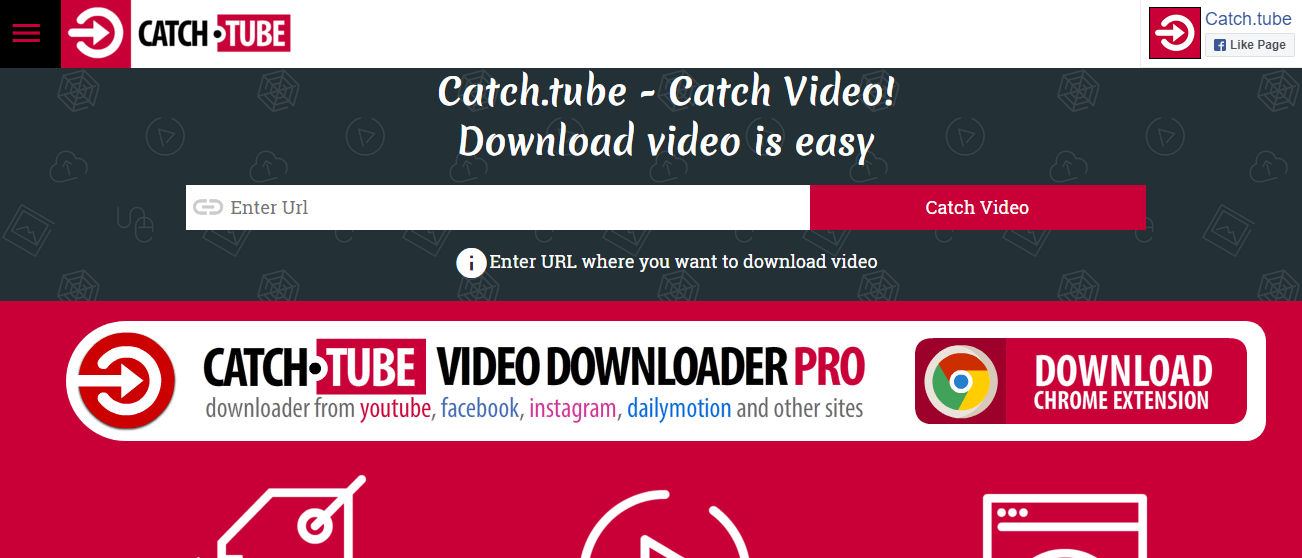
This first step is to open your browser. You can use any browser depending on what is installed in your machine. You will not have any problem with this as long as you know what serves you well. Once the browser is open, you need to visit the following site https://catch.tube/. The beauty of it is that the website offers free services when downloading your Facebook videos to Android. One of the things that you will notice is an empty box beside the red button that states ‘catch the video.’ All you need to do is to enter your URL into this box.

From here, you can scroll downwards and search for a red button that states ‘show media list.’ Once you get this button, you can tap on it to proceed. You will realize that the whole process flows so smoothly as long as you know what you are doing. You can now select the video version that you would like to download. The page gives you several options and its upon you to choose what you love most. You can now allow the device enough time to download the video.

In some cases, you may be forced to be patient depending on the size of the video that you are downloading and the stability of your internet connection. It can be wise to connect to a high-speed internet if you want the whole process to flow seamlessly. After the download is complete, you will see the download indicator in your status bar telling you that the download is complete. All you need to do at this stage is tapping on it. You can now open the video that you have just downloaded to make sure that it is functioning correctly. The whole process is simple and straight forward. In case you want to download another video, you can use the same procedure. The most important thing is to be keen to the video format so that you don’t choose the wrong option as this may affect the functionality of the video.

Conclusion

Most people all over the world own android devices. One of the reasons is that Android is a reliable operating system, especially on Smartphones. With over 12 billion Facebook accounts globally, a large proportion of these individuals use their Android devices to access their pages. However, most of them don’t know how to download Facebook videos on Android. You don’t want to mix an opportunity of saving your favorite videos in your handset. In this article, we have explained how you can achieve this objective through two simple steps. The first one is copying the URL of the video while the second one entails the actual downloading of the video. Follow these simple processes, and you will get your Facebook video in your device within no time.

Read Also:

Content Rally wrapped around an online publication where you can publish your own intellectuals. It is a publishing platform designed to make great stories by content creators. This is your era, your place to be online. So come forward share your views, thoughts and ideas via Content Rally.

View all posts

Leave a Reply

Your email address will not be published. Required fields are marked *

All Comments

Hi, i read your blog occasionally and i own a similar one and i was just curious if you get a lot of spam feedback? If so how do you reduce it, any plugin or anything you can advise? I get so much lately it's driving me crazy so any support is very much appreciated.

When I originally commented I clicked the "Notify me when new comments are added" checkbox and now each time a comment is added I get several emails with the same comment. Is there any way you can remove me from that service? Cheers!

It's remarkable in favor of me to have a site, which is useful for my know-how. thanks admin

After exploring a handful of the blog articles on your web page, I truly appreciate your technique of writing a blog. I bookmarked it to my bookmark webpage list and will be checking back in the near future. Please check out my website as well and let me know your opinion.

Thanks very nice blog!

This piece of writing is really a good one it helps new net people, who are wishing in favor of blogging.

whoah this weblog is great i like studying your articles. Stay up the great work! You recognize, lots of persons are looking round for this information, you can aid them greatly.

Very nice post. I just stumbled upon your weblog and wished to say that I have truly enjoyed browsing your blog posts. In any case I'll be subscribing to your feed and I hope you write again very soon!

Excellent pieces. Keep posting such kind of information on your blog. Im really impressed by it. Hi there, You've done an incredible job. I'll definitely digg it and individually recommend to my friends. I am sure they will be benefited from this web site.

Howdy! Quick question that's completely off topic. Do you know how to make your site mobile friendly? My site looks weird when viewing from my apple iphone. I'm trying to find a theme or plugin that might be able to fix this problem. If you have any suggestions, please share. Many thanks!

I really love your website.. Excellent colors & theme. Did you create this website yourself? Please reply back as I'm looking to create my own website and want to learn where you got this from or exactly what the theme is named. Appreciate it!

Thank you, I've just been searching for information about this topic for a long time and yours is the best I have found out till now. But, what concerning the conclusion? Are you sure in regards to the source?

I'm amazed, I must say. Rarely do I come across a blog that's equally educative and engaging, and let me tell you, you've hit the nail on the head. The problem is an issue that too few folks are speaking intelligently about. I am very happy I came across this during my search for something concerning this.

Quality articles is the crucial to invite the visitors to visit the website, that's what this website is providing.

I go to see daily a few websites and information sites to read articles, but this webpage presents feature based writing.

After looking over a number of the blog articles on your blog, I really appreciate your way of writing a blog. I saved it to my bookmark website list and will be checking back soon. Take a look at my web site as well and let me know your opinion.

An outstanding share! I have just forwarded this onto a coworker who had been conducting a little homework on this. And he in fact ordered me lunch simply because I stumbled upon it for him... lol. So let me reword this.... Thanks for the meal!! But yeah, thanks for spending the time to talk about this matter here on your blog.

I believe that is among the most important information for me. And i'm happy reading your article. But wanna remark on some general issues, The site style is perfect, the articles is in point of fact nice : D. Excellent activity, cheers

Thanks for ones marvelous posting! I definitely enjoyed reading it, you can be a great author. I will make sure to bookmark your blog and will often come back someday. I want to encourage yourself to continue your great posts, have a nice day!

I was suggested this blog by way of my cousin. I am not positive whether or not this put up is written by him as no one else understand such particular approximately my difficulty. You're wonderful! Thanks!

Very rapidly this web page will be famous amid all blogging visitors, due to it's pleasant articles

Saved as a favorite, I really like your web site!

Wow, that's what I was looking for, what a information! existing here at this blog, thanks admin of this web page.

Very nice post. I just stumbled upon your blog and wished to mention that I've truly loved browsing your blog posts. After all I'll be subscribing to your feed and I hope you write once more soon!

Related

Podcast topics

How To Find Best Podcast Topics Ideas In 2021

Podcasting is a trending concept, although not a new one. However, 2020 gave a surge to the international podcasting industry. Podcast statistics state that from 2019 to 2020, about 100 million Americans have listened to at least one podcast per month. It is thus evident that the popularity of podcasts has been increasing over recent years.  With the expansion of internet services and changes in tastes and preferences, the number of loyal podcast listeners is growing steadily. The people from the 18-24 age group listen to podcasts more than any other age category.   It is thus crucial to understand how to stay ahead of your competitors in terms of podcast topics. Therefore, this guide would focus on the ways of finding the best podcast topics in 2021. What Are Podcast Topics, And Why Are They Important? A podcast is a section-wise series of digital audio files. It consists of spoken words as well. Furthermore, users can download it to their devices for ease of listening. Podcasting services and streaming platforms provide collaborative waves to regulate usage traffic across different sources. Podcasts are cost-effective and time-efficient mediums of communication. They have utter social importance as the listeners dive into trendy, insightful, and message-oriented topics.  Some podcasts offer articles also in smaller bytes, perfect to listen to in busy daily schedules. , Mostly, podcasts are themed around a specific topic. Then, the hosts talk about the issues in different episodes. Nonetheless, the discussion is limited to the central topic only and considers several related or sub-topics.  Podcast topics are essential to keep the discussion relevant. Moreover, the host may ignore the time limitation if there is no specific theme. Therefore, to make the discussion strategic, time-bound, and logical, the hosts must follow a particular topic from their niche. How To Find Best Podcast Topics in 2021?  Creating fresh podcast ideas daily or weekly is tedious. This gives nothing to the podcast creators but stress. Here are some tools and tips through which you can create unique and good podcast topics regularly. 1. Examine The Question That Your Audiences Are Asking Observe the question answers and discussions minutely from several forums. In addition, collect the frequently asked questions from multiple E-Commerce sites. Now you can tally those with your available relevant podcast topics to choose yours. For instance, you can check the related themes tab to explore the wide range of associated questions. It will help you to think independently, thereby enhancing your creative podcast ideas. 2. Know The Engaging Content Pieces In its actual terms, social engagement indicates the success of content. To optimize your content ideas, you can deep dive into leading content based on trending topics. Ensure that the contents that you are exploring are within your niche.  Different content analyzer tools in the market offer a wide range of features. These include: Identifying the most engaging content within a certain period Spot the most popular shades of content in various sub-sectors Filter content by infographics, videos, content methodology, etc. Filter contents prepared by leading marketers 3. Understand The Trends In Twitter Twitter is an excellent tool for keeping up with current events. Whenever I'm communicating with followers on Twitter, I prefer using Tweetdeck to keep popular hashtags and trends handy. All the Twitter trends appearing in your feed are customized as per your search pattern and interests. Hence, there are high probabilities that you would discover the important things there. If you wish to add a trending column, tap the ‘+’ icon on the left-hand side and choose ‘Trending.’  4. Analyse The Google Trends Emerging podcasters often feel lost or anxious due to a lack of creative podcast ideas. An ideal option for them is to check Google Trends to get new ideas. One of the best sections is ‘Related Queries’ that many people are not aware of. This section lists all the trending podcast content ideas arranged in increasing order in terms of the search frequencies over a specific time. You will gain immense podcast topics by surfing these, which would optimize your overall confidence.    5. Have A Look At Quora Quora is an incredible platform to look for trending podcast topics adhering to the choices of your audiences. By exploring the ‘Related Questions’ column at Quora, you will be able to discover a wide range of creative content ideas that remain unexplored to date. In addition to this, it is possible to keep track of the active contributors in Quora. Thus, you can take a look at the answers posted by them to get a broad idea of topics in your niche. Apart from these, it is a brilliant way to come across more professionals to invite to your upcoming podcast shows or interviews. Such experts are mainly the storehouse of ideas. With extensive experience in this field, they have a heap of tricks to find creative podcast topics every time. Quora will bring you closer to them, and you can learn some more worthy hacks of developing crispy podcast content ideas. In this way, you can increase your connections, therefore, boosting more value to your podcast. The Bottom Line  Creating the best topics for a podcast is not as easy as it seems. First, you need to invest quality time to find out which topic is best suitable to engage your audience in an innovative way. To make the entire process smooth, conduct virtual or face-to-face meetings with your co-stage partners, friends, or other podcast professionals. You may receive many podcast topics, popular podcast topics, and podcast content ideas from them. Lastly, remember that dedication and practice together bring perfection. Search for new creative podcast ideas and podcast topics every day until you develop a spreadsheet of the best ideas. To be very honest, it will take months to happen, but with experience and perseverance, you will achieve success. More Resources How To Post On Reddit? A Step By Step Guide 10 Instagram-Worthy Hens Party Ideas-Without Losing Your Mind Why Businesses Should Invest In Backblaze’s Cloud Storage?

READ MOREDetails
snapchat

Getting Access to Other People’s Snapchat

There are plenty of ways in which you can hack into Snapchat accounts as well as passwords without even knowing about it. The best way to hack into the account of someone else’s Snapchat is through a dedicated phone spy app to see other people’s Snapchat. So, what is Snapchat? This is a complete communication platform with that of the videos and messaging as well as following the users as this started all as fun photo sharing. This can also be a massive issue for parents who are very much worried about the safety online similar to every messenger apps that are present online. All you now be working is to hack on Snapchat. You can readily keep a lookout on the activity of your kids who have a Snapchat account and this is mainly to keep them safer here. Hacking into Snapchat So, how can you hack into the Snapchat of someone else? The best way in which you can spy on their accounts and in managing what they are up to is through the use of complete cell phone spy software here. This will be giving you the most comprehensive method that would allow you to see everything that they would do with the use of one of the recommended spy apps. mSpy also has the complete coverage of every activity on the Snapchat when you want to get access to other people’s Snapchats. You will be able to view the photos, videos, as well as the messages that are sent and received along with the time logs including the places and friends here. You can even block them and have complete control of their Snapchat account. How to hack on the passwords? This is one of the best applications as there are benefits in using mSpy as you get something more than just mere monitoring on the same. Through this, you can monitor Snapchat on iPhone as well as on the Android phones and tablets. There are even other features that are included here which a dedicated spy program is. You can even track on their phone in the real-time as you can spy on every text messages. The information that you are looking out for, this is the simple way to achieve the same. You will also come across Snapchat hacking tools through online research. It rings a bell here as this is the most advertised as that of the Free SnapChat hacking and no Survey Snapchat hacking tools that are there. You will come across the hacking tools all throughout the internet today. You will also get videos to check on the same. But you need to make sure that the tool that you use for hacking is a legitimate one when you view Snapchat photos online. There are even some other ways in which you can hack into a Snapchat account and they are known as the Phishing campaigns in which you can have both your PC and cell phone hacked. But, this is something intrusive as well as illegal. Read Also: Cocospy Review: The Best Snapchat Monitoring App In 2019 Best 5 Instagram Marketing Tools You Should Be Using How To Become A Hacker: X Steps To Follow

READ MOREDetails
which network has the longest life for a piece of content?

Which Network Has The Longest Life For A Piece Of Content?

The longest life of the contents means maximizing the chances to convey your message to your audiences. The social media platform is the best one for circulating your message more quickly. So which network has the longest life for a piece of content?  You are using multiple social communication platforms to increase your social media engagement level. Among this long list of social media, few have a significantly shorter lifespan for the contents. Some of them have the longest life for a piece of content. The longest life for a piece of content is stretching up the time of your post, and more viewers can see the posts. For social media marketers and people who want a larger fan base, long-life content is the best way to reach the maximum of audiences. So let’s see which network has the longest life for a piece of content? Advantages Of The Longest Life For A Piece Of Content? For the social media marketers and the influencers, the longest life of the content is playing the leading role for viewer’s engagement. If you are an entrepreneur or an influencer, the viewer’s attention is significant for you. And the knowledge of which network has the longest life for a piece of content? It is providing you with the best choice of networks to share your content. Here are few advantages of the longest life for the piece of contents Maximum content life means a maximum number of viewers can see your posts Increasing the viewer’s engagements For the promotion and the branding, the maximum viewers can see your posts and share your posts. Fast sharing and the fast response is the best feature of the longest life for the piece of the contents. Which Network Has The Longest Life For A Piece Of Content? The social media marketers and entrepreneurs are using Facebook, Pinterest, Snapchat, and linked in. These four social media platforms effectively increase the viewer’s engagements and the brand’s promotional work. Among these four options, which network has the longest life for a piece of content. Let’s see the detailed descriptive answer for it. 1. Facebook Facebook contents have a reasonable lifespan for the piece of content. The average lifespan of the Facebook post is not more than five to six hours. But if your posts are going to be shared by your audiences. And within these five to six hours, your audiences and the viewer’s engagements will increase then your Facebook content life span will increase. So if you want to improve the engagement level through your Facebook profile. Then you always have to announce the direct call to action for your individual Facebook posts. 2. Pinterest Do you want to know which network has the longest life for a piece of content? This is the right option for you. The correct answer is nothing but the Pinterest network. You want to build up your customer engagement through social media engagement, and Pinterest is the right option for you. The content life is so long even the half-life of the pin is shorter than the Facebook posts. Are you interested to know how long the pins are going to last? You will be surprised to know that the pin’s lives are more extended than every other social media network for more than four months. As for the blog post, you can see the Pinterest posts for four months. And Pinterest has the longest life for a piece of content. 3. Snapchat If you are using the Snapchat network as your most preferred network. Then you already know which one has the ghost icon. Like the ghost, the content is also going to disappear within 10 seconds. When did you want to know Which network has the longest life for a piece of content? Snapchat is just the opposite. Snaps are going to last only ten seconds because Snaps have auto-deleting options. Even personal texting is going to be deleted after 30 days. Snaps will be deleted after 10 seconds, and along with the posts, your viewer’s reactions and other details will be deleted along with the snaps. 4. Linkedin Linked in is the best platform to increase professional and skill-based engagement levels. For the skill-based products and the services, engagements are playing an important role, and every time you are going to post anything on Linked in, the viewers will ask you and expect an answer from you within a few hours. LinkedIn content has a moderately long life span in comparison to Snapchat and Facebook. Among all the professional skill-based networks, which network has the longest life for a piece of content? LinkedIn is the most appropriate one. Linked-in posts have 48 hours of lifetime. And this time is enough for increasing the engagement. How Can You Improve Your Life For A Piece Of Content? Facebook, Snapchat, and Instream is a top-rated social media platform. The influencers and digital marketers are using this platform to increase the viewer’s engagement. If you are going to see the longest Facebook post of Nokia with 63,206 characters, you will understand the exact users and the fan followers of the Facebook page.  If you want to increase the life of your posted piece of content, then you can simply apply these tips. Always publish quality, engaging content with relevant images. Announce a solid call to action for increasing the engagement level among the viewers. Increase your response frequency and give the answers to your audiences for increasing your product brand value and elongate the life of the content. Give the preference to the new contents. Add some uniqueness when you are creating the content. These are the few tips that you can apply for increasing the lifespan of the piece of content. Hence you know which network has the longest life for a piece of content? It is not possible to shift to the newer one every time. You can apply these tips to give your post content a longer life. Wrapping It Up Now you know among the four network options, which network has the longest life for a piece of content? If you are currently using Facebook or LinkedIn, you can apply these tips to give your content a longer life. Along with the long life, the engagements are also going to increase. But for every network, the call to action is playing the most valuable part. Applicable solid, informative content with a reliable call to action is the best weapon to kill the short content lifespan. What is your opinion? Do not forget to share your opinion in the comment sections.     FAQ( Frequently Asked Questions)  Which Social Network has the longest life for the content?  Pinterest has the longest life for the content unlike for many other social media sites. You have to consider these facts while you want to wire up the social site networking for your business promotion. On which social network you must share the contact most frequently?   There are certain social networks where you must share your contact frequently some of them are as follows:- You must do 2-5 Facebook posts per day. Twitter the more you post the better visibility you will get. 2-5 posts a week you will get on Linkedin. There is a specific number that you must maintain on Instagram. What is the Social Hubspot exam?  The social media Hubspot exam tests the brands, products, industry, and services to check the rate of efficiency in an easier way. Why would you want to service that will help you to manage and discover the influence?  Here you will get the details on which social media site you have the highest number of influencers. More Resources The Definitive Guide to Market Your Business on Facebook How to Get More Traffic to Your Amazon Listings Content Marketing Mistakes You Shouldn’t Be Making

READ MOREDetails