Multilingual marketing and global e-commerce development require rapid visual content localization.
Also, it is the same for cross-border digital operations.
Historically, localizing an image demanded an expensive, multi-step workflow.
Modern Generative AI has fundamentally changed this process.
Contemporary AI image translators handle text detection, contextual translation, and much more automatically in a single unified pipeline.
However, not all engines preserve layout equally well.
To discover which platform minimizes manual graphic redesign, we conducted a rigorous comparative benchmark test of five accessible tools:
- Google Translate
- Canva AI
- DeepL Pro Image
- Yandex Translate
- ImageWise
The Testing Methodology
To evaluate structural accuracy, we tested each AI image translator across three real-world asset archetypes:
- Complex E-Commerce Infographics
- Multi-Column Textured Restaurant Menus
- Dense Software Dashboard Screenshots
The sample image that we have used is that of a dense, multi-column French restaurant menu.
It uses stylized decorative serif typography, tight line spacing (leading), custom currency symbols, and a textured paper background.
Performance Evaluation Factors
- Layout Preservation: Accuracy in mapping boundaries, tracking text angles, and reconstructing pixel backdrops.
- Typography Matching: Preserving font weights, style families, and sizing boundaries to prevent content overflow.
- Linguistic Quality: Contextual handling of brand assets, currencies, and technical syntax.
- Workflow Efficiency: Measuring raw processing velocity alongside subscription scalability costs.
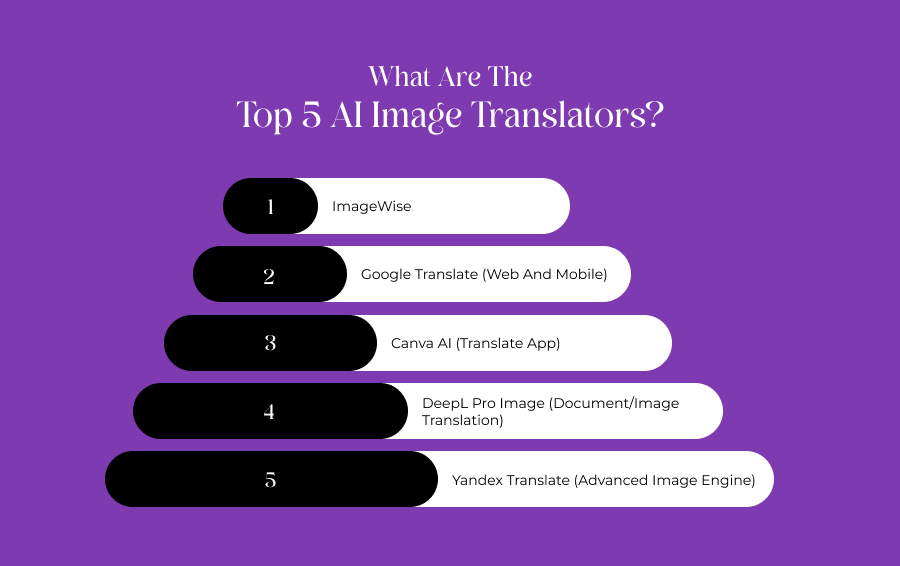
What Are The Top 5 AI Image Translators?
Below is our detailed, data-driven analysis of how each tool performed under matching test conditions.
1. ImageWise
ImageWise is a specialized SaaS multimedia platform built explicitly around layout-aware localization, background reconstruction, and detailed asset editing.
Rather than dropping flat text overlays over an image, its framework processes interconnected design assets in the form of:
- Visual Hierarchy
- Reading Order
- Background Pixels
Layout Preservation And Typography Performance
During our benchmark testing, the ImageWise AI image translator delivered high structural accuracy.
Instead of masking text with generic solid boxes, the system used advanced background repair to preserve the textured paper grain seamlessly beneath the newly placed English words.
The tool automatically analyzed text regions, adjusted line spacing, and matched font weights to fit text within the original bounding boxes.
In the technical screenshot test, it handled small interface labels cleanly.
Therefore, this keeps vertical alignment without overlapping adjacent button elements.
It also includes a custom text instruction field, allowing users to lock specific brand terms, SKUs, or currencies to prevent the translation engine from altering crucial business data.
Translation And Speed Efficiency
- Translation Quality: Highly nuanced. Contextual awareness kept menu item translations natural rather than overly literal.
- Speed: Processing times range from 3 to 6 seconds, depending on the selected quality mode (Fast, Auto, High).
- Pricing: Offers a daily free trial for account holders, with tiered subscription plans available for batch processing up to 20 images simultaneously.
2. Google Translate (Web And Mobile)
Google Translate remains the most globally accessible free translation ecosystem.
Its image translation feature combines Google Lens OCR (Optical Character Recognition) with the company’s neural translation networks.
Layout Preservation And Typography Performance
Google's engine excels at raw text extraction across almost any language pair.
However, its layout reconstruction remains basic.
When processing the e-commerce graphic, Google successfully wiped the original text.
Instead, it replaced it with plain, solid-colored bounding boxes that completely covered portions of the background image.
Furthermore, typography matching is highly restrictive.
It defaults to basic system fonts (like Arial or Roboto). Additionally, it ignores the original decorative serifs on our test menu.
Text alignment often slips, causing longer English translations to clip or run outside the boundaries of buttons and banners on the dashboard screenshot.
Translation And Speed Efficiency
- Translation Quality: Highly accurate for literal descriptions. But it occasionally misses context-specific industrial terminology or brand-name boundaries.
- Speed: Near-instantaneous, averaging under 1.5 seconds per file.
- Pricing: Free tier available for web and mobile apps. Enterprise scaling requires Google Cloud Vision and Translation API billing ($15 to $20 per million characters).
3. Canva AI (Translate App)
This one is integrated directly within Canva’s design ecosystem.
The Canva Translate application lets users import an image asset and isolate the text via built-in OCR layers.
Furthermore, you can use it to convert it directly inside an editable workspace canvas.
Layout Preservation And Typography Performance
Canva handles layout localization uniquely by converting flattened graphic text into fully editable typography layers.
In our e-commerce infographic test, Canva mapped text locations accurately.
However, if the tool cannot identify an exact match for a specialized brand font in its current library, it switches to a generic sans-serif variant.
Background repair can be hit-or-miss.
While it effortlessly removes text over solid colors or simple gradients, it's not as effective with complex patterns.
In fact, the detailed photographic backdrops often leave noticeable smudges behind the new text layers.
Then, you must manually use Canva's object eraser to touch up the design.
Translation And Speed Efficiency
- Translation Quality: Reliable and solid, backed by major neural translation partners. It struggles slightly with highly complex technical data strings or specialized industrial acronyms.
- Speed: Averages 4 to 8 seconds, as it builds live, interactive text boxes across your design canvas.
- Pricing: Free tier provides limited monthly translation credits; unlocking full high-volume automation requires a Canva Pro subscription ($13.99/month)
4. DeepL Pro Image (Document/Image Translation)
Widely recognized for its high linguistic accuracy, DeepL features an image translation architecture inside its desktop and enterprise applications.
Also, it prioritizes precise syntax and professional phrasing.
Layout Preservation And Typography Performance
DeepL delivers excellent linguistic accuracy, but its structural layout performance is more conservative.
On our technical dashboard screenshot test, DeepL preserved the spacing between sidebars and data grids cleanly.
However, it struggled with the complex cafe menu's decorative serifs, leaning heavily toward standard, clean sans-serif replacements.
The background fill mechanic is stable but basic. It handles minor textures well but occasionally struggles with complex colour boundaries, sometimes resulting in a slight blur around newly generated sentences.
DeepL prioritizes reading clarity over advanced artistic matching, making it excellent for documents, schematics, and corporate presentations, though less optimal for highly stylized marketing banners.
Translation And Speed Efficiency
- Translation Quality: Outstanding. DeepL consistently captured industry-specific jargon and phrasing nuances across the e-commerce specification test better than its competitors.
- Speed: Consistently fast, averaging 2 to 4 seconds per upload.
- Pricing: Limited free web testing; advanced image and document workflows require DeepL Pro tiers starting at $10.49 per user monthly.
5. Yandex Translate (Advanced Image Engine)
Yandex Translate features a dedicated image processing app optimized for complex character sets and tricky spatial orientation, making it a popular choice for Cyrillic, Asian, and Middle Eastern languages.
Layout Preservation And Typography Performance
Yandex performed surprisingly well on our vertical text layout test within the e-commerce infographic.
Its text positioning engine maps out rotated and angled text layers with high precision.
However, its visual rendering engine lacks fine-grained polish.
When translating into English, Yandex often ignores text padding rules, which can cause newly generated paragraphs to push against the edges of their background shapes.
Background fill consistency is decent over flat colors, but processing complex photographic backdrops can result in noticeable pixelation or artifacts.
Translation And Speed Efficiency
- Translation Quality: Highly reliable for Eastern European and Asian language pairs; can feel slightly rigid or overly literal on Western European translations.
- Speed: Extremely fast, frequently returning completed images in 2 seconds or less.
- Pricing: Completely free for standard web browser use; API access is managed via Yandex Cloud usage tiers.
Final Verdict: Which AI Image Translator Should You Choose?
Selecting the right AI image translator depends entirely on your specific workflow bottlenecks:
You should go for ImageWise if your primary challenge is preserving:
- Strict Graphic Design Layouts
- Custom Background Textures
- Typography Spacing
It also offers the specialized, layout-aware reconstruction needed to avoid rebuilding the file from scratch.
If you need to fully edit the resulting text layers manually after translation, Canva AI provides the most flexible workspace environment.
For highly detailed technical specifications and legal contracts, DeepL Pro remains the industry standard.
Additionally, you can use this platform for user manuals where perfect linguistic phrasing takes absolute priority over background aesthetics,
For instant, high-volume, cost-free translations of basic road signs or documents where layout design doesn't matter, Google Translate is the most accessible choice.