Published on: 07 August 2023
Last Updated on: 12 August 2024
Your next artistic endeavor, special occasion, or just your everyday life can all find inspiration on Pinterest. Additionally, it's simple to lose yourself when exploring other users' posts or "Pins." But what if you wanted to make your own Pins to share while using Pinterest?
You may do it. And whether you're using a PC or a mobile device, doing so is fairly simple.
That is exactly what I will be talking about today in this article. So keep reading this blog till the end to learn more about how to post on Pinterest and more…
What Are Pins On Pinterest?
On Pinterest, "pins" refer to individual content that users save to their boards. A pin can be an image or video representing an idea, inspiration, or information related to a specific topic. When users find the content they like or find interesting while browsing Pinterest, they can "pin" it to one of their boards to save and organize it for future reference.
For example, suppose a user sees a recipe they want to try later, a travel destination they'd like to visit, or a DIY project they want to attempt. In that case, they can pin the corresponding images or videos to a relevant board. Each pin is like a bookmark that allows users to revisit the content and access the source link when they click on it.
Pins play a crucial role in Pinterest's visual discovery process, as they represent the ideas and inspirations that users find most engaging and worth saving for themselves or sharing with others. These pins can be found, saved, and repinned by other users, fostering a community-driven approach to discovering and sharing content on the platform.
How To Post On Pinterest?
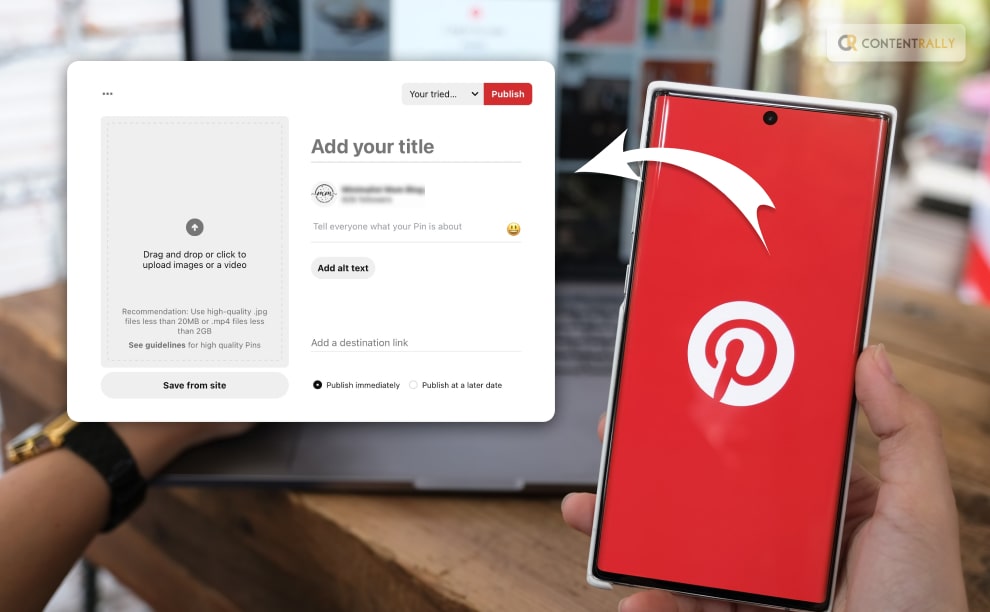
Creating a pin or a pinboard on Pinterest is probably one of the easiest things that you can do. However, a little assistance has never been bad. Here is the step by step guide on what you need to do to create a post or a pin on the app!
In the bottom right corner of your screen, click the + sign.
To create a pin, click.
To upload an image, drag it and drop it or click the upward pointing arrow.
Include the destination link, a title, and a description.
Choose a board from the drop-down menu on the top right by clicking it, or click Create Board to start a new board.
Press Save.
How To Post On Pinterest On Android?
Register for a Pinterest account.
In the bottom right corner of your screen, click the + sign.
To create a pin, click.
To upload an image, drag it and drop it or click the upward pointing arrow.
Include the destination link, a title, and a description.
Choose a board from the drop-down menu on the top right by clicking it, or click Create Board to start a new board.
Press Save.
How To Post On Pinterest On iOS?
Log into your Pinterest account and launch the Pinterest app on your device.
To access your profile, tap the image of your profile.
On your screen, click the + sign in the upper right corner.
Touch Pin.
Tap the camera icon to take a picture or choose a picture to upload.
Then select Next.
Tap Next after adding a Title, Description, and Destination webpage.
To save the pin, choose a board or Create Board to start a new one.
How To Build Pins On Pinterest For Business Accounts?
People use pins, which are bookmarks, to save the stuff they love on Pinterest. People can use the search function to find Pins, bookmark the ones they like, and click on a Pin for further information.
According to Pinterest, “If you have a business account, you can create Pins that link back to your website to share your products and ideas with people on Pinterest. If you see a Pin performing well, you can promote it to create an ad.”
By including an image from your mobile device, you can create a Pin. You can change or remove your Pin at any moment after publication.
You can include alternative text to your Pin to describe what viewers can see in the image to ensure your Pins are accessible to all users.
Review your Pin data to track how well your Pin is performing. Visit our article Review Pinterest Analytics to view your entire performance on Pinterest.
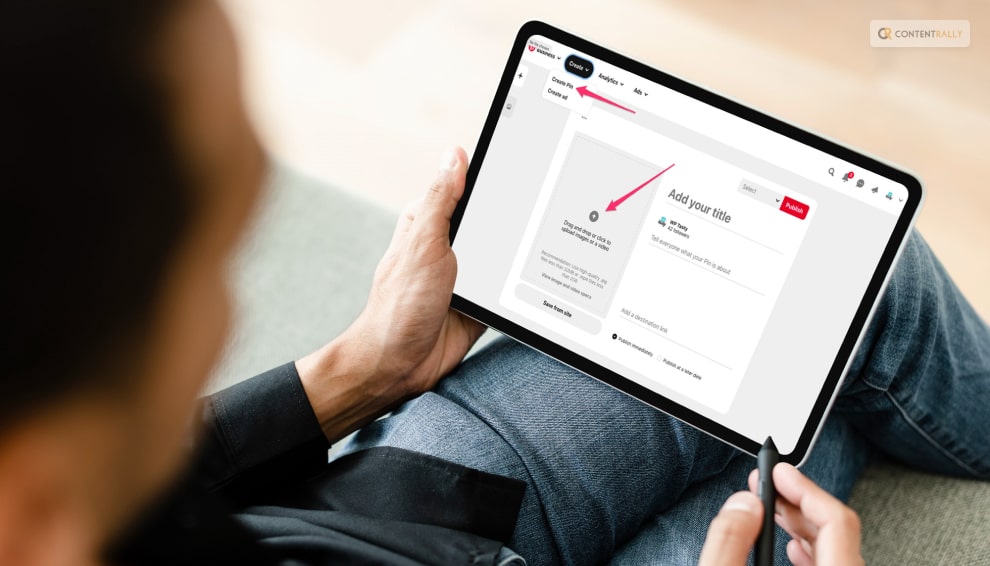
Click Create in the upper-left corner of your screen, then Create Pin.
You can add an image to a Pin by selecting the Upward arrow icon.
Then either drag and drop an image into the uploader or choose an image from your PC.
Include a destination link, title, description, and alt text.
Click the edit icon to the left of your Pin to make changes.
Use the recommended 2:3 ratio or drag and drop the red frame to crop your Pin, then click Update Adjustments.
To include a logo, click, choose your logo, and then click Save Changes.
Enter text on your Pin by clicking the A icon, following which you should click Update modifications.
How To Create Pins For Business Accounts On Android?
On your mobile device, launch the Pinterest app, and then hit the plus icon at the bottom of the screen.
Touch Pin.
Choose the picture that you wish to save as a Pin from your gallery.
Click Next.
Include an alt text, title, description, and destination website. Adding "@" before their usernames can include up to 5 accounts on Pinterest in your description.
Click Next.
Decide which board to pin to. Once chosen, your Pin will be stored automatically on your chosen board.
How To Create Pins For Business Accounts On iOS?
Tap the plus icon at the bottom of the screen after launching the Pinterest app on your device.
Touch Pin.
Choose a photo from your gallery that you want to pin.
Click Next.
Include a title, description, link to the destination webpage, time, and alternative text. Adding "@" before their usernames can include up to 5 accounts on Pinterest in your description.
Click Next.
Decide which board to pin to. Once chosen, your Pin will be stored automatically to your chosen board.
Wrapping It Up!
In case you wanted to know how to post on Pinterest, I hope that this article has been of help to you. If there are any other queries related to the same, feel free to let me know. All you need to do is scroll down until you reach the bottom of the page. Then leave your comments and queries in the box below. And I will be there to answer them all for you!
Ankita Tripathy loves to write about food and the Hallyu Wave in particular. During her free time, she enjoys looking at the sky or reading books while sipping a cup of hot coffee. Her favourite niches are food, music, lifestyle, travel, and Korean Pop music and drama.
Have you ever wondered who owns Pinterest in the first place?
Imagine a place where your wildest ideas come to life with just a click of a button. That place is Pinterest, your digital corkboard for inspiration, a treasure trove of creativity. So, what exactly is Pinterest, you ask? Well, let's embark on a whimsical journey through this digital wonderland.
Whether you're a foodie, fashionista, or a DIY daredevil, Pinterest is a place where your imagination takes flight. It's where you discover new hobbies, plan your next adventure, and unleash your inner artist. It's more than a platform; it's your creative confidant, your idea incubator, and your inspiration mecca.
But who IS the owner of this social media platform? Well, if that is what you have been curious about, then you have reached the right place. So, keep on reading till the end to learn more about Pinterest, its owner, as well as the story behind the creation of this platform…
But First, What Is Pinterest?
Before starting with the topic of who really owns Pinterest, it is important that you get some idea about what this platform is and how it works. So let me start with that!
Pinterest is like a virtual bulletin board where you can "pin" anything and everything that tickles your fancy. From mouthwatering recipes and jaw-dropping travel destinations to DIY crafts and fashion trends that make your heart skip a beat, Pinterest is where dreams meet reality.
It's a place where creativity knows no bounds. Whether you're planning your dream wedding, looking for home decor ideas that scream "you," or searching for the perfect workout routine to sculpt your body, Pinterest has got you covered. You can search for ideas, known as "pins," and create boards to organize them. It's like having a personal curator for your interests.
And the beauty of Pinterest is that it's a boundless universe of ideas. You can dive into niche communities, where passionate pinners share their expertise. From knitting enthusiasts sharing their coziest patterns to gardening gurus imparting wisdom on how to grow the lushest greens, you'll find a community that shares your passion.
But Pinterest isn't just about inspiration; it's a shoppable wonderland too. You can explore and buy products directly through the platform, turning your dreamy ideas into tangible reality with a simple click.
In a world where endless possibilities abound, Pinterest is your passport to the extraordinary. It's where you turn everyday moments into extraordinary experiences and transform your whims into reality. So, if you haven't ventured into this enchanting digital realm yet, it's time to take the plunge and let your imagination run wild on Pinterest.
So, Who Owns Pinterest?
Image Source: images.inc.com
Pinterest, the digital wonderland of inspiration and creativity, may seem like a boundless universe of ideas, but it, too, has a captain at the helm. So, who's the wizard behind this pinboard of dreams?
The wizard's name is Ben Silbermann, a tech-savvy dreamer who co-founded Pinterest in 2010. Armed with a passion for collecting, he transformed a simple concept into a global phenomenon. Ben is the heart and soul of Pinterest, steering it towards becoming a treasure trove of DIY projects, fashion inspiration, and mouthwatering recipes.
But, wait, there's more to this story! Ben isn't the sole owner of Pinterest. It's a team effort. A team of investors and shareholders who believe in the magic of pins and boards. These shareholders, including venture capital firms and individual investors, have a slice of the Pinterest pie. They've helped nurture Pinterest's growth, turning it into a platform where you can discover everything from home decor ideas to life hacks.
So, in the grand Pinterest story, Ben Silbermann is the visionary creator, and the ownership is spread across those who saw the potential in his dream. Together, they've woven a tapestry of inspiration that's just a click away, making Pinterest a place where creativity knows no bounds. The next time you're lost in the labyrinth of pins, remember, that it's a collective effort that keeps this digital wonderland alive and thriving.
Who Owns Pinterest Other Than Ben?
Yes, as I have already mentioned, Ben is not the only owner of Pinterest. He is not the only mind behind the creation of the platform.
Then who were the others?
Well, if that is what you want to know, then I have the names ready for you!
So, apart from Ben, Paul Sciarra and Evan Sharp were also behind creating Pinterest in 2010. The reason was very simple, to be hornets. They wanted to ensure that they created a platform where people would easily be able to create and share ideas and get creative. And there we have it!
Who Owns Pinterest Shares The Most?
In the year 2021, the lion's share of Pinterest's ownership is under the control of its co-founders. Specifically, Ben Silbermann commands the most substantial stake in the company. In addition to the co-founders, Pinterest's ownership landscape includes participation from venture capital firms, institutional investors, and high-ranking executives.
It's noteworthy that despite substantial investments and a lofty valuation, Pinterest has retained its status as a privately held company and has not undergone the process of becoming a publicly traded entity.
The Birth Of An Idea: What Is The Story Behind Pinterest?
Now that you know who actually owns Pinterest, you might be interested to know about the story behind the creation of this platform. well, sit back and relax for this ride!
In the vast digital landscape, where ideas swirl like stardust, Pinterest found its humble beginnings. It all started with a man named Ben Silbermann. Imagine him, a former Google employee, and his college buddy, Paul Sciarra, in the heart of Silicon Valley. Their brains buzzed with aspirations, and one day, a peculiar idea fluttered into Ben's mind like a butterfly. Considering the fact that at the time of making, there were no apps like Pinterest, they went ahead with the idea!
The 'Pin' That Started It All
Ben's fascination with collections—stamps, insects, you name it—drove him to envision a digital platform for collecting and organizing things people love. In December 2009, the first 'pin' on the virtual corkboard of Pinterest was pinned, giving birth to the Pinterest we know today. The name itself, a blend of "pin" and "interest," suggested the core concept: bookmarking the world.
Early Days: Crafting A Vision
In the early days, Pinterest was a cozy, invite-only platform that resonated with crafters, DIY enthusiasts, and fashionistas. It was a sanctuary of inspiration, where users could pin images of their interests onto their boards. The magic lay in the curation; Pinterest encouraged users to organize their pins neatly, creating a tapestry of dreams.
Making Connections
But building a dream requires teamwork. Ben and Paul brought in Evan Sharp, a talented designer. Together, they embarked on a journey to make Pinterest more intuitive and user-friendly. They added features like boards, pins, and the "Pin It" button, creating an online wonderland for collectors.
A Digital Revolution
As Pinterest evolved, so did its user base. What started as a niche community of creative souls soon became a global phenomenon. People weren't just pinning fashion tips and DIY projects; they were pinning dreams, aspirations, and future plans. Pinterest became a reflection of the world's collective imagination.
Pinning For The Greater Good
Intriguingly, Pinterest started transcending its original purpose. It became a hub for health and wellness, as users sought inspiration for healthier living. Recipe boards were stacked with scrumptious ideas, and exercise routines were just a click away. Pinterest evolved into a source of positivity, mental wellness, and even activism.
The Art Of Discovery
Pinterest didn't stop at just allowing users to curate their interests. It introduced the concept of discovery, using AI algorithms to suggest pins and boards tailored to individual tastes. This made Pinterest not just a place to find what you were looking for, but a place to discover what you didn't know you were looking for.
Shopping On The Boards
As time passed, Pinterest became more than an inspiration hub; it turned into a shopping paradise. With the "Shop" tab, users could explore and purchase products directly from their favorite pins. Pinterest wasn't just about ideas; it was about making dreams tangible.
The Future Beckons
Pinterest's story is far from over. With an ever-growing community, new features, and the power of inspiration, it continues to shape the digital world. From DIY novices to seasoned professionals, from fashionistas to activists, Pinterest remains the canvas where dreams are painted.
But, Can We Consider Pinterest A Social Media Platform?
Just close your eyes and imagine this: a cozy Sunday afternoon, a cup of your favorite brew, and you are lost in a world of beautiful visuals. You're scrolling through Pinterest, a platform that seems like a delightful blend of social interaction and a visual discovery engine.
But here's the million-dollar question: can we really consider Pinterest a social media platform? Let's explore this digital wonderland together.
The Basics Of Pinterest
First things first, let's get down to the nitty-gritty of Pinterest. Founded in 2010, Pinterest is often described as a social media platform, but it's not your typical one. Instead of endless status updates, it's all about images. And THAT is exactly what the owners of Pinterest wanted it to be like!
Users pin, share, and discover visual content, creating virtual mood boards filled with everything from recipes to home decor and travel inspiration.
A Community Of Curators
One key aspect of social media is interaction, and Pinterest certainly has that covered. Users can follow each other, like, comment, and share pins. It's a place where people can connect based on shared interests and tastes, much like other social media platforms.
Sharing Is Caring
Now, let's talk about sharing. While Pinterest doesn't encourage sharing your life's every moment like Facebook or Twitter, it promotes sharing ideas, inspiration, and creativity. You might not be posting selfies, but you're sharing DIY projects, fashion tips, or your dream wedding plans. It's a different kind of personal sharing.
The Influence Factor
Here's where Pinterest takes an interesting turn. It's a platform with substantial influence. It's not just about personal expression; it's about shaping trends and influencing purchasing decisions. Users flock to Pinterest for inspiration, and businesses have capitalized on this, making it a powerful marketing tool.
No Status Updates, Just Pins
Unlike traditional social media where status updates reign supreme, Pinterest's content revolves around "pins." These pins are like bookmarks for the web, allowing users to save things they find interesting. This distinction sets it apart from your standard social media fare.
The Search Engine Angle
Pinterest isn't just about following friends; it's also a massive search engine. People turn to Pinterest for ideas and solutions. Whether you're looking for a new hairstyle or a recipe for dinner tonight, Pinterest is a go-to source. It's like Google but dressed up in a beautiful collage of images.
The Verdict: Social Media Or More?
So, after this whirlwind tour, can we officially call Pinterest a social media platform? Well, it's a bit like calling a jackalope a rabbit - it's a unique hybrid.
Pinterest shares traits with traditional social media – community, interaction, and personal connections – but it's also a potent visual search engine, a creative haven, and an influencer in its right.
In conclusion, Pinterest might not fit neatly into the box labeled "social media," but that's what makes it special. It's a canvas for ideas, a hub for inspiration, and a community of people brought together by their passions. Whether you're planning your dream home or just admiring cute puppies, Pinterest is, without a doubt, something more than just social media – it's a creative treasure trove.
How Does Pinterest Help The Creators?
Pinterest, often seen as the hidden treasure trove of the internet, is not just a virtual mood board; it's a dynamic platform that breathes life into the wildest creative dreams. Whether you're an artist, a writer, a chef, or anyone with a spark of creativity, Pinterest can be your muse. Here's how this wonderland of ideas helps creators unleash their potential.
1. Sparking Ideas With Pins
Imagine a pin as a tiny seed. Pinterest is the fertile ground where these seeds grow into magnificent, towering trees of creativity. When you browse through pins, you're exploring a universe of inspiration. Each click unveils a new idea, a fresh perspective, or a different color palette. With each pin, you can uncover the missing piece to your creative puzzle.
2. Mood Boards: Organized Chaos
Ever felt like your ideas are scattered like autumn leaves in the wind? Pinterest offers the perfect solution with mood boards. These digital canvases allow you to organize your thoughts, ideas, and inspirations in one place. Whether you're planning a room makeover or drafting a novel, mood boards help you see the bigger picture.
3. Tailoring Trends For Your Niche
Pinterest isn't just about following trends; it's about customizing them to suit your unique creative flair. Whether you're a fashion designer looking to add your twist to the latest runway trends or a home chef aiming to create a fusion masterpiece, Pinterest helps you tailor global trends to your niche.
4. Finding Your Audience
Creators often toil in obscurity, waiting for their work to be discovered. Pinterest has a solution for that too. The platform boasts an impressive search engine that connects your content with the right audience. By using keywords and tags, your creations can pop up on the screens of people who are genuinely interested in what you have to offer.
5. Networking And Collaboration
Creativity thrives when it's nurtured in a community. Pinterest offers a vibrant space for creators to connect, collaborate, and exchange ideas. Whether you're joining a group board for like-minded individuals or engaging with fellow artists, Pinterest opens doors to a world of collaboration.
6. Showcasing Your Portfolio
As a creator, your portfolio is your golden ticket to success. Pinterest serves as a stunning, visual portfolio where you can showcase your best work. Whether it's a collection of your paintings, photographs, or writing samples, your Pinterest profile becomes your digital showroom.
7. Analytics: Measuring Success
In the world of creation, it's essential to know what works and what doesn't. Pinterest offers in-depth analytics that helps you understand how your content is performing. You can track which pins resonate with your audience, giving you valuable insights to refine your creative strategy.
8. Learning From Others
Pinterest isn't just about showcasing your work; it's also about learning from others. By following boards and creators in your field, you can gain insights, gather ideas, and stay updated with the latest trends. It's like having a mentor at your fingertips.
9. A Source Of Encouragement
Creating can be a rollercoaster of emotions. Pinterest is there to provide encouragement when you need it the most. Positive comments likes, and shares from your followers can boost your confidence and motivate you to keep chasing your creative dreams.
All You Need To Know About The Pinterest Creator Fund In 2023!
The Pinterest Creator Fund is like a secret door that opens up a treasure trove of opportunities for content creators. But what exactly is it? Simply put, it's Pinterest's way of saying, "Hey, we believe in your creative genius, and we want to help you bring your ideas to fruition."
So, how does this fund work its magic? It's all about empowering creative minds. Pinterest provides financial support to creators, helping them turn their imaginative pins into reality. Whether you're a talented artist, a DIY enthusiast, or a budding chef with a flair for food photography, this fund has your back.
Think of the Pinterest Creator Fund as your personal patron of the arts. It's there to fund your projects, fuel your creativity, and turn your Pinterest boards into real-life masterpieces. From crafting supplies to camera equipment, the fund can cover a wide range of expenses.
In other words, the Pinterest Creator Fund is a game-changer for content creators, offering not only financial support but also a thriving community of like-minded individuals. It's where imagination meets opportunity, and where your creative journey truly begins.
Building A Community
What's more, the Pinterest Creator Fund isn't just about financial support. It's about building a vibrant community of like-minded creators who share ideas, collaborate, and inspire each other. It's a place where creativity knows no bounds, and everyone is welcome to join the party.
Unleashing Your Imagination
Imagine this: you have a vision for a stunning home decor project. With the Pinterest Creator Fund, you can turn that dream into a reality. You'll have the resources you need to bring your ideas to life, whether it's through captivating videos, breathtaking photos, or step-by-step tutorials.
Sharing Your Passion
Have a passion for fashion? The Pinterest Creator Fund can help you turn your love for style into a thriving online presence. From outfit inspiration to styling tips, you can share your fashion-forward ideas with the world, all while receiving support to keep your creative juices flowing.
Making Your Mark
The Pinterest Creator Fund isn't just about short-term gains. It's about helping you make your mark in the world of creativity. With the resources and community it provides, you can establish yourself as a go-to source for inspiration and knowledge in your niche.
Join The Creative Revolution
So, are you ready to join the creative revolution? The Pinterest Creator Fund is your ticket to turning your passion into a profession. It's where your ideas take flight, your dreams become reality, and your creativity knows no bounds. Whether you are just there to get ideas, or you want to start blogging through Pinterest, this platform is there for you!
Wrapping It Up!
Pinterest is one of the most popular platforms with a daily user base of nearly a hundred million. And I'm pretty sure that even the founders, Bill, Paul, and Evan never imagined how big this creative space for sharing ideas would become in a few years.
In case you were searching about who owns Pinterest, I hope that this blog has been of help to you. If there are any other queries related to the same, please feel free to let me know. All that you need to do is scroll down till you reach the bottom of the page. Then leave our comments and queries in the box below. And I will be there to answer them all for you!
Learn More About Pinterest:
Here’s How To Post On Pinterest?
How To Get Followers On Pinterest? Follow This Guide
Want To Know How To Delete Pins On Pinterest? Read This Blog
In case you are searching for different apps like Pinterest, then you have reached the right place. Pinterest is undoubtedly one of the growing social media platforms for visual content. However, there are people who have started to search for other apps like Pinterest.
If you are one of them and are searching for some of the best Pinterest alternatives, you will find this article to be of help. Keep reading this blog till the end to learn more about how Pinterest works and what are other apps are just like Pinterest...
What Is Pinterest?
Pinterest is a social media platform and visual discovery engine that allows users to discover, save, and share ideas and inspirations using images and videos. It was founded in 2010 and has gained popularity as a virtual pinboard where users can create and organize collections of images called "boards."
Users can find and save images or "pins" on various topics such as fashion, home decor, recipes, DIY projects, travel destinations, and much more. When users come across an image they like, they can "pin" it to one of their boards, making it easy to revisit and share with others.
The platform also offers features to follow other users, discover content tailored to their interests, and connect with like-minded people. Businesses and creators often use Pinterest to showcase their products, ideas, and services, making it a valuable marketing tool for some.
Pinterest is designed to be an inspiring and creative platform, allowing users to curate and explore content based on their interests and passions. It's a visual hub that fosters discovery, ideas, and creativity, making it a unique and popular platform among users seeking inspiration and information in a visually appealing format.
How Does Pinterest Work?
Pinterest operates as a visual discovery platform, and its functionality revolves around the following key elements:
1. Pins:
Pins are individual pieces of content that users discover and save on Pinterest. These images or videos represent ideas, inspirations, products, recipes, tutorials, and more. When users find the content they like, they can "pin" it to one of their boards for future reference and easy access.
2. Boards:
Users create Boards like digital bulletin boards to organize and categorize their pins. Each board represents a specific theme or topic, such as "Travel Destinations," "Home Decor Ideas," or "Healthy Recipes." Users can create multiple boards to keep their saved content neatly arranged.
3. Searching And Exploring:
Users can search for specific content using keywords or browse through categories to discover content tailored to their interests. Pinterest's algorithm suggests content based on users' interactions and the types of pins they save, allowing them to explore diverse ideas.
4. Following:
Users can follow other Pinterest users who share content they find interesting. By following someone, users see their pins on their home feed, making it easy to stay updated with the latest inspirations from their favorite creators.
5. Engagement:
Users can like, comment on, and save others' pins to their own boards. This engagement helps in creating connections and fosters an interactive community on the platform.
6. Pinning from External Websites:
Users can also add pins to their boards directly from external websites by using the Pinterest browser extension or the "Save" button integrated into many websites.
Overall, Pinterest operates as a user-curated visual platform where people can discover, save, and share ideas in the form of images and videos. It promotes creativity, exploration, and the building of a community around shared interests.
Pinterest Alternatives: 15 Apps Like Pinterest You Need To Know About!
There is no wonder that Pinterest is a popular social media platform for people who are looking for inspiration and businesses who want to grow. But there can be times when you want to try out other platforms that are similar to this one.
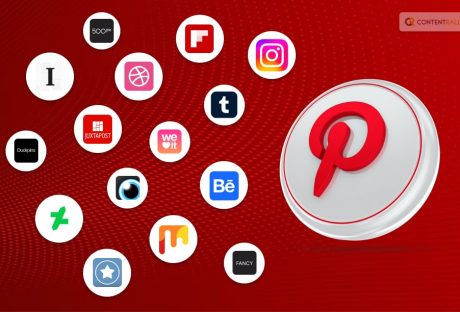
In case you were searching for the best apps like Pinterest, you have found a friend in me! Here are the top fifteen apps that are very similar to Pinterest that you should try out:
1. Instagram:
A popular social media platform for sharing photos and videos and visual storytelling features like Stories and Reels, Instagram is not unknown to anyone of us. And you might be wondering why I am placing this app on this list. Well, this is because you can get a number of "inspirations" just like Pinterest in this app as well. why, don't you get inspired from all the pages and accounts or posts that you van see on your "For you Page?"
2. Tumblr:
Image Source: techwiser.com
A microblogging platform that allows users to share various types of content, including images, GIFs, and short-form text, Tumblr is the next one on this list. Users can submit multimedia and other items to a brief blog using the service. people can follow the blogs of other people. Additionally, bloggers can make their blogs private.
3. Flipboard:
Image Source: imageio.forbes.com
Flipboard is a content curation app that aggregates articles, images, and videos based on users' interests to create personalized digital magazines. A platform for curating content, Flipboard is mostly used for written items including recipes, how-to manuals, blog posts, news, analysis, and conversation.
Then, you can save your favorite articles in the "Magazines" collection. For any subject that is on your mind, you are free to produce as many magazines as you like.
4. We Heart It
What if young girls could use Pinterest? We Heart It is a platform that best appeals to this group. This app targets female college students with its content. With its cutting-edge UI, We Heart It claims of letting you find and follow the people you care about.
5. 500px:
Similar to Flickr, the photo-sharing website 500px allows photographers to upload and share their works. You can look for pictures based on a variety of topics, and follow teams, or certain photographers. The last option is to store your favorite pictures in collections of your choosing.
6. Fancy:
If you are looking for an app for discovering unique and stylish products, where users can save and buy items they find interesting, Fancy is for you! In order to send visitors to their official website anytime they want to see more, Pinterest now allows e-commerce apps to create marketing posts. Fancy also uses the same idea.
It is made up of carefully chosen content featuring a wide range of opulent goods divided into sections like apparel, décor, art, technology, and many more. If something catches your eye, you can click on the post to go to the brand's official website. The app also recommends things that are popular right now in the field you enjoy.
7. Dribbble:
Dribble is a platform for designers to showcase their work and find creative inspiration from other designers. It can be called the "Pinterest for designers." You should sign up for Dribbble right now if you enjoy creating pixel art, posters, logos, websites, and other visual content and want to learn more about the techniques used. Its user interface is very similar to Pinterest's. Small pieces of content have been published by several designers.
8. VisualizeUs:
If you are into home decor and that is why you like Pinterest, then you need to try out VisualizeUs. For people that enjoy home furnishings, there is VisualizeUs. Its user interface resembles Pinterest's. The photographs are immediately shareable and can be saved to your feed. Numerous articles on contemporary furniture and interior design are available. If you want to design your home and give it a fresh style, this shows to be a great platform.
9. DudePins:
DudePins is a website for males, whereas We Heart It is for ladies. In fact, you'll be greeted on the home page with the words "Discover everything that's manly." Although the website's appearance may not be as eye-catching as Pinterest's, it contains a wealth of content that would appeal to men of all ages.
10. Behance:
A platform for creative professionals to showcase their portfolios, collaborate, and discover inspiring design work, Behance is the next one on this list. It is a website for professionals in the visual arts, such as illustrators, photographers, web designers, brand strategists, fashion designers, animators, motion graphic designers, and 3D modelers.
11. Instapaper:
Image Source: tapsmart.com
As a bookmarking tool, Instapaper was created to let users save things like webpage articles for later reading. It stores all of the browsing content found on a website, including text, images, audio, GIFs, and much anything else. You only need to sign up for an Instapaper account to be able to save anything right away with a single click.
12. DeviantArt:
An online community for artists to display and discuss their artworks, ranging from digital art to traditional media. You can follow certain artists, collections, groups, and journals on the website. You can add your favorite creations to collections that are uniquely yours.
13. Pearltrees:
The next one on this list of the best apps like Pinterest is Pearltrees. It is a content curation tool that lets users organize and share web pages, images, and notes into visual collections. An intriguing organizer is Pearltrees, which enables users to browse and arrange various types of creative content in different ways. Users can signup with ease.
14. Juxtapost:
An app for collecting and organizing visual content from across the web, similar to Pinterest's board system. Its greatest asset is its community, which has developed a fantastic space to discuss other people's articles and even collaborate on projects.
15. Mix:
Image Source: assets.mix.com
Mix meets expectations when it comes to tailored discovery platforms like Pinterest. Mix has practically all types of information imaginable, from philosophy to cooking instructions. You may anticipate moving quickly from one article to another while using high-quality curated pieces. Browse through category lists and bookmark the ones you wish to learn more about later.
On this website, there are full-length articles in addition to pictures. Similar to Pinterest, you can customize the feeds from different categories. Register on Mix if you enjoy reading articles and looking at photographs.
Wrapping It Up!
In case you have been searching for some apps like Pinterest, I hope that this blog has been of help to you. If there are any other queries related to the same, please let me know. All you need to do is scroll down until you reach the page's bottom. Then leave your comments and queries in the box below. And I will be there to answer them all for you!
Learn More About:
How To Delete Pinterest Account Easily?
How To Get Followers On Pinterest? Follow This Guide
What Is The Pinterest Creator Fund & How Can It Help Your Business?
Trying to do something on Pinterest and this platform shows you the error message: “Sorry, we blocked this link as it may lead to spam!”
Even though you did not do anything spammy, your account was either blocked or suspended. AND you cant seem to find a way out of this problem!
Well, if this is the problem that you are facing, you are not alone in this! And I am here to help you out with this!
Keep reading this article till the end to get your Pinterest unblocked with ease…
A Little Brief On Pinterest!
Pinterest is a social media platform and visual discovery tool that allows users to discover, save, and share images and videos related to their interests and hobbies. It was launched in 2010 and has since grown to become one of the popular platforms for collecting and organizing ideas, inspiration, and creative content.
Pinterest is particularly popular among users looking for inspiration for home decor, fashion, recipes, travel, DIY projects, and much more. It serves as a platform for users to curate their interests, gather ideas, and share their passions with a global community.
Whether users are planning a wedding, decorating a room, or searching for new recipes, Pinterest provides a visual and organized way to explore and collect ideas.
Features Of The Pinterest Platform!
Image Source: remessaonline.com.br
Before learning about how to get Pinterest unblocked, it is important that you get to know about the various features of this platform. These are the things why users tend to use Pinterest app or social media platform.
The key features of Pinterest include:
1. Pins
A pin is an image or video that users can save to their boards. It represents a specific idea, product, recipe, DIY project, travel destination, or any other topic of interest.
2. Boards
Users can create boards to categorize and organize their pins. Each board is like a virtual pinboard dedicated to a particular theme or topic.
3. Following
Users can follow other Pinterest users and see their pins in their home feed. This allows users to discover new content and get inspired by the pins shared by others.
4. Search And Discovery
Pinterest offers a powerful search and discovery feature that allows users to find pins related to their interests. It also suggests similar pins based on the user's activity and preferences.
5. Rich Pins
Rich pins provide additional information, such as product details, recipe ingredients, and article previews, making the content more informative and engaging.
6. Business Accounts
Pinterest offers business accounts for brands and businesses to showcase their products and services. Business accounts have access to analytics and advertising features.
7. Buyable Pins
Some pins on Pinterest have a "Buy It" button, allowing users to make purchases directly through the platform from participating retailers.
Pinterest Unblocked: Get Your Account Unblocked To Harness The Power Of Pinterest!
If Pinterest is blocked in your location or on your network, there are several steps you can take to try to access it:
1. Use A VPN
A Virtual Private Network (VPN) can help you bypass network restrictions and access blocked websites like Pinterest. A VPN masks your IP address and routes your internet traffic through a server in a different location, allowing you to access blocked content.
2. Use A Proxy
Similar to a VPN, a proxy server can also help you access blocked websites. It acts as an intermediary between your device and the website you want to visit, allowing you to access the site without directly connecting to it.
3. Access Via Mobile Data
If Pinterest is blocked on your Wi-Fi network, you can try accessing it using your mobile data connection instead.
4. TOR Browser
The Tor browser is a privacy-focused web browser that can help you access blocked websites anonymously. It routes your internet traffic through a network of volunteer-operated servers, making it difficult for anyone to trace your online activity.
5. Contact The Network Administrator
If you're trying to access Pinterest on a school or work network, reach out to the network administrator or IT department to inquire about the reason for the block. Sometimes, they may be able to provide a valid reason or make an exception if there is no policy against using Pinterest.
6. Use Pinterest Alternatives
Look for alternative image-sharing platforms or websites that offer similar features to Pinterest.
7. Check Country Restrictions
If you're trying to access Pinterest in a different country, it's possible that the website is blocked due to country restrictions. In such cases, using a VPN with servers in a different country may help.
Benefits Of Using Pinterest As A Social Media Platform!
Pinterest is a versatile platform that caters to various interests and needs. Whether you're seeking inspiration, showcasing your work, planning a project, or simply exploring new ideas, Pinterest can be a valuable resource to enhance your online experience.
Using Pinterest offers several benefits for individuals and businesses alike. Some of the key advantages of using this platform include:
1. Inspiration And Idea Generation
Pinterest is a treasure trove of ideas and inspiration across various topics, such as home decor, fashion, beauty, travel, food, and more. Users can explore a vast collection of images and videos to spark their creativity and find new ideas for their projects and interests.
2. Visual Bookmarking And Organization
Pinterest allows users to save and organize content in the form of pins and boards. It serves as a visual bookmarking tool, making it easy to keep track of interesting articles, products, recipes, and other content for later reference.
3. Personal And Professional Branding
For businesses and content creators, Pinterest can be a powerful platform for showcasing products, services, or creative work. It helps establish a visual brand identity and reach a broader audience.
4. Traffic And Engagement
For bloggers and website owners, Pinterest can drive significant traffic to their sites. By sharing visually appealing and valuable content, users can attract more visitors and engage their audience.
5. DIY And Tutorials
Pinterest is a go-to platform for DIY enthusiasts and those seeking tutorials. Users can find step-by-step guides, craft ideas, and instructional content to help them complete various projects.
6. Recipe Discovery
Food lovers can explore a vast collection of recipes on Pinterest. It serves as a recipe discovery platform, making it easy to find and save recipes for any occasion or dietary preference.
7. Travel Planning
Pinterest can assist travelers in planning their trips by providing travel destination ideas, travel tips, and itinerary suggestions shared by other users.
8. Collaborative Boards
Users can create collaborative boards, allowing them to share ideas and collaborate on projects with friends, family, or colleagues.
9. Personal Growth And Development
Pinterest is not just about hobbies and interests; it can also serve as a platform for personal growth. Users can find motivational quotes, self-improvement tips, and resources for personal development.
10. Shopping And E-commerce
With "Buyable Pins" and shopping features, Pinterest offers a convenient way to discover and purchase products directly from the platform.
11. Discover New Content Creators
Users can find and follow content creators and influencers on Pinterest to get regular updates on their latest creations and recommendations.
Wrapping It Up!
Before using any of these methods to access a blocked website, ensure that it is allowed by the policies of your organization or network. It's important to respect network restrictions and use these methods responsibly.
In case you were searching about the various ways to get Pinterest unblocked, I hope that this blog has been of help to you. If there are any other queries related to the same, feel free to let me know. All that you need to do is scroll down till the end of the page. Then leave your suggestions and comments in the box below. And I will be there to answer them all for you!
Learn More About:
Want To Get Instagram Unblocked? Here’s What To Do!
9 Ways To Use Pinterest To Promote Your E-Commerce Store