Pressure Transducers 101: Working Principle, Types, And Applications

Published on: 01 July 2023 Last Updated on: 17 January 2024
Pressure Transducers

Pressure transducers are vital components used in various industries and applications to measure and monitor pressure.

They convert mechanical pressure into electrical signals, enabling accurate and real-time pressure readings. Here at microsensorcorp.com, we have taken the time to explore the working principle of pressure transducers for our clients, discuss the available types, and delve into their wide range of applications.

Working Principle

The fundamental principle behind pressure transducers lies in their ability to convert physical pressure into an electrical signal. They typically have a diaphragm or sensing element that deforms under applied pressure.

This deformation is then converted into an electrical signal through various sensing technologies, such as strain gauges, capacitive, piezoresistive, or resonant frequency mechanisms.

Types of Pressure Transducers

  • Strain Gauge Pressure Transducers: These transducers utilize the principle of electrical resistance changes in a strain gauge under applied pressure. As pressure is exerted on the diaphragm, the strain gauge experiences a change in resistance, which is then converted into an electrical signal.
  • Capacitive Pressure Transducers: Capacitive transducers measure pressure changes by monitoring the capacitance variation between the diaphragm and a fixed plate. As the diaphragm deforms, the distance between the plates changes, altering the capacitance and generating an electrical output.
  • Piezoresistive Pressure Transducers: The principle of a piezoresistive pressure transducer is to generate a change in resistance after the sensitive core is pressurized, and then convert the change in resistance into a standard signal output through an amplification circuit.
  • Resonant Frequency Pressure Transducers: Resonant frequency transducers measure pressure changes by monitoring the shift in the resonant frequency of a vibrating element under pressure. The pressure causes a change in the vibrational frequency, which is converted into an electrical signal.

Applications of Pressure Transducers

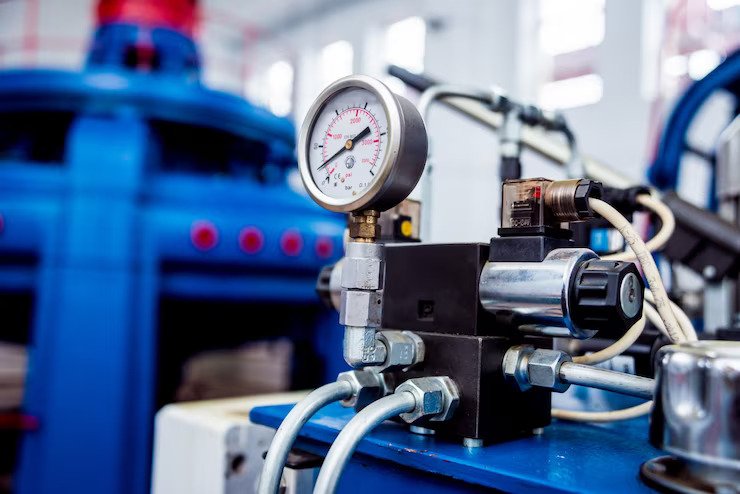
  • Industrial Automation: Pressure transducers are crucial in industrial automation, monitoring hydraulic and pneumatic systems and ensuring optimal operating conditions. They are used in process control and quality control applications.
  • HVAC Systems: Pressure transducers are employed in heating, ventilation, and air conditioning (HVAC) systems. Their purpose is to monitor and control air pressure. They enable efficient and precise regulation of airflow and ventilation, enhancing energy efficiency and comfort levels.
  • Automotive Industry: Pressure transducers are extensively used in the automotive industry to monitor fuel pressure, oil pressure, tire pressure, and various other critical parameters. They help ensure optimal performance, efficiency, and safety of vehicles.
  • Aerospace and Aviation: Pressure transducers are vital in aerospace and aviation applications, where they monitor and control cabin pressure, fuel pressure, and hydraulic systems. They contribute to the safe and reliable operation of aircraft.
  • Medical and Healthcare: Pressure transducers are utilized in medical equipment and healthcare applications, including respiratory systems, blood pressure monitors, and dialysis machines. They provide accurate pressure measurements for precise diagnosis and treatment.
  • Environmental Monitoring: Pressure transducers are used in environmental monitoring systems to measure water pressure, air pressure, and weather conditions. They help in flood control, weather forecasting, and atmospheric research.

Conclusion

Pressure transducers are essential instruments used in various industries and applications to measure and monitor pressure accurately. They employ different sensing technologies to convert mechanical pressure into electrical signals.

With their versatility and reliability, pressure transducers contribute significantly to industrial automation, HVAC systems, automotive, aerospace, healthcare, and environmental monitoring. 

As technology advances, pressure transducers continue to evolve, providing more precise measurements and enabling enhanced control and safety in numerous fields.

Read Also:

Arnab is a professional blogger, having an enormous interest in writing blogs and other jones of calligraphies. In terms of his professional commitments, He carries out sharing sentient blogs.

View all posts

Leave a Reply

Your email address will not be published. Required fields are marked *

Related

Ergonomics

Prep Your Office For An Ergonomics Work Setting: Tips To Make It Perfect

A healthy and safe working environment is quite a product-oriented work environment. Regardless of the company’s size, some enterprises strive to prepare an ergonomically sound and capable workplace for their employees.  Ergonomics is vital because it safeguards the employees' mental and physical health and well-being. Similarly, you can avoid issues like repeated injuries and overexertion by incorporating effectively designed ergonomics equipment.  When there is poor ergonomic practice, it is the duty of every employee to ensure they are using good ergonomics at their own working station.  With a desk, fancy chairs, and equipment, the world will not assist an employee who slumps and slouches in an awkward way at their desk. In this article, you will find certain important tips to help you focus on the office and create a productive and healthy working environment.  Ways To Immediately Improve Your Workstation Ergonomics When you are uncomfortable at your desk or feel discomfort while working, it is due to a poorly positioned keyboard and monitor. It might further prevent an individual from reaching their full potential of working.  Here is a list of tips to help you create an ergonomic working station.  1. Proper Height Display  Monitor and other display devices should be placed at an eye level when your employees use them.  Similarly, when viewing a display, one must not strain the neck or squint the eyes. Therefore, ergonomics is dedicated to employees not being required to alter their neck to right, left, down, and up to see a display.  Thus, the principles apply to individuals with conventional single monitors and power the users in employing the multiple displays. 2. Good Working Posture  Whether your employees work in a warehouse or within a corporate office, the top ergonomics priority is establishing an effective workstation.  You need to ensure that your employees are able to stand or sit in the correct body posture. On the other hand, you need to see if they work in a relaxed position that requires no stress or excessive reaching to task completion.  Standing at the workstation is also suggested and is a good ergonomics approach. This will ensure your employees stand straight and wrists and arms remain in a neutral position.  3. Keyboard Position With ergonomics, a proper keyword, a mouse, and other gadget configurations are just as significant as your employee posture regarding neutral body position.  If the individual is reaching out for the mouse at a problematic place and has violated the parallel rule (inline) of wrist or elbow, then it might not be suitable for health reasons.  Ensure the employees reach for input devices that can lead to excessive fatigue after lengthy exposure.  You should place the mouse and keyboard where the employees can easily access them without neglecting any of the neutral body positioning rules.  Furthermore, tailor your devices for the employee who is using them.  Furthermore, both the devices should be tailored for the person using them. This might require an adjustable device for diverse users. Thus, flexibility or malleability is the most important element.  4. Adjustable Chairs And Desk  You must prioritize purchasing high-quality commercial business furniture with adjustable chairs and equipment to maintain a good posture and a neutral body position.  If you observe, there are individuals who have a poor sitting posture. On the other hand, there are employees who do not take breaks and sit constantly in one place for a long duration. This creates a risky situation of experiencing injuries and weariness to their neck and back.  The more comfortable a chair and desk can be, the more you can tailor the individual's use. Similarly, when it comes to ergonomics, employees must sit comfortably and work with dedication rather than suffer from pain.  5. Reduced repetitive Movement  The majority of business or corporate employees suffer from MSDs or Musculoskeletal disorders that occur due to repetitive movement.  Even if your employee applies perfect ergonomics rules, repeating the same without any motion will cause them stress and later an injury.  One of the best ways to combat the issue is by altering the duties and responsibilities. When they do something else and perform a different movement, even after a short time, it will eventually bringing down the capability for stress and injury.  6. Environmental Setting Often, the environmental setting is overlooked within a working station. Some essentials of ergonomics are proper lighting, convenience, humidity, and temperature.  However, the lighting must not cause any glare on the computer screen. This denotes that your workplace should be equipped with soft light systems. Incorporate light that is good for working and reading and will be necessary for computer light.  On the other hand, the settings of temperature are trickier since individual preferences differ. Avoid MSD among employees and reduce the working space temperature for a comfortable work experience.  7. Standing Up And Moving Around  This is one of the most important tips for office employees: get up from your seat and move around. It is as simple as it can be.  Once an hour, workers should get up from their seats and take a few minute breaks.  You can also encourage your employees to take short breaks, walk, visit the restroom, or grab a cup of tea. Remember, a healthy working environment is a productive working environment.  8. Shield Your Eyes  There are many business sectors that use computers regularly, and employees spend several hours each day.  When you constantly work in front of the computer at a regular stretch of time, the blue light from the screen induces eye weariness and strain.  In this situation, it is an effective method of incorporating ergonomics in your workstation to include preventive measures to keep employees motivated.  It is your responsibility to look after the employee and their well-being. In order to do this, you might either wear blue glasses or rearrange the employee schedule of spending screen time.  Summing Up Some of the major advantages of ergonomics working station include: Increased working satisfaction. Reduced number of employee compensation claims. Decreased sick leaves or less number of physical injuries.  Therefore, the majority of professionals within different business sectors spend their working days at a desk. This is why it is crucial to adjust their desk and chairs to their comfort level.  Thus, it is important to learn about workplace ergonomics as it can help you reduce fatigue, workplace injuries, and stress levels.  Even if the employee is not in danger, you can contribute to making the workplace a pleasant atmosphere where individuals look forward to coming to work every day.  Read Also: Remote Working In 2022: 5 Must-Have Tools—You Need To Know Sneak Peek Into The Working Of HR Department Five Reasons Why Freelancers Should Use a Coworking Space

READ MOREDetails
Active Shooter

Active Shooter In The Workplace Training: How To Conduct It

Active shooter situations in the workplace are definitely unpredictable, and they can evolve in so many different directions in a matter of minutes. Naturally, contacting law enforcement is the best way to stay safe, but here is the thing. You need to know what to do until law enforcement arrives on the actual scene. After all, you don’t want to leave anything up to chance even for a few minutes. These situations usually last around 15 minutes, or even longer, and that is definitely enough for serious damage to be done, and for a lot of people to get hurt. So, as mentioned, what you need to do is learn what to do in order to keep yourself and your employees safe. This is why conducting active shooter and violence training is absolutely necessary. If you visit this specific website, you will get to see precisely why this training is necessary. Anyway, if you have thought about this for at least some time, then you have most likely already figured out why this type of training is actually necessary for your employees. This further means that you are ready to conduct it. It’s just that, you might not know how to do that. Well, you are not alone there. When people first start thinking of this training, it is natural for them to be a bit confused about how to conduct them. The same goes for you. So, instead of just jumping towards making some random moves, you should learn a bit more about how to actually conduct workplace active shooter and violence training, and I’ll help you out with that below, by letting you know which steps to take. It Can Be Done Online The first thing to understand here is that this can now be done online. There are a lot of amazing training programs that you can find through the Internet that you can use to raise your employee’s awareness of active shooter situations and violence in general. This is a great thing since it makes everything much easier. Your employees will get the chance to easily learn more about how to react in these situations. But Make Sure To Find A Great Course While it is clear that this can be done online and that there are a lot of helpful resources out there that you can use to your advantage, there is one thing that you should always keep in mind. The quality of the training will depend on the course that you will choose. This basically means that you should take time to find a great active shooter and violence in the workplace training course so that your employees can get the best out of it. Research The Providers When you are trying to make that specific choice, you should remember to research the course providers as well. Their reputation and their experience will tell you a lot about the actual quality of their courses. So, don’t forget to do this. You will be able to find info regarding the providers on the official sites, as well as on some other places online. Check Out The Courses In Details Apart from checking out the providers, you should also check out the contents of the actual courses in detail. This way, you will get to see in advance what your employees will be able to gain by going through certain programs. Thus, you’ll be able to determine if certain courses are of great value or if you should perhaps avoid them. Make Sure That Your Employees Have Gone Through This After you have made your choice, you will need to be absolutely sure that all of your employees have gone through the course. You want them to gain all the knowledge they need, and nobody should be left out. By going through the programs, your employees will learn how to address violence in the workplace and how to behave in the event that an active shooter arrives on the premises. Check What Has Been Learned Once everyone goes through the course, it would be a wise move to check what it is that your workers have learned. After all, you are not conducting the training simply because it is mandatory and because it complies with certain regulations. Instead, you really want your staff to learn how to protect themselves and the people around them in dangerous situations. So, make sure to always check what they have learned. Revise & Repeat If Necessary If you find that the employees haven’t really learned everything they need to know, you should start thinking about repeating the training. Of course, if you believe that some revisions are necessary regarding the course, feel free to mention that to the providers. This way, you’ll get a tailor-made course for your company, and you’ll be sure that your staff will get the most out of it. Additional: Common IT Security Risks in the Workplace Strategies For Preventing Workplace Injuries Proactively What To Do About Discrimination In The Workplace: First Steps To Take The Hidden Damages In Workspaces: 5 Steps To Reduce The Risk Of Workplace Injuries!

READ MOREDetails
Manage Multiple Accounts and Listings on Airbnb

How to Manage Multiple Accounts and Listings on Airbnb

Working with multiple accounts and listings on Airbnb is not easy. This requires the ability to solve several problems at the same time. Only specialists who are constantly working in this field have such skills. For ordinary citizens, following some rules makes it easier to work on effective business control. Why Managing Multiple Accounts and Listings on Airbnb Can Be a Problem for a Host? The use of multiple accounts is appropriate when working on the service on behalf of the company. The owner, who has decided to do so, may face the following problems: You risk losing all your accounts. Airbnb is able to recognize accounts that are included with a single IP address; Many owners lose potential customers. To keep many accounts active, you need to respond to guest messages right away. With many accounts, it's hard to keep track of everyone; Lack of experience and organizational skills leads to confusion and complicates business. In order not to have such problems, you should carefully study the service instruction for the region where you are. How to Improve Account Management: The company has gained a lot of experience in its segment. Over the years, the service has brought its work by customers and companions to perfection. The company has created conditions to facilitate the work of staff, to provide all assistance to holidaymakers and owners who are ready to provide them with temporary accommodation. If you work closely with the service, all problems can be solved. To do this, you have to meet several conditions. Using Only 1 Account: One of Airbnb's main requirements is that customers should use one account to address multiple issues. This condition may not apply to all regions. Customers of the company should carefully consider the requirements of the service to the place of residence. It happens that somewhere it is more effective to use more than one account. In such cases, the service attentively explains to the customers. Using Special Software: It's not easy to choose a company having much experience with Airbnb in managing a multi-listing business. The most appropriate option in this situation would be to choose automation. iGms free service will provide you with software for multiple accounts. Automatic mode will allow you to receive messages from guests without your intervention. This will give you the opportunity to respond quickly to guests and constantly be aware of things. All transactions will take place in a single mailbox. It will save you time because you don’t have to admit multiple accounts all the time. Another reliable assistant for effective listing management is Hosty software. It allows you to access all ads on the same panel. Hosty offers you several advantages: Increases productivity; Simplifies the work; Cleans up listings. An intelligent filter performs an important function. With it, you can: Filter ads in a specific account; Find lists from multiple accounts; See listings on other channels and services besides Airbnb. Custom tags will allow you to clarify details in lists: Parking features; Real estate location coordinates; Handicap availability. In Hosty, you can open the calendar of each property. Here you will see all the information you are interested in. A messenger is built into the calendar to communicate with guests. The best way to do things successfully is to use the automation of listings on Airbnb through Hosty. It includes some useful features that will improve your work. Automation in the software will help not only recreational lovers, owners of rental premises, and young businessmen, but also experienced real estate professionals. Follow the link for more information: https://www.hostyapp.com/airbnb-listing-management/. Hire an Airbnb Real Estate Management Company: Many hosts are unable to cope with their accounts. They are not able to communicate with multiple guests at the same time. It's hard for them to determine which account the conversation is on. Such situations lead to confusion. The best way to solve your problems is to hire Airbnb management. This will give you several advantages: Saving time and efforts; Guarantee against banning accounts; Professional salvation of the problems. You will have to pay only a small percentage of your income for the company's services. Using Airbnb Sharing: The service allows you to register jointly on the platform for one account. If a group is going on vacation nearby or booking one room, there is no need to have multiple accounts. How to Create a Functioning Calendar for your Airbnb Listing?  Running an Airbnb involves everything from scheduling to making sure there are no double bookings.  This is why you will need a calendar!  A calendar keeps you organized and makes sure that potential guests know when your property is available to rent. Here’s how it works:  1. First thing first – sync your calendars  If you are listing your property in multiple platforms like Booking.com, Vrbo, or any other rental site you use, you will need to sync all calendars to prevent double bookings.   Airbnb makes it easy to sync with external calendars through iCal integration.  How to sync:  Go into your Airbnb calendar and click “Availability Settings."  Scroll down until you see the import/export calendar.   Find the calendar link from the external platform and paste it into the import calendar section.  2. Choose your Availability  Choose which days in the year you would like to make your property available for bookings. You can also block dates if you want to make sure it’s not rented during specific times of the year.  How to block dates:   Go to your Airbnb calendar  Click on the date (or start date of the range)  Set it as unavailable.  3.  Set Minimum and Maximum Stay Requirements  To make sure guests who book is fit for your desired booking duration, you also can set minimum and maximum stay requirements.  This way, you can maximize your time by accepting longer stays and reducing guest turnover and cleaning costs.  Here's how to set stay requirements:   Go to "Availability Settings" on Airbnb.com  Update the number in either the minimum or maximum fields for trip length (nights).  It is Not Easy!  Maintaining multiple accounts is not an easy task. Don’t be overconfident about the Airbnb app. It is better to discuss all the details regarding the booking of accommodation with the management of the service.   Otherwise, the period of preparation for rest can be spoiled by unpleasant problems. No one knows the nuances of the company’s activities better than its staff. Before you decide, you should consider Airbnb's rules.  Read Also: Best Transaction Management Software for Your Real Estate Business This Is Why Every Organization Should Invest in Job Management Software 7 Ways Technology Can Help in Customer Management and Sales Services Offered By A Property Management Service  

READ MOREDetails