







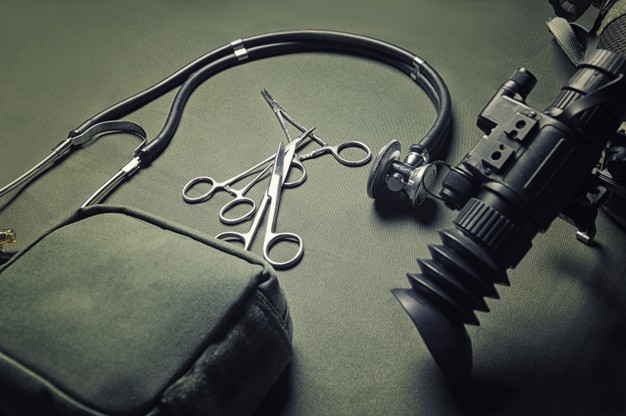
What To Look For In A Night Vision Weapon Sight?

Published on: 22 March 2021 Last Updated on: 27 December 2024
Night Vision Weapon Sight

Most operations performed by the tactical members of Military & Law Enforcement are done in a low, failing, or altered light.

Night vision weapons sight offer the high ability to set up the target, motivate & shoot with a pinpoint at an accurate point across the long distance during the night. As we have noticed from the pointers we are going to mention below,

Several considerations are there to bear in mind when choosing the right type of night vision sights, and it relies on certain requirements or the kind of operations they may deploy.

Here is the list of some parameters and a proper guide to consider while deciding or picking up a weapon sight as given below:

Things To Look For In A Night Vision Weapon Sight

When choosing a night vision weapon sight, a set of features need to be looked upon. Some of those features include –

Resolution

The soldiers or the tactical teams need to confirm that they are sighting the right target. That’s why it’s important to check the resolution of the night vision sight weapon they are getting.

The resolution stands for the amount of detail someone can get through the 12-weapon sight. The measurement unit for resolution here is lp/mm (line pairs per millimeter)

When considering the resolution, it’s important to note what works best for the tactical team. Here are a few resolutions and the levels of their capacity –

640 x 480: Here’s a good resolution to help the team identify the target and ready a shot.

1280:  this resolution is the best for providing exceptional image quality and target.

384 x 288: If you are going for this resolution instead, this will only provide basic thermal imaging. It’s good enough to understand if there’s a target in the place or not.

Optics Quality And Electronics:

The optics quality plays a huge role no matter whether it is a thermal sight or weapon sight as it hampers the performance at the top. 0

The weapon sight is a perfect combination of top-notch quality, fast optics, latest generation, and infra-red sensitivity that offer high resolution, a wider FoV, and clear vision to the operator that allows improving the device’s capability.

Probably, the size, specs, and resolution of the device are the important ones and judge the quality of the device perfectly.

Zoom & Magnification:

The idea of choosing the maximum magnification when it comes to choosing a weapon sight, but the better one is the low magnification usually. Higher magnification results in a smaller view, and a weapon device with 4x magnification have-it-all. Thus, weapon sight is recommended.

Image intensifier tubes:

I2 tubes are accountable for the light amplification rather than anI2 sight. Across all years, I2 tubes are advanced and better than Generation 1 or 2 to all the newest Gen 2+ as well as three tubes. These tubes are produced by a handful of companies across the globe and the labels are different in each one.

The most advanced versions of I2tubes are Gen 2+ and Gen3 responsible for a clear vision in low light, which will be measured as SNR and Ip/mm for resolution of the modern weapon sight as available on www.defendandcary.com.

Weapon sight range:

For tactical use, weapon sights are mounted on snipers, rifles, carbines, and LMGs with a primary motive to set up, aim, obtain, and shoot at a target during the conditions of low visibility or types of special missions.

Generally, they ought to be chosen to complement an effective variety of weapons that will be used in the future. If the weapon sights have the longest ranges, then it results in larger, more expensive, heavier, and not optimal at all.

Ergonomics control and easy to use:

Weapon sights are too easy to use anytime and ought to be exposed to all controls while adjusting for magnification, windage, and elevation.

Here’s an important point of consideration if you are getting a night vision weapon sight. Typically, it shouldn’t be a problem if you are using a tripod to aim and shoot on a still target.

But, if you have to do a lot of moving around with the night vision weapon, you need something lightweight. But, it’s also important to consider that the night vision sight that is lightweight will have lesser magnification.

Also, since we are talking about ergonomics, the lens size is also something we must talk about. If you have a large-sized lens, the FOV ( field of view) will become narrow. With a shorter lens, you have a wider FOV but a shorter distance. So, it’s important to first note what you need in the night vision weapon sight.

Additional Factors To Consider

While all the different parameters explained above are important, there are other parameters as well. You can go much deeper with your points of consideration when choosing the perfect night vision weapon sight.

Mounting: one of the things to consider is whether you can mount the night visitation weapon sight on the weapon or not.

Spectral Range: the range of light this weapon sight can detect is also another important area you need to consider.

Display Resolution: if the display resolution isn’t up to the mark, the users won't get the right output.

Field of View: It’s important to consider the field of view of the weapon's sight vision.

Start-Up Time: The sight should also get ready quickly. When considering a night vision weapon sight, the start and off time are also important to consider.

Wrapping Up:

In the end, you need to make sure that all weapons work in a better way, and also, these pointers are covered under the same. These are the main things to take into account. First, it’s best to understand the type of operation you need the night vision weapon sight for.

When it comes to imaging sights, the weapon-mounted night vision sights are the best. They are also the most waterproof ones to use.

However, there are different other types of weapons sights, each serving a unique purpose. Hopefully, you found this article useful. Do share your feedback about the type of weapon sight that you think is the best.

Read Also:
 

A passionate writer and an avid reader, Soumava is academically inclined and loves writing on topics requiring deep research. Having 3+ years of experience, Soumava also loves writing blogs in other domains, including digital marketing, business, technology, travel, and sports.

View all posts

Leave a Reply

Your email address will not be published. Required fields are marked *

Related

Hearing Aid

Hearing Aid Devices: The Ultimate Guideline

Hearing loss is one of the most emerging issues in the world right now!! There are no age boundaries for developing this condition. And you must have seen many people wearing a device on their ears. -Yes, like earphones!!! But those are not earphones. Instead, those are hearing devices people with mild or severe hearing loss use. Deafness, partial deafness, or sudden hearing loss disable people from hearing to sudden sound frequencies. Researchers are still on the go to find the perfect remedy for hearing loss but are still far from achieving the goal!!! Until now, one of the most effective remedies for deafness has been hearing devices or hearing aids. Therefore, through this article, I’ll tell you what hearing aids are and what you should grab for your hearing loss. So read till the end to the “ULTIMATE GUIDELINE” of hearing aids!!!! Hearing Aids: What Is It? These are small devices that people wear behind their ears. Hearing aids are designed in such a way that they can amplify or make the sounds louder. Therefore, those who face issues in hearing or communicating can easily use them. The specialty of these devices is that they can help you hear in both noisy and quiet environments. This device has three different compartments: a microphone, an amplifier, and a speaker. The microphone captures the sound, converts it into electrical signals, and sends it to the amplifier. The amplifier then boosts the sound and releases it into the ear with the speaker’s help. These are the essential functions of a hearing aid device, which don’t cost much. How Can It Help? The primary job of this device is to help you hear sounds so that you can easily communicate with the people around you. It can be challenging for many people, especially those with severe hearing loss. Just imagine, there was a time when you used to communicate with your friends and family, but now you cannot communicate at all because you cannot listen to what they say. Painful, isn’t it? The same thing happens to those who suffer from such conditions. But these hearing aids can be a gift to their “soundless lives.” They can hear people speaking, and they also communicate with them. Before these devices were invented, those who had hearing loss isolated themselves and put them away from environmental communications. That’s because they feel embarrassed to show up in front of the public. But now, with these hearing devices, they can relive the moments that they thought were lost!!!! How Will You Know If You Need An Aid? In this case, you can always go for a check-up with your audiologist, who will help you carry out a hearing test. These tests can also be carried out online. The benefit of an online hearing test is that you don’t have to go to the clinic; instead, you can take the test just by sitting at home. But make sure when you are taking these tests the rooms are pin-drop silent. Otherwise, you won’t be able to take the test correctly, and it will affect your test results. Also, keep in mind to use good quality earphones for these tests. I suggest you go to the clinic and talk with the audiologist directly, as he’ll help you out with this hearing issue!!!! As they are highly professional, they’ll help you with all the ins and outs regarding this matter!!! Types Of Hearing Aids That You Can Get There are various types of hearing aids that you’ll find!!!! These have different features and designs. Each suits another purpose, but one common thing between all these devices is that they will help you hear again.0 Behind-The-Ear: These hearing aids are made up of hard plastic, and it’s worn behind the outer ear. All electronic compartments stay behind the ear. The tube that’s connected to the hearing aid is put inside the ear. The sound then passes through the line and into your inner ear. A new version of the device has no sort of outer fits; instead, it’s open-fit, making it look like a “Bluetooth Earphone.” And this new version of the device is also very reliable!!! These devices are used by people of all ages who suffer from ”mild” hearing loss or partial deafness. In-The-Ear: These devices are more high-tech than the behind-the-ear devices. People of all ages also use in-the-ear hearing aids and are only applicable for mild deafness. The hearing aid is directly connected to the outer ear, and in this device, you’ll also find an extra feature that’s the “telecoil.” Telecoils are tiny magnetic coils that help the user receive the sound through the circulatory instead of the microphone. This can be very helpful to people, especially when they talk over the phone or are in crowded places. But it’s highly recommended for adults of all ages but not for young children as the casing of this hearing aid might need to be replaced often as the size of the ear increases. Canal: Canal aids come in two forms: the “in-the-canal” and “completely-in-canal.” The in-the-canal is designed so that it easily fits the shape and size of a person’s ear. The completely in-canal is more advanced as this hearing aid directly fits into the ear canal, keeping it hidden. The best part of this aid (completely-in-canal) is that people will not see this device; hence, there will be no chance for them to identify whether you are suffering from hearing loss or not. But the only issue that you might face is adjusting these devices as they are tiny in size. These devices are not usually suggested for young children. Moreover, this device should only be used for mild or moderate hearing loss and only when your audiologist will recommend it!!! I hope this article will now give you a complete guide to hearing aid devices!! Choosing Hearing Aids: 5 Things To Consider Before Buying You must explore the options of hearing aids you have before you choose something. There’s more to it than just the types of aids available in the market. Here are a few things to remember when choosing a hearing aid. Get Yourself A Checkup. First, get your hearing tested and checked by a specialist. If the reason for your hearing problems is temporary, then they’ll help you decide accordingly. But, if it’s because of earwax or infections, then they might rule out the need for one. Consult With An Audiologist The best thing would be to take a referral to an audiologist from your doctor. They’ll check your hearing abilities and adjust a device tailored to your needs. This might be for one ear or for both. Ask For A Trial Period When getting a hearing aid, make sure that you are buying one with a trial period. This is important since you don’t know if the product you are buying will fit you or not. If it’s not your size or feels discomforting, you may want to exchange it. That’s why it’s important to know whether there’s a trial aid or not. Also, consider if the amount of the device’s trail period is adjusted to the final price or not. It’s also good to consider if they have a refund policy. Think For Future Needs When considering a hearing aid, consider one that’ll work with increased powers. If your hearing capability reduces, you’ll need something better to help you listen. But, if you have to change it, then it’s better to opt for other options. Check For A Warranty Some hearing aids provide you with a warranty for a period. Also, in that period, check if you can claim part replacement or get any technical problems solved through their technicians. Warranty periods and terms are also considerable parameters for choosing the right hearing aid. How Much Does Hearing Aid Cost? Hearing aids cost around $1000 to $3500. If you are getting one that costs around $3000, then you’re spending around $5.50 to $6 dollar per day for the next 4 years. However, it does not necessarily have to be of the same price since the price range starts at $1000. Bottom Line No two products are the same. So, when buying your hearing aid, first consider what helps your health. Take help from your audiologist in choosing the right specifications. Then, take your budget and warranty into consideration. In many cases, you can also get your hearing aids insured when they are expensive. But the best results won’t come until you keep using them and adjust your hearing capabilities with their help. Read Also: Important Habits to Protect Your Ear Health and Hearing Headphones vs Earbuds: How to Choose for the Best Music Experience

READ MOREDetails
how to turn off chromecast

Fix: How To Turn Off Chromecast? – Latest Update 2021

Are you the regular users of the Chromecast devices? Then you already notice sometimes the Chromecast turning off is becoming very troubling. Turning off the Chromecast helps you to hide the connected device’s presence when people start searching in your network. In that respect, the most important question which comes to your mind is how to turn off Chromecast? As Chromecast sometimes gives you more sweat than the usually hot summer weather can. As every one of the users is aware of these facts, the Chromecast does not come up with an on and off switch.  Many users are preferring the Chromecast device showing in their home network while it is not being used. But many of the regular users do not prefer the Chromecast device showing in the home network. How To Turn Off Chromecast In Television? The easiest method of turning it off is just to unplug the device. Or the easiest answer is just to disconnect the wifi connections of the Chromecast. But both of these ways are not the fully authentic and technical way to stop working. Before asking how to turn off Chromecast, you have to learn about the Chromecast turning off technical functions. How to turn off Chromecast on tv is a very common question when you are accessing multiple television connections with the Chromecast. For your better understanding and knowledge, here is the step-by-step guide on how to turn off the Chromecast device from your home network, android phone, and Television. Turning Off The Chromecast By Switching Off The Plug As we told you, switching the power off is the easiest method to turn off the Chromecast devices. Chromecast is coming with a separate power port, which was connected with the main switch. You have to plug in the wall charger to get the connection. If you can unplug the charger from the port, the device is automatically getting disconnected from the network. If the Chromecast device is connected with your television, you can switch off the television. But that move does not turn off the Chromecast device. If you face a problem turning off the main power switch, you can use the aromatic switch to get the operation done automatically. But still, then the Chromecast device is connected with your home wifi networks. And the Chromecast device is still showing in the available connected devices like the android phones. How To Turn Off Chromecast On Android? In many Chromecast devices are getting used in the single house, then most of the time the android phone users are facing more trouble turning off the devices. If you are using the Chromecast devices, then turning off the Chromecast on android is the common question arising in your mind when you are facing the interruption in the middle of your streaming videos.  Most of the users want to turn off the Chromecast to preserve the phone’s safety-related concerning issues. And most of the users are facing problems during the streaming of the video because, in the middle of your streaming video, some content can pop up. You can simply stop the casting by simply enabling the Chromecast device from your android phones. And this is the simple process of how to turn off Chromecast. Step 1: Just click on the image of the Chromecast device from your android phone. Step 2: Open the file of the Chromecast devices. Step 3: Click on the settings of the Chromecast devices options and open the setting options. Step 4: After entering the setting of the disable Chromecast option, let others control your cast media. Step 5: And you can turn off the Chromecast from the android devices. How To Stop Casting To Chromecast? If you want to stop the casting of the Chromecast, as you already know, there are many apps that are getting compatible with the Chromecast. Still, if you are using these apps to operate the Chromecast, then you lose control over the Chromecast. And if the remote control over the Chromecast is disabled, then your manual controls are also limited. How to turn off Chromecast is a common feature of turning off the multiple connectivities of the television. But if you lose control over the Chromecast, the volume bar to pause button everything is in a non-functional state. For these purposes, you can use google chrome. Here is the step-by-step process to stop the casting of the Chromecast. To stop the interference from popping up, casting closer is an essential task. Step 1: Go to the google chrome browser settings. Step 2: Then go to the cast options after opening the browser setting options. Step 3: If you see the Chromecast options in the blue color mode, which means the Chromecast is now in the functional state. Step 4: You have to make it white by disabling the options. Step 5: After disabling the options, then cross the chrome and restart your device. Step 6: After restarting your device, recheck the casting option after opening the browser. Step 7: You can also shut down the Chromecast casting from your google homepage. Bottom Line If you are using the Chromecast in multiple ways and the different devices, switching off the devices and turning off Chromecast is necessary. How to turn off Chromecast is a common question that has multiple ways of solving.  If you ask us why you need to turn off the Chromecast devices, here are the answers. If you want to preserve your device security and are eager to close the outside’s external interference, then turning off the Chromecast is the easiest solution.  When you are connected with the Chromecast devices, you automatically see how many other devices are connected with the network, and this causes interference and trouble in the network. More Resources: Headphones vs Earbuds: How to Choose for the Best Music Experience. Your Guide In Buying Kid-Friendly Gadgets. Alexa Voice Assistant: Why It Succeeds Where Others Fall

READ MOREDetails
Alexa device issue

How To Troubleshoot The Alexa Not Responding Issue? [Fixed]

Alexa is a virtual assistant, which works with an echo dot in order to fulfill all the demands of its users. With its thousands of attractive features, Alexa has made the life of its users super easy and also entertaining at the same time.  With its hi-tech features, Alexa can do almost everything from controlling smart home lights to set reminders, playing songs, jokes, news, quizzes, and much more things. But due to some reasons, you may find your Alexa not responding to the commands that you are giving it.  Do not worry if you are facing the Alexa not responding issue. Here we have the most effective and easiest troubleshooting steps to fix this issue.  Troubleshoot The Alexa Not Responding Issue: Here are the troubleshooting steps that you need to follow for solving the Alexa not responding issue with your echo dot. There are a bunch of reasons for what you may be facing this Alexa not working issue.  So, let’s head towards the troubleshooting steps.  1. Check The Microphone Button There are many instances when we find that the reason behind Alexa not responding is because the microphone is damaged or we forget to turn the button on. The microphone button is one of the most common reasons for this issue.  So, check the microphone button first. If the issue persists and it seems that everything is totally fine there. You can step to the next process.  2. Reboot The Device This is one of the most effective and easiest ways in the whole troubleshooting process of Alexa is not responding issue. There is not much trouble, all you need to do is just restart the device and the issue will get resolved. But this restarting has a definite name called power drain, and it is more than just powering off the power button and power on it again.  Here is the step-by-step guide for the power drain process. First, you need to check the power light. In case it is showing blue light, that means the device is able to hear you but simply the Alexa device is unresponsive to your commands.  Disconnect the power cable from the power source for at least 30 seconds. Wait for a little while, and after that, connect the power cord again with the power outlet. Now, when your device is ready completely, try to give it any command again. If the issue is resolved, then it is fine. But in case the issue of Alexa not responding continues, head to the next step.  3. Echo Dot Hard Reset In case the above described troubleshoot does not work for your echo dot. Here is the step-by-step guide to hard reset. You will find the reset button at the bottom of the device. You can use a pin to press the button. As soon as you press the button, the device will power off. Here, you need to wait for a little and then power the device on again. All the settings of the device will then reset to the original.  4. Disable And Enable Alexa Privacy If Alexa not responding after all the above-mentioned troubleshooting steps, now is the time to enable Alexa privacy and in order to do so, follow the below steps. You will find a button at the end of Alexa’s nucleus screen. You need to press the button. This button is to enable the privacy of Alexa. If you press the button again, the device will hear you again. Give a command to Alexa in order to check whether the issue is resolved or not.  5. Check Your WiFi Connection Behind the “Alexa not responding” issue, there is a huge chance that maybe your wifi connection is not working properly. That is why Alexa is finding it difficult to respond to your commands.  Well, let me tell you that if you do not have a proper internet connection, there will be no use for this Alexa device. So, check the router now. In case you find anything wrong, contact your network service provider.  6. Try Changing The Position  In case you have placed your echo dot device far from your router or in someplace where it is having issues connecting with the router. This can be the main reason why you are experiencing “Alexa not responding.”  Make sure that you are placing Alexa within the wifi range. The place should be accessible to yours as well so that your echo dot device can connect with the network properly and also can hear you clearly.  7. Set Echo And Smartphone On The Same Network Always keep in mind that the smartphone that you are using and Alexa have to be connected within the same network. In case they are connected with different routers or your phone is not connected with the router’s network, you will face the “Alexa not responding issues.” Connect both of them on the same router’s network in order to resolve the issue.  8. WiFi Congestions If you have connected a lot of devices within the same router’s network, it may create the “Alexa not responding” issue. Due to excessive wifi congestions, your echo dot is not able to respond to your given commands. Remove or disconnect some other devices, and then try to give your device command and check if the issue is resolved.  Still Alexa Not Responding? All the steps that I have told you in this troubleshooting guide are enough for resolving Alexa not responding to voice issue. But if you face the same problem after performing all the troubleshooting steps. You should contact Alexa customer care. Call on the Alexa helpline number and ask for help.  More Resources:  Benefits Of Having A Cordless Vacuum Cleaner At Home What is type c cable, and is it worth buying

READ MOREDetails