Published on: 23 November 2020
Last Updated on: 11 February 2026
Let’s see if this situation sounds familiar.
You just bought the latest phone on the market. And, like any responsible citizen, you took the old gadget to an e-waste recycling center and deposited it. You walked out of the center confident that the old phone would be taken care of safely. You then forgot about the gadget altogether.
Well! The story doesn’t quite end there. And, if you are an environmentally conscious person, you may want to take a closer look behind the scenes to identify what happens to the redundant and used devices once they leave your ownership.
Did You Check for the Certification of the E-Waste Recycling Center?
Should you check this feature on MoneyCrashers, you will come across an interesting observation. Delivering your e-waste to a recycling agency does not guarantee safe disposal. That’s because many such centers use unscrupulous methods to get rid of the gadgets. While the measures they use may comply with U.S. e-waste management regulations, they could cause severe damage to the environment in other offshore locations. The only way you can get complete assurance that the old electronics will be taken care of the right way is if you deposit them at certified recycling centers.
Alternatively, you can exchange them at the original manufacturer. It might interest you to know that in the year 2015, Apple accepted and recycled 90 million pounds of electronic gadgets to extract usable materials. These materials included plastic, 6612 pounds of silver, 2.9 million pounds of copper, and 2204 pounds of gold.
Choosing a certified e-waste recycling agency when getting rid of old and used electronics ensures that your gadgets will not end up in landfills and pollute the environment around your hometown. But, that’s just one good reason. Here are 4 more.
1. Recycling Agencies Choose Supposedly Economical Methods for IT Asset Disposal:
You might think that you’re doing your bit to help the environment by recycling cell phones and other devices. But, keep in mind that although the recovered materials are valuable, the recycling process is not exactly economical for regular agencies. Extracting metals for reuse involves a careful process using the right kind of equipment and trained personnel. To save on the expense of dismantling old gadgets and separating the useful materials, most agencies simply ship them off to third-world countries.
Would you like to know how the process works? Containers reaching the shores of the U.S. from Hong Kong and other vendor companies across the world are typically sent back empty after the goods are unloaded from them. In an attempt to cash in on the reverse transportation, the giant cargo boxes are now filled with used electronics and sent to Far East destinations under the guise of donations for philanthropic purposes.
2. Environmental Damage is Transferred to Third World Countries:
When the gadgets make their way to countries like China, Ghana, and India, unskilled laborers including young children burn them in giant pits. Once the process is complete, all that remains is the precious metals that are sorted out without any regard for the toxic materials in the ashes. These poisons like arsenic, bromates, lead, and cadmium not only leach into the soil and underground water, but also cause various illnesses among the people who handle them or live around the processing plants. To know more about the extent of the damage, read this article in the Smithsonian magazine.
If you’re looking for e-waste recycling procedures that protect the environment not just in your country, but also in any other location around the world, deliver your devices to certified agencies.
3. Irresponsible E-Waste Recycling is the Largest Cause of Data Breaches:
Should you work with a licensed recycling company, the expert professionals will make sure to dispose of the hard drives in them securely. They may use DoD-approved multiple overwriting or shredding protocols to erase the data and make it impossible to decipher.
Why is this important? According to PBS, The U.S. State Department has identified Ghana as the top sources of data leaks in the world. Hard drives from discarded electronics are easily available to hackers here at $35 apiece. Even novice cybercriminals can retrieve records of online transactions, credit cards, personal financial data, and various other kinds of sensitive information.
Enoch Kwesi Messiah is a computer scientist at the Regent University in Accra. He reveals, “I can get your bank numbers and I retrieve all your money from your accounts. If ever somebody gets your hard drive, he can get every information about you from the drive, no matter where it is hidden.”
A shocking incident reported in recent times involves the details of a government contract worth $22 million that were extracted from an old hard drive. When attempts were made to locate the source, it was traced back to Northrop Grumman, one of the military contractors of the country. The drive also held highly classified information about contracts with Homeland Security, NASA, and the U.S. defense intelligence agency.
Think about it! If government agencies can become the targets of millions of dollars worth of data breaches, your information is a much easier target.
4. Recycling Lowers Wastage of the Earth’s Resources:
Reusing gadgets and recovering reusable materials from them will help reverse some of the wastage of the earth’s resources. Should you check some of the statistics revealed by ThoughtCo., you will learn that the power saved by recycling a cell phone can run a laptop for 44 hours. If all of the 130 million phones annually discarded in the U.S. were recycled, the energy saved could power 24,000 homes for a whole year. Other than gold, silver, and copper, cell phones also contain palladium, platinum, tin, and zinc, all of which are metals that can be used and reused several times over simply by adopting the proper e-waste recycling methods.
Responsible e-waste recycling is now more about protecting the environment in your country. The problem has become so huge that you need to take a step back and carefully view the big picture. Saving the earth begins with every citizen who upgrades to a new gadget. Have you REALLY done your bit?
Read Also:
Content Rally wrapped around an online publication where you can publish your own intellectuals. It is a publishing platform designed to make great stories by content creators. This is your era, your place to be online. So come forward share your views, thoughts and ideas via Content Rally.
Are you in search of an affordable laptop? If your answer is a YES, then you probably have heard about Lenovo Ideapad 330-15 AMD. In case you are searching for more about this product, you have reached the right place.
A much popular and budget-friendly laptop, this gadget comes with a variety of options when it is related to battery life and storage. In this article, I will be talking about the product in detail and point out how the Lenovo Ideapad 330-15 AMD can be of help to you.
So, if you have been searching for its reviews and other information about this laptop, you do not have to look any further. Keep reading this article till the end to learn more…
Lenovo Ideapad 330-15 AMD
Lenovo IdeaPad 330 is a cheap laptop with a comfortable keyboard and enough processing power for daily computing needs. This 15.6-inch laptop has a sturdy design and features that are uncommon for budget laptops.
It even features a DVD drive, which is unusual to find on laptops these days. Sadly, a subpar display, limited battery life, and average performance ruin the fun, so we advise spending a little more on a more effective device, such as the Acer Aspire E 15. It remains one of the greatest laptops available for around $300.
The product's starting price is $275, making it a cheap laptop (as of August 2021 when I published this review). Unfortunately, the Lenovo IdeaPad 330 has some drawbacks, just like most budget laptops.
Keep reading this blog till the end to learn more about the same…
Design And Looks
Lenovo IdeaPad 330 is an attractive low-cost laptop, and there is no doubt about that. The color palette is Platinum Grey.
This color scheme is ideal for a laptop used for school or the workplace because it is on the cool side of the color spectrum.
Plastic is used to make the laptop. However, the color scheme gives the impression that the keyboard deck and palm rest are made of aluminum.
Like the IdeaPad 320 before it, even the horizontal Lenovo logo on the lid follows the brand's standard aesthetic.
Lenovo IdeaPad 330 is a 15.6-inch display panel with two resolution options included with the IdeaPad 330. Either the HD (1366 x 768) or FHD (1920 x 1080) screen resolution is available for the laptop.
The IdeaPad 330 is one of the few inexpensive laptops with a larger display than the typical 13-inch size offered by low-cost laptops. The 15.5-inch display screen of the laptop of the Lenovo IdeaPad 330 that I tested had an HD (1366 x 768) screen resolution.
Lenovo IdeaPad 330 is a rectangle with rounded corners and a silver lid on which is imprinted the Chrome logo. The silver laptop lid and the dark-gray undercarriage are composed of durable plastic, and the IdeaPad's chassis is neither bulky nor heavy nor thin.
Features
Now that you know a little about the gadget, it is time for you to learn about its features.
Here are some of the many features of Lenovo Ideapad 330-15 AMD that you need to take a look at:
1. Productivity
Upgrade to AMD Ryzen for industry-leading graphics (on some models). The most recent AMD Ryzen CPUs were developed over the course of more than 4 years and 2 million engineering hours. The AMD Ryzen Accelerated Processing Unit was produced by AMD using that technology along with the most eagerly anticipated graphics engines. Your power, performance, and speed will be optimized whether you're working or playing.
2. Storage
You can customize the storage on your Ideapad 330 so that you only pay for the things you require. Choose a SATA HDD up to 2 TB to store thousands of files, videos, and photos. A rapid SATA SSD with a capacity of up to 256 GB offers quicker data transfer rates and quicker boot-up times. Additionally, you can create hybrid storage by combining a 128 GB SATA SSD with a 1 TB SATA HDD to get the best of both worlds.
3. Rapid Charge
Are you short on time and low on battery? The Ideapad 330 has a battery life of up to 6 hours and features Rapid Charge, which gives you up to 2 hours of use after only 15 minutes of plugged-in time. Utilize it as best you can.
4. Windows 10
With the help of Lenovo Ideapad 330-15 AMD, you can take advantage of Windows 10's best features with a brand-new update. To tell your story in video, the powerfully redesigned Photos app makes it easier and more fun: add a soundtrack, use changes, send 3D impacts, and from there, the sky's the limit. Furthermore, sharing is faster than at any other time, with instinctive settings that make it more straightforward to in a split second associate with individuals you care about most.
5. High Resolution And Sound Quality
The Ideapad 330 provides powerful visuals while on the go thanks to its 15.6-inch display with up to FHD resolution. The 330 delivers a significantly enhanced entertainment experience when paired with Dolby AudioTM. You will hear every detail if you turn up the volume without causing distortion.
Specifications
ProcessorUp to AMD Ryzen™ 7 2700U Mobile Processor with Radeon™ RX Vega 10 GraphicsUp to 7th Generation AMD A9-9425 APUOS Operating systemWindows 10GraphicsUp to AMD Radeon™ 540*AMD IntegratedDisplay15.6” FHD (1920 x 1080)15.6” HD (1366 x 768)Memory16 GB onboard DDR4*4 GB onboard DDR4 + 8 GB DIMM*4 GB onboard DDR4 + 4 GB DIMM*4 GB onboard DDR4 + 2 GB DIMM*16 GB DIMM4 GB onboard DDR4*8 GB onboard DDR44 GB onboard DDR4Storage128 GB SATA SSD256 GB SATA SSD500 GB SATA HDD1 TB SATA HDD2 TB SATA HDD128 GB SATA SSD + 1 TB SATA HDDAudio2 x 2 W speakers with Dolby AudioBatteryUp to 4.5 hours*; Rapid ChargeDimensions (W*D*H)378 mm x 260 mm x 22.9 mm / 14.1" x 10.2" x 0.9"Weight2.2 kg / 4.85 lbs (starting weight)ColorPlatinum GrayBlizzard WhiteMidnight BlueChocolateOnyx BlackWiFi Bluetooth1 x 1 AC WiFi + Bluetooth 4.1PortsUSB Type-C 3.1*2 x USB 3.0 (one charging)**HDMI4-in-1 card reader (SD, SDHC, SDXC, MMC)Audio jack
Wrapping It Up!
In case you were searching about the Lenovo Ideapad 330-15 AMD reviews and other specifications about the same, I hope that this review blog has been of help to you. If there are any other queries related to the same, feel free to let me know.
All that you need to do is scroll down till you reach the bottom of the page. Then leave your doubts and suggestions in the comment box below. And I will be there to answer them all for you!
More Resources:
How to Unlock HP Laptop if you Forgot Login password?
Factory Refurbished Laptops: Why Would You Buy New?
Power tools have become indispensable for professionals and DIY enthusiasts, making tasks more accessible and efficient. RYOBI stands out as a reliable choice among the numerous brands in the market.
However, like all power tools, RYOBI devices can occasionally encounter issues. In this guide, we'll explore techniques for troubleshooting for RYOBI power tools and power tools in general, focusing on the common problems and solutions that can apply to various brands and models.
Power Issues
Begin by examining the power source. Ensure that the cord is securely connected for corded tools and that the battery is adequately charged for cordless ones. For persistent issues, inspect the tool's switch for damage or debris. Also, check for loose or frayed wires and replace them as needed.
If you're dealing with a cordless tool and it's not turning on, the battery might be the culprit. Before assuming the worst, try charging the battery fully and then attempt to use the tool.
Sometimes, a drained battery can give the appearance of a malfunctioning tool. Consider using a different, fully charged battery if this doesn't work. If the device still doesn't work, the issue may be with the tool itself or the charger.
Loss Of Power In Power Tools
Power loss may result from a worn-out or damaged motor or brushes. Inspect the brushes for signs of wear and tear and replace them if necessary. Clean the air vents and cooling fans to prevent overheating, which can lead to power loss.
If your tool still experiences power loss after checking the brushes and vents, it may be due to an issue with the motor. Motors can wear out over time, mainly if the tool is used heavily. In this case, it might be necessary to replace the engine, which is a job best left to professionals unless you're experienced with power tool repair.
Overheating
Overheating can damage your tool and pose safety risks. Proper maintenance is crucial in such cases. Ensure air vents are clean and unobstructed.
If overheating persists, consider shorter usage intervals and allow the tool to cool down between sessions. Regularly check for proper lubrication in moving parts and replace worn-out components.
Excessive heat buildup in a power tool often indicates it's being pushed too hard or used beyond its recommended capacity. Pay attention to the tool's specifications and try to match it with the right type of work. If you frequently overheat a device, consider upgrading to a more robust model that can handle the demands of your projects.
Vibrations And Noise
Vibrations and noise can indicate loose or damaged components. Tighten all screws, bolts, and nuts. Inspect the blade or bit for damage and replace it if necessary. Lubricate moving parts following the manufacturer's recommendations to reduce friction and noise.
Excessive vibrations and noise are annoying and can indicate potential safety hazards. Loose parts in power tools can lead to accidents or damage to the tool. Regularly inspect your tool for loose fasteners and tighten them as needed. If you notice unusual vibrations or noise persisting after this, it's advisable to have the device checked by a professional technician.
Battery Troubles
Battery issues can stem from a lack of use, overcharging, or a faulty battery. Always follow proper charging and storage guidelines from the user manual. If battery performance remains subpar, consider investing in a replacement battery.
Batteries, especially rechargeable ones, have a finite lifespan. Over time, they can lose their ability to hold a charge effectively. If your cordless tool's battery life has significantly decreased, it may be time to invest in a new battery pack. Make sure to recycle old batteries properly, as they can be hazardous to the environment.
Blade/Bit Issues In Power Tools
Dull or damaged blades/bits can hamper performance. Sharpen or replace them as needed. Ensure you're using the appropriate type of blade/bit for the material at hand, as using the right one can lead to efficiency and damage.
The blade or bit's quality and sharpness directly impact your power tool's performance. When you notice a decrease in cutting or drilling efficiency, it's time to inspect and maintain these essential components.
Regularly sharpen blades or replace them if they're excessively worn or damaged. Also, be mindful of the material you're working with, as using the wrong type of blade or bit can result in subpar performance and even safety hazards.
Trigger Sticking
Disassemble the tool's handle and clean the trigger mechanism. Lubricate moving parts with a manufacturer-recommended lubricant. If the problem persists, consult your user manual or contact the manufacturer's customer support.
A sticking trigger can be a frustrating issue, and it can also be a safety concern. Before attempting any repair, ensure the tool is disconnected from its power source.
Disassemble the handle carefully and clean the trigger mechanism. Lubricate any moving parts as recommended in the user manual. If the issue persists, consult the manufacturer's customer support or take the tool to a professional repair service.
Conclusion
These tips are not limited to RYOBI tools; they apply to various power tool brands and models. Always refer to your user manual for specific guidance and safety precautions. Safety should be your top priority when troubleshooting and repairing power tools.
Read Also:
Home Warranty Plans: How To Choose The Right One
We Buy Houses Companies Saving Homeowners From Foreclosure
Top Fixer-Upper Improvement Ideas That Make A Huge Impact
Chrome vanadium steel has become popular for its exceptional mechanical properties and varied uses across the vast expanse of manufacturing strong, durable, and versatile tools and components.
It's now the go-to solution for engineers, craftsmen, and manufacturers in different industrial niches. So how about we dive in a little to see why chrome vanadium steel is revered in metallurgy?
1. Chrome Vanadium Steel Emanates Strength and Toughness
Primely, chrome vanadium steel stands out from other metals, such as carbon steel, due to its alloy composition of chromium and vanadium, which results in hardness and wear resistance. At the same time, it maintains flexibility and impact resistance.
It presents a unique blend of properties that fortifies the tools and components made from this alloy to withstand heavy loads, repetitive stress, and harsh working conditions without compromise.
2. Chrome Vanadium Steel for Corrosion Resistance
While the environment has always been tough on metals due to rust, chrome vanadium steel is not permeable to rust. It boasts a longer lifespan, thanks to the chromium content, which is handy when forming a protective oxide layer on the surface upon exposure to oxygen. You may use chrome vanadium steel even in moist or corrosive atmospheres.
3. Chrome Vanadium Steel for Wear Resistance
Unlike conventional carbon steel, chrome vanadium steel can resist wear. It follows that the alloy bears hardening properties, which makes its products retain their structural integrity and resist abrasion or stress.
As such, it's versatile for cutting tools since it can retain sharp edges. Still, it may be used on screws, milers, bolts, and wrenches.
4. High Fatigue Strength
If you run an industry where repetitive tasks are common, fatigue failure can be challenging. It would help if you had metal such as chrome vanadium steel due to its ability to withstand cyclic loading and deformation without succumbing to fatigue cracks.
And so, it can be an ideal choice for springs, automotive components, and various tools subjected to repetitive use. Also, this aspect tends to ensure safety and durability throughout their usage.
5. Cost-Effective Solution
While chrome vanadium steel remains with exceptional properties, it's still cost-effective. Its constituent elements, chromium, and vanadium, are readily available, thus making it affordable.
Moreover, it benefits you from the prolonged lifespan, fewer maintenance requirements, and resistance to wear and corrosion. Factor this up, and you realize it truly justifies the initial investment.
6. Wide Range of Applications
Chrome vanadium steel is versatile as it gets. To begin with, it finds its use in manufacturing hand tools, automotive parts, and industrial machinery to craft high-performance aerospace parts.
Its flexibility to heat treatment and various forming processes further expands its application range, making it a preferred choice for your intricate engineering needs.
Conclusion
As you can see, chrome vanadium steel is a powerhouse alloy, which means strength, toughness, corrosion resistance, and wear resistance. Considering its high fatigue strength and cost-effectiveness, it remains a favorite in diverse industries.
Even so, technology and innovation are set to advance, and you can expect this alloy to be in more demand or even find more uses. Lastly, If you are in search of high-purity vanadium, try out HUBEI OUSHI METAL CO., LTD.
Read Also:
Is Prefabricated Metal The Future Of Warehouse Construction?
Is Steel/Iron Ore A Good Career Path In 2021?
Best Uses for Stainless Steel in Construction













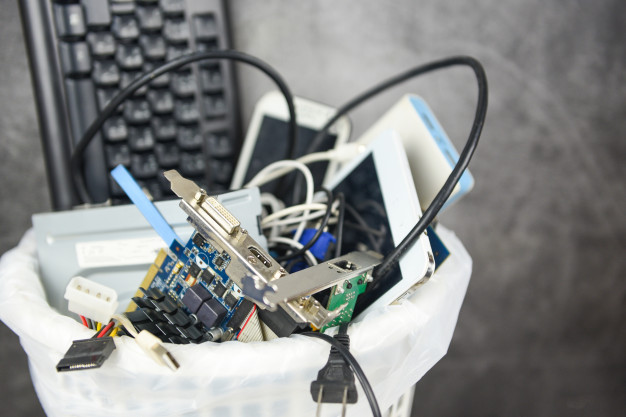
 You might think that you’re doing your bit to help the environment by recycling cell phones and other devices. But, keep in mind that although the recovered materials are valuable, the recycling process is not exactly economical for regular agencies. Extracting metals for reuse involves a careful process using the right kind of equipment and trained personnel. To save on the expense of dismantling old gadgets and separating the useful materials, most agencies simply ship them off to third-world countries.
Would you like to know how the process works? Containers reaching the shores of the U.S. from Hong Kong and other vendor companies across the world are typically sent back empty after the goods are unloaded from them. In an attempt to cash in on the reverse transportation, the giant cargo boxes are now filled with used electronics and sent to Far East destinations under the guise of donations for philanthropic purposes.
You might think that you’re doing your bit to help the environment by recycling cell phones and other devices. But, keep in mind that although the recovered materials are valuable, the recycling process is not exactly economical for regular agencies. Extracting metals for reuse involves a careful process using the right kind of equipment and trained personnel. To save on the expense of dismantling old gadgets and separating the useful materials, most agencies simply ship them off to third-world countries.
Would you like to know how the process works? Containers reaching the shores of the U.S. from Hong Kong and other vendor companies across the world are typically sent back empty after the goods are unloaded from them. In an attempt to cash in on the reverse transportation, the giant cargo boxes are now filled with used electronics and sent to Far East destinations under the guise of donations for philanthropic purposes.