












How to Download Facebook Videos on Android?

by

07 February 2019

Social Media

How to Download Facebook Videos

Have you watched a video on Facebook and you would like to download it to your Android? Several people out there are struggling with such downloads. If you are one of them, you can be sure that your struggles have come to an end. Some people believe that it is impossible to save and even keep a local copy of that fun video they came across on online. Facebook has an easy way of doing this especially if you are using an Android device. The most important thing is to follow the simple steps, and you will have the video in your device. In this article, you will get useful tips on how to download Facebook videos on Android.

Do you know why several people are struggling with downloading Facebook videos on Android? The reason is that the whole process is not direct because the option is not readily available on the Facebook app. Facebook does not have the intention of allowing users to download a copy of the uploaded videos. However, the app will enable you to save a copy of the video link so that you can view it again any time you feel like doing so. Therefore, you may find it tricky unless you know how to download Facebook videos on Android. Even though most users are comfortable with this arrangement, we have people who prefer to download the video on their personal Android devices. If this is your intention, then the content of this article will be helpful to you. I will take you through the whole process on how to download Facebook videos on Android.

There are typically two steps that you should undertake if you want to keep a copy of your video on the Android phone. The initial one involves the video URL or the link. The second section guides you through the actual steps on how to download Facebook videos on Android. This article makes use of the free service to help you in downloading Facebook videos to your Android device. You can be sure you will like the page once you discover that they are offering exemplary services.

Step One: Copy the Link
Copy the Link

Source

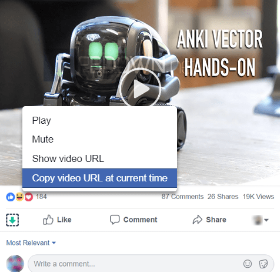
The first step you need to undertake while downloading Facebook videos on Android is getting the video link. However, I am aware that most people don’t know how to do this. The first thing is to open the Facebook application that is readily available on your screen. After this, you can now go to the video that you would like to download. Tap on the ‘more settings button that you will find on the upper right section. You can easily locate it by looking for an icon that has three dots. It has all the setting functions that you need for your Facebook page. You can now select the ‘copy link’ option then move to the second phase of instructions.

Step Two: Downloading the Video to Your Android Device
Cube

This is the second step that you undertake while downloading Facebook videos on Android. After copying the video link to the clipboard, you can now embark on the process of downloading. Here are the simple steps that you need to follow to achieve this objective.

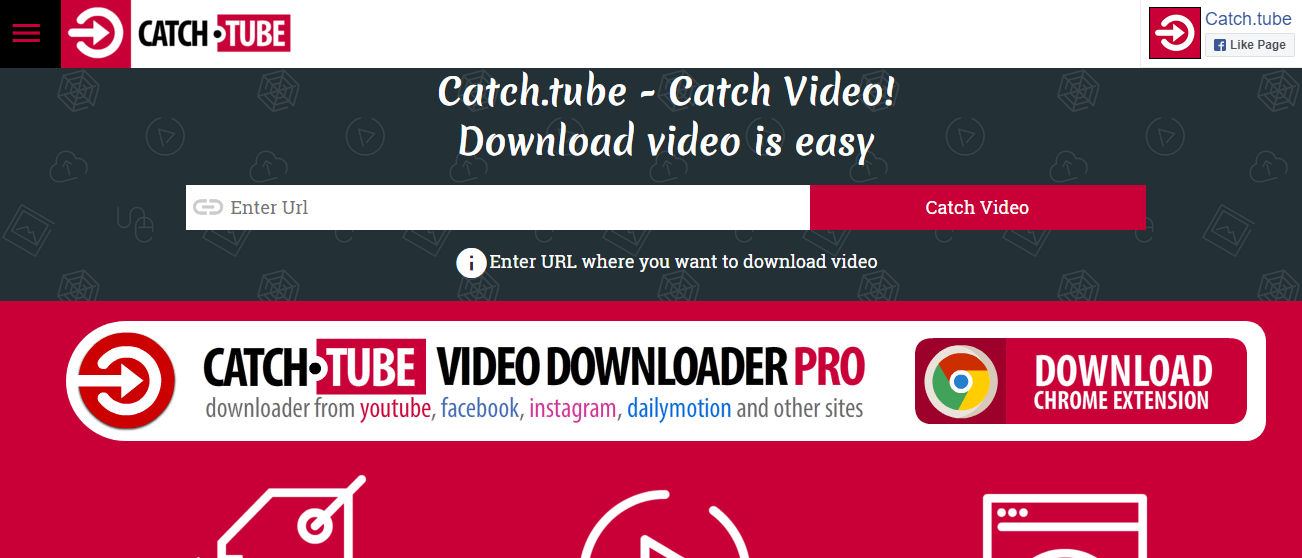
This first step is to open your browser. You can use any browser depending on what is installed in your machine. You will not have any problem with this as long as you know what serves you well. Once the browser is open, you need to visit the following site https://catch.tube/. The beauty of it is that the website offers free services when downloading your Facebook videos to Android. One of the things that you will notice is an empty box beside the red button that states ‘catch the video.’ All you need to do is to enter your URL into this box.

From here, you can scroll downwards and search for a red button that states ‘show media list.’ Once you get this button, you can tap on it to proceed. You will realize that the whole process flows so smoothly as long as you know what you are doing. You can now select the video version that you would like to download. The page gives you several options and its upon you to choose what you love most. You can now allow the device enough time to download the video.

In some cases, you may be forced to be patient depending on the size of the video that you are downloading and the stability of your internet connection. It can be wise to connect to a high-speed internet if you want the whole process to flow seamlessly. After the download is complete, you will see the download indicator in your status bar telling you that the download is complete. All you need to do at this stage is tapping on it. You can now open the video that you have just downloaded to make sure that it is functioning correctly. The whole process is simple and straight forward. In case you want to download another video, you can use the same procedure. The most important thing is to be keen to the video format so that you don’t choose the wrong option as this may affect the functionality of the video.

Conclusion

Most people all over the world own android devices. One of the reasons is that Android is a reliable operating system, especially on Smartphones. With over 12 billion Facebook accounts globally, a large proportion of these individuals use their Android devices to access their pages. However, most of them don’t know how to download Facebook videos on Android. You don’t want to mix an opportunity of saving your favorite videos in your handset. In this article, we have explained how you can achieve this objective through two simple steps. The first one is copying the URL of the video while the second one entails the actual downloading of the video. Follow these simple processes, and you will get your Facebook video in your device within no time.

Read Also:

Content Rally wrapped around an online publication where you can publish your own intellectuals. It is a publishing platform designed to make great stories by content creators. This is your era, your place to be online. So come forward share your views, thoughts and ideas via Content Rally.

View all posts

Leave a Reply

Your email address will not be published. Required fields are marked *

All Comments

Hi, i read your blog occasionally and i own a similar one and i was just curious if you get a lot of spam feedback? If so how do you reduce it, any plugin or anything you can advise? I get so much lately it's driving me crazy so any support is very much appreciated.

When I originally commented I clicked the "Notify me when new comments are added" checkbox and now each time a comment is added I get several emails with the same comment. Is there any way you can remove me from that service? Cheers!

It's remarkable in favor of me to have a site, which is useful for my know-how. thanks admin

After exploring a handful of the blog articles on your web page, I truly appreciate your technique of writing a blog. I bookmarked it to my bookmark webpage list and will be checking back in the near future. Please check out my website as well and let me know your opinion.

Thanks very nice blog!

This piece of writing is really a good one it helps new net people, who are wishing in favor of blogging.

whoah this weblog is great i like studying your articles. Stay up the great work! You recognize, lots of persons are looking round for this information, you can aid them greatly.

Very nice post. I just stumbled upon your weblog and wished to say that I have truly enjoyed browsing your blog posts. In any case I'll be subscribing to your feed and I hope you write again very soon!

Excellent pieces. Keep posting such kind of information on your blog. Im really impressed by it. Hi there, You've done an incredible job. I'll definitely digg it and individually recommend to my friends. I am sure they will be benefited from this web site.

Howdy! Quick question that's completely off topic. Do you know how to make your site mobile friendly? My site looks weird when viewing from my apple iphone. I'm trying to find a theme or plugin that might be able to fix this problem. If you have any suggestions, please share. Many thanks!

I really love your website.. Excellent colors & theme. Did you create this website yourself? Please reply back as I'm looking to create my own website and want to learn where you got this from or exactly what the theme is named. Appreciate it!

Thank you, I've just been searching for information about this topic for a long time and yours is the best I have found out till now. But, what concerning the conclusion? Are you sure in regards to the source?

I'm amazed, I must say. Rarely do I come across a blog that's equally educative and engaging, and let me tell you, you've hit the nail on the head. The problem is an issue that too few folks are speaking intelligently about. I am very happy I came across this during my search for something concerning this.

Quality articles is the crucial to invite the visitors to visit the website, that's what this website is providing.

I go to see daily a few websites and information sites to read articles, but this webpage presents feature based writing.

After looking over a number of the blog articles on your blog, I really appreciate your way of writing a blog. I saved it to my bookmark website list and will be checking back soon. Take a look at my web site as well and let me know your opinion.

An outstanding share! I have just forwarded this onto a coworker who had been conducting a little homework on this. And he in fact ordered me lunch simply because I stumbled upon it for him... lol. So let me reword this.... Thanks for the meal!! But yeah, thanks for spending the time to talk about this matter here on your blog.

I believe that is among the most important information for me. And i'm happy reading your article. But wanna remark on some general issues, The site style is perfect, the articles is in point of fact nice : D. Excellent activity, cheers

Thanks for ones marvelous posting! I definitely enjoyed reading it, you can be a great author. I will make sure to bookmark your blog and will often come back someday. I want to encourage yourself to continue your great posts, have a nice day!

I was suggested this blog by way of my cousin. I am not positive whether or not this put up is written by him as no one else understand such particular approximately my difficulty. You're wonderful! Thanks!

Very rapidly this web page will be famous amid all blogging visitors, due to it's pleasant articles

Saved as a favorite, I really like your web site!

Wow, that's what I was looking for, what a information! existing here at this blog, thanks admin of this web page.

Very nice post. I just stumbled upon your blog and wished to mention that I've truly loved browsing your blog posts. After all I'll be subscribing to your feed and I hope you write once more soon!

Related

Engaging Storytelling Videos On Tiktok

Tips For Creating Engaging Storytelling Videos On Tiktok

In today's digital era, TikTok has emerged as a powerful platform for creative expression and storytelling. With its massive user base and engaging video format, TikTok provides an excellent opportunity for content creators to captivate audiences through short, impactful narratives. One effective strategy for boosting engagement and receiving valuable feedback is to harness the power of authentic interaction. This includes encouraging viewers to share their thoughts and experiences through comments. To amplify this engagement and kickstart the conversation, some creators opt to buy real TikTok comments from genuine users who appreciate and resonate with their content. 10 Proven Tips To Create An Engaging TikTok Video Further in this article, we will explore valuable tips and tricks for creating compelling storytelling videos on TikTok. So, buckle up and get ready to learn how to create compelling storytelling videos that leave a lasting impression on your audience. Put All Efforts In The First Seconds Tik-Tok has to be one of the fastest platforms that is navigable by users easily. Hence, if you wish your prospects to hold on and check your content, you have to grab their attention quickly. For this, you will have to utilize the initial seconds of your video.  Instead of starting slowly, show your best moves in the first few moments. Secondly, you might want to try including a narration or a text overlay that can catch the interest of users quickly.  Craft A Captivating Hook With millions of videos vying for attention on TikTok, it's essential to grab viewers' attention right from the start. Begin your storytelling video with a compelling hook that piques curiosity or provokes an emotional response. This initial moment should instantly captivate your audience and make them want to keep watching. Whether it's a surprising statement, a visually stunning shot, or a cliffhanger, your hook sets the tone for the rest of the video. Embrace The Power Of Visual Storytelling TikTok is a visual platform, and leveraging its potential for visual storytelling can significantly enhance engagement. Use a combination of creative camera angles, captivating visuals, and intuitive editing techniques to immerse your viewers in your narrative. Experiment with transitions, effects, and filters to create a visually stunning experience that resonates with your audience. Use Right Hashtags Hashtags are crucial for enhancing visibility, including context, and driving discovery on your TikTok. Add industry as well as contextual hashtags to your video so that it becomes relevant and trending. Fans can easily locate you when you use branded hashtags.  With a trending hashtag, you get the ability to increase reach. Additionally, it provides you with new ideas for content. You might want to utilize the TikTok Creative Center to get an overview of trending content. Be Authentic And Relatable Authenticity is key to building a connection with your audience. Share personal stories or experiences that are relatable and showcase your genuine self. TikTok users appreciate content that feels real and relatable. So, don't be afraid to showcase your vulnerabilities or highlight everyday situations that others can identify with. This authenticity will help you build a loyal fan base and foster meaningful engagement. Don’t Forget To Track TikTok Insights A major portion of the TikTok appeal consists of “Trends.” Thus, leveraging it might help your brand gain massive recognition on the platform. However, it is significant to create content that not only reaches your audience but also resonates with them.  Do not forget to review the TikTok analytics of your brand regularly. If you want to find content insights, head over to “Profile” and then open the right-hand side menu. There, you might need to tap on Business Suite and choose Analytics. Thus, get an easy overview of content, followers, and engagement. Optimize For Tiktok's Short Attention Span TikTok thrives on short-form content, so it's crucial to optimize your storytelling videos to fit within the platform's time constraints. Condense your story into bite-sized, digestible portions that capture attention quickly. Consider using text overlays to emphasize key points and ensure your message is conveyed effectively, even without sound. Utilize Captions And Subtitles To cater to a wider audience, including those who prefer to watch TikTok videos without sound or have hearing impairments, consider adding captions and subtitles to your storytelling videos. This inclusivity will not only engage a broader audience but also enhance the accessibility of your content. Schedule Your Content  Timely content is the essence of TikTok. However, busy managers on social media might not get ample time to create engaging moments always. Fortunately, the application provides an easy alternative to schedule content. You might easily create your video, upload and schedule it in advance.  All you need is TikTok’s desktop version. Open it in the browser, log in to your account, and tap the Upload button. You will most likely find it in the upper right corner. Then, share the file you wish to upload and write an engaging caption.  Don’t forget to add hashtags and mentions to boost the reach of your video. Engage With Your Audience Building a loyal community on TikTok involves actively engaging with your audience. Respond to comments, ask questions, and encourage viewers to share their thoughts and experiences related to your video. This interaction creates a sense of connection and encourages viewers to become invested in your content. Remember, the more engaged your audience is, the more likely they are to share your videos and spread the word about your storytelling skills. The Bottom Line Crafting engaging storytelling videos on TikTok requires a thoughtful approach and an understanding of what resonates with your audience. By following the tips outlined in this article, you can create compelling narratives that captivate viewers and spark meaningful engagement. While considering unconventional methods such as buying real TikTok comments can provide a boost, the true key to success lies in your ability to tell authentic, relatable stories in a visually appealing manner. So, go ahead, unleash your creativity, and captivate the TikTok community with your storytelling prowess! Read Also: Instagram Advertising For Beginners What Are The Three Components In The Youtube Ecosystem? How To SEO Optimize WordPress Category And Tag Pages 5 Marketing Tips to Help Grow Your Business on Instagram

READ MOREDetails
whatsapp not working

WhatsApp Not Working: Why It Happens And How To Fix It!

Thousands of users appear to be unable to use WhatsApp every other month. A number of users complain on Twitter about not being able to send/receive messages on the social messaging app. One of the most widely used instant messaging apps available today is WhatsApp. Many rely on it for everyday communication. You can only imagine how annoying it can be when WhatsApp stops functioning out of the blue. WhatsApp may stop functioning for multiple reasons. While certain WhatsApp problems are unavoidable, there are other issues that you may resolve to resume sending and receiving messages. Are you also having trouble using WhatsApp? Do you want to know why your phone isn't working with WhatsApp and how to fix it? We want to help. The causes of WhatsApp not functioning on your phone are listed below, along with some potential fixes. Why Is WhatsApp Not Working On My Phone?   Here’s a swift look at a few of the issues that could cause WhatsApp to malfunction on your phone: Internet connectivity WhatsApp is dated Account deleted Smartphone expiry WhatsApp server down Internet Connectivity    WhatsApp may not be functioning on your phone because you may have neglected to turn on the internet. Or there may be a problem with connectivity. Sending and receiving calls via the instant messaging app requires being online. To find out if your internet is functioning, you might try using different programs or browsers. If something appears to be wrong, make sure you are connected to Wi-Fi or mobile data. You can always get in touch with your internet service provider if nothing else works. WhatsApp Not Working: How To Enable Data Connectivity   To allow internet connectivity on your device for WhatsApp to work, you need to keep your mobile data on. If not, you must be connected to an active Wi-Fi. Here's how to activate your phone's mobile data. To enable mobile data on both iOS and Android smartphones, slide down the notification panel and hit the arrow icon. In case you cannot locate it, proceed with the steps listed below to activate the internet on your device: Open Settings. Go to the SIM card and mobile data or Mobile Data management section, depending upon the OS you are using. Toggle the Mobile data switch. WhatsApp Is Dated   Verify that your WhatsApp is up to date if everything else with your internet connection seems normal. WhatsApp frequently stops supporting older versions, which might leave your data vulnerable to hackers. WhatsApp releases new versions with enhanced security and other features frequently. The app can stop functioning if your WhatsApp is using an outdated version for an extended period of time. You'll receive a notification saying that in order to continue using WhatsApp, you must update. It's time to upgrade WhatsApp if you receive a message like this when you launch it. To update WhatsApp, click the Download icon located at the bottom of the screen. WhatsApp Not Working: Ways To Update WhatsApp    Here's how to manually update the app, in case you'd like to: Launch the App Store and Play Store, then look up WhatsApp. To update WhatsApp, click the WhatsApp search result and press the UPDATE option. It is not usually necessary to update WhatsApp frequently in order to utilize the service. But to stay safe, make sure you're using the most recent versions in order to avoid any problems. Account Deleted    This can also be the cause of WhatsApp not functioning properly on your device. It's possible that WhatsApp erased your account if you haven't used it in a long time. In the event that your account is inactive for 120 days, WhatsApp retains the right to remove it. Whatsapp claims that it takes these precautions to protect users' security and privacy. WhatsApp won't erase your account as long as your smartphone is connected to the internet and has WhatsApp installed. The only thing you can do in this situation if your account has been destroyed is to make a new one. Smartphone Expiry   Each year, WhatsApp publishes a list of gadgets that violate the platform's security and privacy guidelines. WhatsApp is forced to stop operating when the business stops providing support for these smartphones. Most of these gadgets are running outdated operating systems (OS). Recently, WhatsApp support for Apple's first-generation iPhone SE, iPhone 6S, and iPhone 6S Plus, as well as handsets running Android 4.0.4 and earlier versions, was discontinued. As of right now, the app is limited to Android 4.1 or later, iOS 10 or later, and KaiOS 2.5.0+ devices. You should absolutely check the status of your operating system and upgrade to the most recent version if it's available if WhatsApp isn't working on your phone. WhatsApp Not Working: Checking For Updates   Here's how to check for updates on your iPhone and Android smartphone. Open up the Settings app on your phone. Look for updates to the software. Select the Software update option and then click Check for updates. Install any updates that are available by downloading and installing them. To use WhatsApp on your phone, you must have a suitable device. If your phone doesn't fit the minimum requirements, your only option is to think about upgrading. WhatsApp Server Down   This has to be the most obvious reason, that is beyond your control. If WhatsApp is unavailable, it won't function on your phone. Occasionally, a glitch in WhatsApp's servers could make it impossible for you to send or receive messages or even make phone calls. As it's a backend problem, your only options are to verify if the servers are truly down and bide your time till WhatsApp provides a solution. You have no choice but to wait until the massive instant messaging company resolves the problems if this is the case. Wrapping Up   These were the potential causes of WhatsApp not functioning on your device, along with potential fixes. The remedies provided in this post to fix WhatsApp not working are thorough. After reading over these answers in detail, you will be well-equipped to protect yourself from scenarios that could cause you distress when using WhatsApp.If you have thoughts to share or questions to ask about WhatsApp not working, please leave a comment below. We would love to hear from you! More Resources: Ways To Fix YouTube “Something Went Wrong” Prompt Mastering The Art Of Connecting: How To Reach Out To A Recruiter On LinkedIn   Get Rid Of Boring Instagram Theme: Learn How To Change Theme On Instagram

READ MOREDetails
Social Media Marketing Campaign

A Comprehensive Strategic Partner for Entrepreneurs

A business can't succeed today without the help of marketing on social media platforms. More people than ever before are using social media to find the products and services they need, so it's important that your business is there to meet them. IdeaPros is a firm that specializes in working with entrepreneurs to navigate this competitive field by crafting custom, effective marketing strategies that position businesses for success. Here, one of the founders of IdeaPros outlines a few simple ways to have a successful and profitable marketing campaign on social media. Hire Copywriters for Ads: While free updates such as photos, videos, and links work well, and comprehensive social media campaign will include the utilization of paid advertisements. These ads will be displayed to social media users you choose based on a wide range of demographics. It's a good idea to entrust the creation of these advertisements to copywriting professionals, as you'll want to be sure that your ads will succeed and offer a positive return on your investment. Experienced copywriters know exactly how to craft your advertisements so that they will attract attention, speak to your ideal customers, and help you stand out among your competitors. Learn from Failures: Every business experiences marketing failure from time to time. Whenever a social media campaign underperforms, look as deeply as you can into the reasons why that may have happened. Past failures provide useful insights that will help you create valuable and better ideas for future campaigns. Embrace Transparency: Consumers today love to see behind the scenes updates from the businesses they shop at. Including these kinds of posts in your campaigns can easily improve your transparency and make your followers feel a more personal connection with your brand. Share information, photos, and videos relating to the inner workings of your business, its dedicated employees, your production practices and more. Go Live: Social media platforms now offer the capability to broadcast live updates to your followers. You can either schedule these live broadcasts around specific events, such as sales or other promotions or go live whenever you have something interesting going on at your business. Live broadcasts through social media are yet another great way to add a degree of transparency to your brand and interact with current and potential customers in a way that is fresh and fun. Many businesses also see great results by doing live question and answer sessions with their followers. These are just a few of the many ways that you can get better results from a social media marketing campaign. By learning from past failures, ensuring that your ads are put together professionally, utilizing live broadcasts, and showing more transparency, your brand will only continue to flourish and grow with the help of social media. About IdeaPros: IdeaPros is a Super Venture Partner™, who guides entrepreneurs with great ideas through the complexities and pitfalls of the startup world. Set on elevating the success rate of new innovative products and apps, their team leverages their collective experience to create demand among consumers and maximize upside potential for their partners. Read Also: Social Media Marketing Role In Technology How To Master Social Media For Businesses & Entrepreneurs

READ MOREDetails