

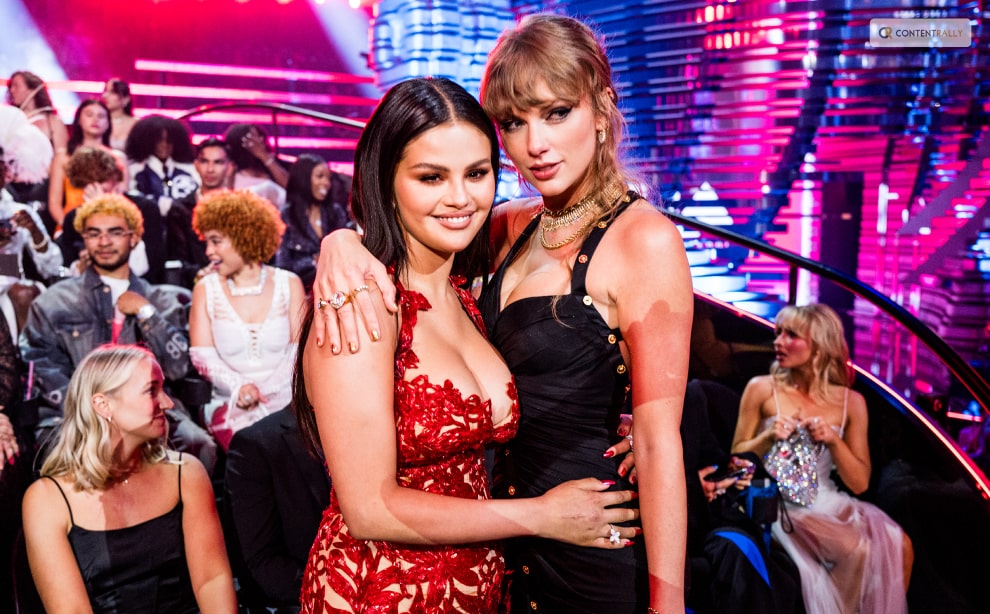
Selena Gomez Gets Birthday Kiss From Bestie Taylor Swift

Published on: 14 December 2023 Last Updated on: 25 May 2026
Selena Gomez Gets A Kiss From Bestie Taylor Swift In Latest Birthday

Selena Gomez just celebrated Taylor Swift's 34th birthday on Wednesday, December 13 by posting their latest photo of the superstar duo. The mirror selfie reveals Swift sweetly kissing Gomez's cheek.

Gomez captioned the Instagram story, saying, “Happy birthday to the goddess that is @TaylorSwift,” with 'I Love You" written over the picture.

https://twitter.com/billboard/status/1735127511648948409?s=20

Their outfits have suggested the picture was taken on Friday night's outing to Ramy Youssef's comedy show in Brooklyn that was also attended by the likes of Anya Taylor-Joy, Zoe Kravitz, and Cara Delevingne.

Swift celebrated her birthday by gifting her fans with the digital release of her Eras Tour film on Wednesday, taking to Instagram, “I had the time of my life fighting dragons with youuuu. Celebrate 34 with me by watching The Eras Tour (Extended Version) including ‘Long Live,’ ‘The Archer’ and ‘Wildest Dreams’ at home!”

https://twitter.com/JustJared/status/1703173584380715139?s=20

She finished her message with loads of emojis to accompany each song title. Swift wrote, “PS troll me all you want about my excessive and literal millennial emoji use but A) no one’s prouder to be a millennial and B) it’s my bday and today I am exempt!”.

The Society for the Prevention of Cruelty to Animals from Swift's home town of Pennsylvania called her dedicated fans to donate $13 in honor of their beloved birthday to a cause very dear to Taylor's heart. The caption says, “To honor Taylor and to help animal shelters everywhere who have had a particularly hard year we created this challenge to support not only our lifesaving mission, but efforts across the country."

Learn More About:

Content Rally wrapped around an online publication where you can publish your own intellectuals. It is a publishing platform designed to make great stories by content creators. This is your era, your place to be online. So come forward share your views, thoughts and ideas via Content Rally.

View all posts

Leave a Reply

Your email address will not be published. Required fields are marked *

Related

User Experience for WhatsApp Users

6 New Features are Changing the User Experience for WhatsApp Users

WhatsApp, the world-renowned messaging app continues to helm the connectivity genre worldwide. Beyond its communication ease, its users also leverage other user-friendly features like image sharing, video sharing and audio as well as video calls. The platform gets all its popularity from its commitment to improving user experience and the introduction of exciting new features. Here are 6 of their features that have gained significant traction in 2023. Features ranging from Chat Lock to sending videos and editing messages Whatsapp has added a lot of range to the platform. Here are the features: Chat Lock Feature The chat lock feature on WhatsApp has gained a lot of popularity. This feature was introduced earlier this year providing users with the option to hide and lock their chats. If you want to lock a specific chat, you can navigate to the particular profile and Choose the Chat Lock option. HD Photo Send Feature WhatsApp offers an option to send high-definition resolution images. This feature that was introduced this year allows users to share images in high quality. To use this option you you have to go to the image-sharing option in the chat box. Then you can find the option to send the photo in HD quality allowing you to share the photo with superior quality. Silent Unknown Caller Feature If you receive calls from unknown numbers, instead of blocking it you can set the call to silent mode. This option will allow you to silent calls that you want to avoid. WhatsApp Screen-Sharing Feature Now you can share screens on WhatsApp too. This feature is adored by corporate workers and people who have family chats. Multiple Device Feature WhatsApp also has the option to use one account across four devices at one time. People who have 2 phones love this feature. Message Edit Feature In 2023 the most standout feature of WhatsApp is that it allows you to edit your sent messages. The time window it provides is a maximum of 20 minutes. You can rewrite and edit messages even after it has been sent and read.

READ MOREDetails
Las Vegas Transformation

NFL’s Roger Goodell Praises Las Vegas Transformation 

NFL commissioner Roger Goodell, spoke at a Las Vegas Super Bowl LVIII Host Committee brunch in Tuesday and he praised the city's shift in image in the last few years which has led them to land the league's championship game. Goodell also touched on other topics like the game's global appeal in a 25-minute sit down with Las Vegas Raiders president Sandra Douglass Morgan that also included appearances by other sports executives from premier leagues such as the UFC, the NHL's Golden Knights, the WNBA's Aces, Formula 1 and the NBA. Goodell addressed the crowd and said, "You really have become Sports Town USA. You really have, and that vision was set out, that vision was clear. We wanted to be a part of it, and I think when that happened, everything seemed to change and the stadium obviously is a key component of that. It's one of the reasons we struggled in Oakland is being able to get a long-term stadium that would work for us. Great news is this is home for us, so we're glad to be here." https://twitter.com/stevemcomedy/status/1732161471310901540?s=20 He added, "I'm going to credit this community because I think you've changed the city on a global basis. It is an extraordinary entertainment city and I think people see this city in a different way. Sports may be part of that, but we're all part of, I think every one of the sports that are represented here today would say that you've changed that, you've changed that narrative, you've changed that image, you've changed that platform. And I think, I probably would not have said 10 years ago, that I would see myself sitting here for a Super Bowl. But I'm not surprised." When Douglass Morgan asked whether Las Vegas would be in a "rotation" for the Suoer Bowl, Goodell laughed."We don't have a rotation of Super Bowls," he said, "but I have no doubt this is going to be a successful Super Bowl. We'll be back here a lot for Super Bowls." Read More About: Which Nations Have the Greatest Disconnect Between Their People Sam Altman, The CEO Of OpenAI Joins Microsoft Adding Further To The Controversy

READ MOREDetails
Android and iPhone WhatsApp Stickers

How to Create Your Own Android and iPhone WhatsApp Stickers

With WhatsApp Stickers, you can communicate and express yourself on the messaging app in a whole new way. But what if you'd prefer to utilize the original sticker sets instead of the default ones? Here's how to use your smartphone to create custom WhatsApp stickers. The cross-platform, free WhatsApp sticker maker app is called Sticker Maker (Sticker Maker Studio on iOS). We'll use it to demonstrate how simple it is to start your first sticker collection. To create WhatsApp stickers using Sticker Maker, follow these steps: Select the My stickers tab after opening the app. Next, choose to make a new sticker pack. As the author, enter your name and give your pack a name. After that, you can add stickers to the created pack by opening it. To add your first sticker, click on any of the boxes numbered 1 through 30. To create stickers using your photos, choose Open Gallery and find the desired image in your library. Next, you can decide which portions of the picture to turn into a sticker. For most images with a transparent background, Smart Select performs admirably. If not, you should use the more accurate selection tools to the right or Select All. Before selecting Save Sticker, text and a colored outline can be added. The pack will now include the sticker. To increase the number of stickers in a pack, click the remaining boxes and repeat the process until you have 30 stickers. To send the pack to WhatsApp after you're done, choose Add to WhatsApp. Before you can add the pack in the free version, an advertisement will appear. Emojis that correspond with a sticker can be changed via the menu that appears when you click on it. After that, you can use these emojis to look through your WhatsApp stickers. With personalized stickers, you can accomplish so much. They are incredibly simple to make and send, and they can liven up your WhatsApp exchanges and conversations. So, why do you hesitate? Now go ahead and make stickers out of your favorite memes and pictures, then share them with your friends. Read Also: Latest Google Discover Feature Allows Access To Liked Stories 6 New Features are Changing the User Experience for WhatsApp Users Immigrants Are Being Denied US Citizenship For Selling Legalized Cannabis!

READ MOREDetails