












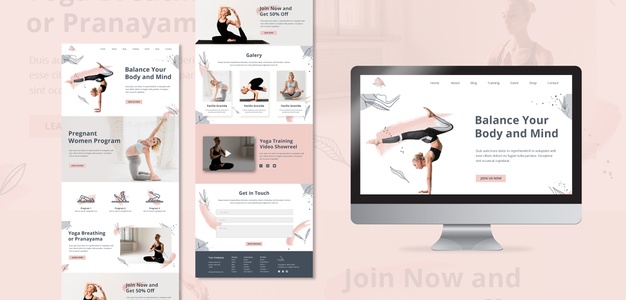
6 Benefits Of Landing Page

Published on: 24 October 2020 Last Updated on: 29 May 2021
Landing Page

There is a reason why marketers swear by the efficacy of a Landing Page when running any online campaigns. Many people make the mistake of creating a landing page out of their own website page. According to experts, this is not a good strategy to follow.

A Landing Page should be created with one single purpose- to ensure higher conversions. Users from different online channels should ‘land’ on the page for a specific purpose.

A brand can use a Landing Page for the following-

  • To book a product or buy something directly from the brand
  • To subscribe to the brand’s Newsletter
  • To announce a News or for a Press Release
  • To Thank its Customers for their loyalty and support

In this article, we are going to look at the top six benefits of a landing page. However, before we get to that, let us first try to define and understand what are landing pages.

Landing Pages: Meaning and Definition
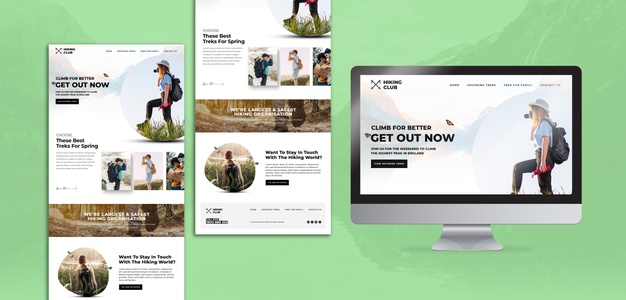
Landing Pages

In very simple terms, a Landing Page is an independent web page, which has been specifically created for campaign purposes. This is the page where users land, whenever they click on the link you have advertised on different digital platforms.

For example, users can come to your Landing Page, after seeing your-

  • Ad on Google AdWords
  • Banner Roll on YouTube videos
  • Social Media Posts on Facebook, Instagram, and other platforms
  • URL Link on Blog Pages
  • Links achieved through Guest Posting on other publisher platforms

A Landing Page is different from a brand website. A website has multiple KPIs- traffic, ranking, metrics, etc. However, Landing Page is created with only one single aim.

This is known as the CTA. Too many mixed signals on Landing Pages can dilute the efficiency and performance of a Landing Page. The isolated single CTA is what makes Landing Pages an attractive and desirable component of any online marketing campaign.

Brands who are looking to create high-performance campaigns should look to take help from the Landing page creator. A landing page is where the conversions happen from visitors into qualified leads.

List of 6 Major Benefits of a Landing Page

1. Makes for a good First Brand Impression-

In many ways, a landing page is like a good first-time introduction to your brand. Brands are typically going to invest a lot more in a marketing campaign. A majority of people who come to the landing page might never have been on your brand website before. For a brand, a well-designed and optimized landing page can be like an impressive visiting card for the business.

2. Great Real Estate to Launch a New Product or Service-

Brands who are looking to create a lot of buzz for their new products or services in the market can take help from landing pages. Automobile companies use landing pages for pre-booking vehicles and others do the same to encourage more sales. This helps in putting all the spotlight on the product. From discussing product details to image galleries, a landing page can do it all.

3. Real and Direct Contact with Website Traffic and Users-

A landing page helps in establishing direct communication between the brand and the visitors or users. If your landing page is engaging enough, it will encourage users to click on the CTA and become a part of your qualified sales leads. This can be nurtured by the sales team and converted into actual sales. Direct messaging is the hallmark of a good landing page.

4. Builds Branding and Adds to Credibility-

Leading Digital Marketing experts suggest that one of the best practices of a successful landing page is including happy customer stories. This helps in improving the brand’s perception as being liked by everyone and you can achieve this by creating professional landing pages with the help of the best landing page tools. In addition, it also encourages new users to fill in the details on the form and become consumers of the brand. A landing page is a credibility building exercise.

5. Data Generation and Analysis-

For businesses who are data-driven and allow data to inform decision making, landing pages are a great asset. A landing page can reveal different kinds of data. Where is the most traffic coming from, how long are people engaging with the page, how many sections are people filling, etc. can help in optimizations and lead to the brand understanding its consumers better.

6. Clear and Simple Messaging and Focus-

The purpose of a landing page is singular in nature. If you compare the same with the homepage of a website you will be able to judge the difference for yourself. A clean and simple direct message means that the focus is stronger and the communication is much more optimized. Landing pages that are able to reduce user distractions perform a lot better.

The Final Word

In this article, we have tried to list out some of the major benefits of landing pages. We have also looked at some ways landing pages can be optimized for greater performance. Marketing professionals and business owners who are looking to leverage online marketing campaigns should pay attention to how landing pages can make a real difference to their brand.

Read Also:
Abdul Aziz Mondol is a professional blogger who is having a colossal interest in writing blogs and other jones of calligraphies. In terms of his professional commitments, he loves to share content related to business, finance, technology, and the gaming niche.

View all posts

Leave a Reply

Your email address will not be published. Required fields are marked *

Related

bootstrap templates

Bootstrap Templates and Allied Tools to Make Your Web Presence Easy and Instant

It is no secret among online business marketers and website builders that the Bootstrap templates and themes could be their first option in terms of building a web presence. There are many reasons why people tend to use handy Bootstrap templates as: Primarily, most of the designers tend to use this as boilerplate. Bootstrap is out there with us for long, and people are so familiar with it. Many find it much riskier to switch to other options unknown to them. Bootstrap is time-tested, and it also found to be valid. It is a tool, which is time-tested and can also pave a strong foundation for websites. An endless collection of classic Bootstrap templates now helps you construct any type of website you want. It also has high flexibility and rich features, so irrespective of a regular blog or portfolio site, you can get it all here. The community around Bootstrap is so immense and extensive. This constantly expanding expert community will give you plenty of choices and unrelenting support for any issues. Most importantly, Bootstrap is a freemium product and also boasts of its high quality. You will come across countless free templates of Bootstrap, which won’t disappoint you at all. All these could act as a quick fix to your web development problems from time to time. In addition, they will also give you the apt solutions on which you can build safely. Some important things you need to know about Bootstrap 4 themes As we have already seen, Bootstrap is a very powerful but freemium CSS framework with an impressive selection of jQuery plugins, components, layouts, and UI/UX elements. The primary thing about Bootstrap is that it can be availed for free by the users. Now, the extreme popularity of Bootstrap has also urged web developers and designers from across the globe to land on this platform and uses it as a top choice in their projects. If you are also planning to use framework or workflow tools in your web projects, one should always make a note about the updated version of Bootstrap. The latest update is Bootstrap 4, which comes with a custom set of tools and features for the users to benefit from. The new version Bootstrap will certainly help the developers to create business websites flawlessly with ease. A few key things to remember while using Bootstrap You should know that there are different types of Bootstrap 4 themes and templates available out there, both official and third party. So, if you consider using one, always make sure that you do a thorough baseline analysis to identify the best theme for your purpose. In fact, with an abundance of choices, it will always be difficult for a customer to feel overwhelmed about the choice and get confused. This will be more so in case of the beginners who don't have an idea about how to make use of the best Bootstrap 4 template for their purpose. If you are among one of those amateurs who are confused about Bootstrap 4 templates, here we will discuss a few handy things which will help you out in making the right choice. When to consider using a Bootstrap template? The ones who are into website design or the developers who are applying the CSS, as well as a markup of Bootstrap, would have some basic default designs handy. Many don't want to customize Bootstrap, which also isn't ideal as it will make your site look similar to many others out there. So, the best move is to take any of the Bootstrap templates which are useful for you and then customize it to match your needs as well as to look unique. When it comes to choosing a default template, the design may not seem to be very appealing because the providers tend to make those pretty simple with some basic features embedded. So, to bring a professional look to the website, you should try to work further on it and customize it. For this, designers need to pay attention to the CSS framework to make the end product more stylish. There are many tools to help you customize the Bootstrap templates. Tools to customize Bootstrap themes It is so easy to create Bootstrap templates and themes, but it may be confusing if you don't use the right tools. In the case of beginners, it could be somewhat difficult until they get a good grip on it through practice. Adding to it, they also need to pay close attention to the fine details to set things right, which is time-consuming. Fortunately, many tools are there to help these novice Bootstrap web builders to create customized Bootstrap templates quickly and easily. Let's explore some such tools. Sublime Text This tool has a fair number of features to help web development. On using this tool, you can get quick access to many quick windows for the project code. Adding to it, you can also see the codes which you have written on the panel. Anvil The same group of developers had developed both Anil and Hammer, and you use both these tools independently. Anvil could work the best for the localhost servers, which could further let you preview the themes and choose the best for your purpose. Hammer As we said above, Hammer could be used in combination with Anvil or independently. It is a Mac-based development tool that comes with a handful of features to develop Bootstrap themes and static sites. With this tool, you can ensure that you make use of various HTML in the standard templates for further customization. Hammer could also be used to compile the languages like CoffeeScript, SASS, JavaScript, Markdown into CSS, and HTML, etc. SASS If you are planning to create a template of design a full-fledged website, then you may know that the Bootstrap 4 framework is built primarily on the SASS (Syntactically Awesome Style Sheets). In simpler terms, SASS is a wonderful scripting language that could be interpreted to CSS. You should also note that SASS is a scripting language used in almost every case. There are many other tools too to be used for customization of Bootstrap as Grunt, Harp, Bootply, Brix.io, Bootstrap Starter Kit, etc. which could be handy for the developers and designers. All this help to pay attention to the crucial elements of Bootstrap customization and help you build the most relevant and user-friendly websites. Read Also: Adrian Rubin Tells How To Bootstrap Business In The Photography Niche Major Financial Problems That Can Affect A New Business

READ MOREDetails
TurboLogo

Create Your Logo for Free with TurboLogo

Creating a logo with Turbologo can be the best solution if you do not have any experience to create a logo. Understandably, you might think it is going to be hard to create a simple logo for your small business or even for your presentation. For common people who do not have knowledge and experience about creating a logo digitally is nearly impossible. However, you can do it by using Turbologo and it will help you to create the logo at ease. You do not need to hire an expert to make a logo that you have in mind. Turning Idea into Logo The Turbologo will give you the facilities to make the logo that you want. You basically can create the logo based on the idea that you have. It is the best application that can help you to create a logo that matches with your taste and preference. Here are some benefits that you can get by using Turbologo. It is Free! This Turbologo is free! So, if you think creating a logo will cost you a lot of money, you should think otherwise. This Turbologo proves that you can be a logo creator even if you have no skill. You do not need to hire a design graphic to create a simple logo. There is no need to spend your money on a simple logo. By using this logo generator, you will create the logo on your own. Simple and Easy to Make The Turbologo provides easy functionalities that can be accessed by people with skill and also for those who do not have the skill as a logo maker. The simple system has a user-friendly interface that will guide you to understand how to create a logo you want step by step. It is a great way to try making your logo without any difficulties especially for a basic logo with a simple design. Free Templates If you do not have time to create your logo from the first start, you can easily stroll through the library to find the templates. There are endless templates with nice designs that you can choose to create your logo. It is easy and simple to create. You can easily create your logo in just a few minutes. Templates like this will ease you to get a logo without spending too much time on a logo. It is nice to be creative and also the fact that it is free, you can start your small business without expenses. When it comes to business, you have to ensure that you don’t spend too much and focus on your income. This Turbologo also offers premium paid products if you want to have more features when needed. With Turbologo the logo creator, you can have the original idea of your logo and it is simple to do. All you need to do is just search for Turbologo and follow the step-by-step tutorial to start creating your logo. Spend some time to try turning your ideas into the logo that you want. It will worth the effort as the logo represents your business and service.

READ MOREDetails
Photo Editing Software

The Best Photo Editing Software You Need to Know About

We all know the Photoshop tool, so much so that we call Photoshop retouching any photo editing. However there are many other photo software, but in this article, we are just highlighting the top 8 best photo editing software which you can use to edit your images without downloading the program. You can edit the image you want from any computer, and you will only need an Internet connection. But the best of all is that some are so simple that without any knowledge you can use them because they are very intuitive. How about? Has the bug bit you? Well, keep reading! So, let’s discuss more. Eight Best Online Photo Editing Software:  1. PicMonkey: I start with this one because it is the one I use the most, it will surely not be the best, but it is effortless to use, and if you do not know Photoshop or other similar programs, it will be beneficial. With it, you can also create collage, design cards or make up the face of a photograph. Some of their tools are paid, but you can do thousands of things without having to pay a penny. 2. Adobe Photoshop Express: Very similar to the original program allows working by layers, select elements. It requires more knowledge and practice, but everything is to put and learn. Besides, some necessary actions you can perform without problems. 3. Skylumluminar: Skylumluminar is the more professional photo software that offers many editing features. Its artificial intelligence feature differentiates it from any other photo software. Skylumluminar’s beautiful Interface offers a sleek canvas to enjoy and enhance your photography without additional distraction. It is a one-stop-shop for photo editing that can be used by itself or as a plugin in with other photo software too. 4. Pixlr It is a complete editor with three variants: Pixlr Editor: With an interface so similar to Photoshop Express that it seems that you are in it. It is complete and more professional, with a lot of tools and filters. You can also use keyboard shortcuts and even the right button. It happens to you like Photoshop, and it requires a bit more learning for more advanced editions. Pixlr Express: More basic and at the same time more intuitive, it is above all for quick touch-ups. It allows us to open photos from the PC, a URL or even from Webcam. You can also make collages with this program. Pixlr O-Matic: Much more comfortable to use, ideal for automatic retouching. A quick way to apply frames, filters, and effects. Of course, you will not find anything else, and you will not be able to select where to add them since they apply to the whole photograph. 5. Fotor: A very careful interface consists of five complete sections that will serve to edit, make collages, covers for your social networks, greeting cards and even "makeup." As the last option offers to merge an HDR image by uploading three photographs with different exposures. Read for more information in Fotor Review. The handling is very intuitive, you can add texts, and it offers a massive amount of creative filters, frames and clip art. And when you finish, you can share your image directly on social networks. 6. Phixr: The editor is quite complete, allows to focus, blur, adjust exposure levels and color, reduce noise and many other options as well as filters and effects. I find it somewhat uncomfortable to work, but the worst is that the photo takes a long time to load at the beginning and can despair a little. 7. Pho.to Editor: It happens the same as the previous one. It takes to load the image, although not so much. The options are minimal because the settings such as saturation, temperature, and filter application are automatic, so you cannot choose the intensity or graduated. It is simple to use and also allows you to share the result directly on social networks. 8. Befunky: To edit and create collages. You can upload your photo from your computer, webcam or some social networks. The highlight is the number of filters, textures, and effects it offers, in addition to the frames. You can include your image in a lot of ways and even letters. It is effortless to use, and the changes are applied to the whole picture although you can choose the intensity or the size of the brush and they are displayed at the same time. Read Also: 5 Things To Take Into Account To Hire Custom Software Development Services Why You Trust Your Photographer?

READ MOREDetails