











Your Cloud Kitchen Essentials: From Licenses to Restaurant Softwares

Published on: 11 March 2021 Last Updated on: 27 December 2024
Cloud Kitchen

The pandemic has been a woe for a few, while a blessing for others. Several restaurants closed down while others have been constantly bearing the brunt. However, during this time taking commercial kitchen on share or cloud Kitchens gained immense popularity as COVID-19 disrupted the restaurant industry.

So, What is a Cloud Kitchen?

Cloud Kitchens are famously known as delivery-only restaurants. They cater specifically to online orders placed through virtual delivery companies such as Swiggy and Zomato. Cloud kitchens bring with themselves the opportunity to conveniently reach a wider audience of foodies. Sounds simple right? Well, setting up your own cloud kitchen is as uncomplicated as its definition.

In this blog, we will specifically dig deeper into the licenses and essentials required to run a Cloud Kitchen.

1. Location:

Finding the perfect location for your cloud kitchen shouldn’t be a challenge considering you don’t have to take into account factors such as accessibility, design, and parking, among others. You can opt for a place that is close to your target delivery locations. In comparison to dine-in restaurants, location acts as a prime differentiator for bringing down the cost of investment.

2.Licenses:

Obviously, there is always a legal compliance requirement! Obtaining the apt licenses and certifications are important to conduct your business as well as provide customer satisfaction.
Licenses

FSSAI (Food Safety and Standards Authority of India) :

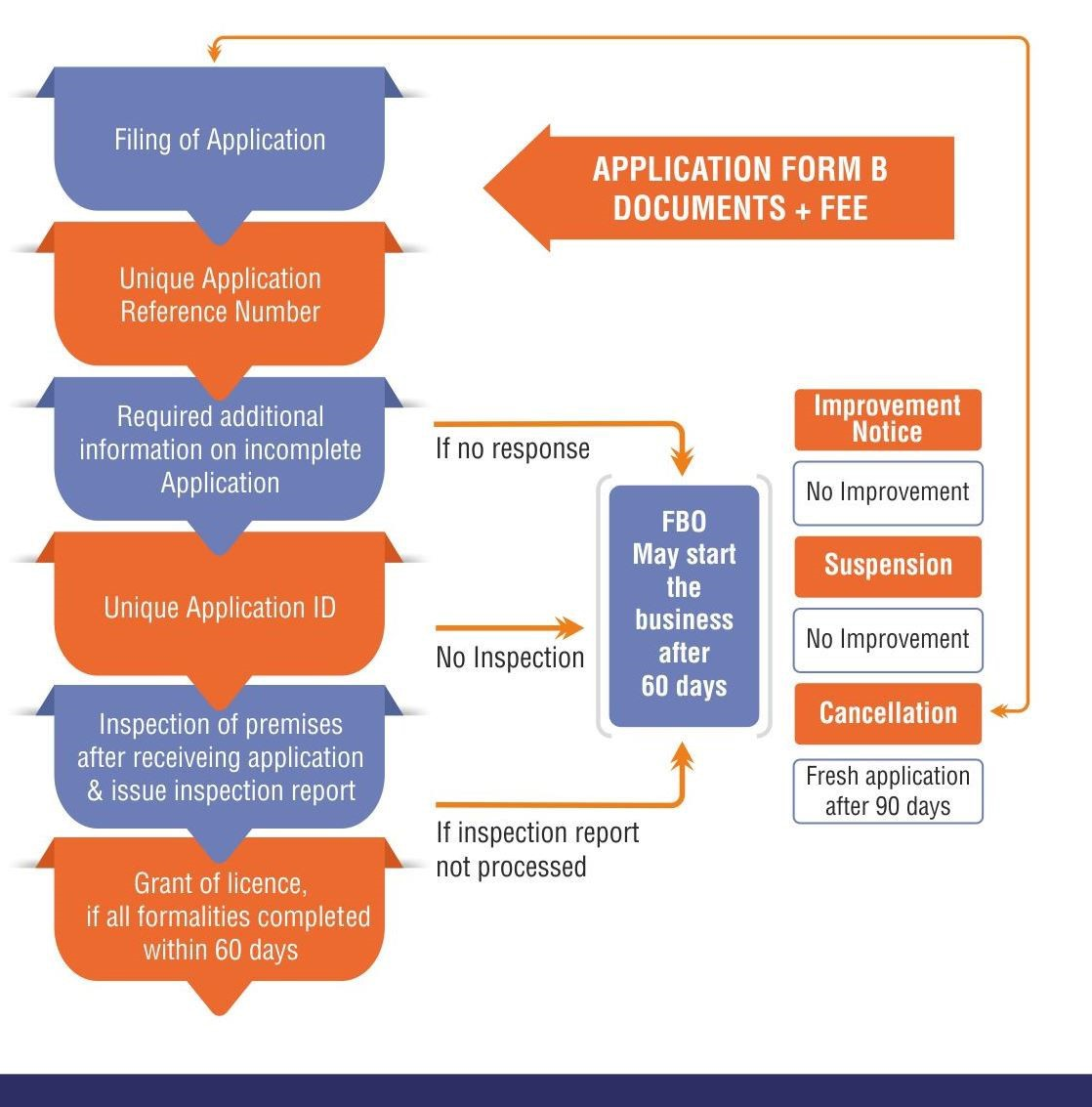
FSSAI Licenses are mandatory for every food business operator in India. This license ensures that the kitchen is maintaining the food safety standards of India. After you file your application for the same, an inspection of the premise is conducted. The license is granted within 60 days if the procedure is successfully completed. The cost for a new license ranges between Rs. 2000- 5000.

GST Registration:

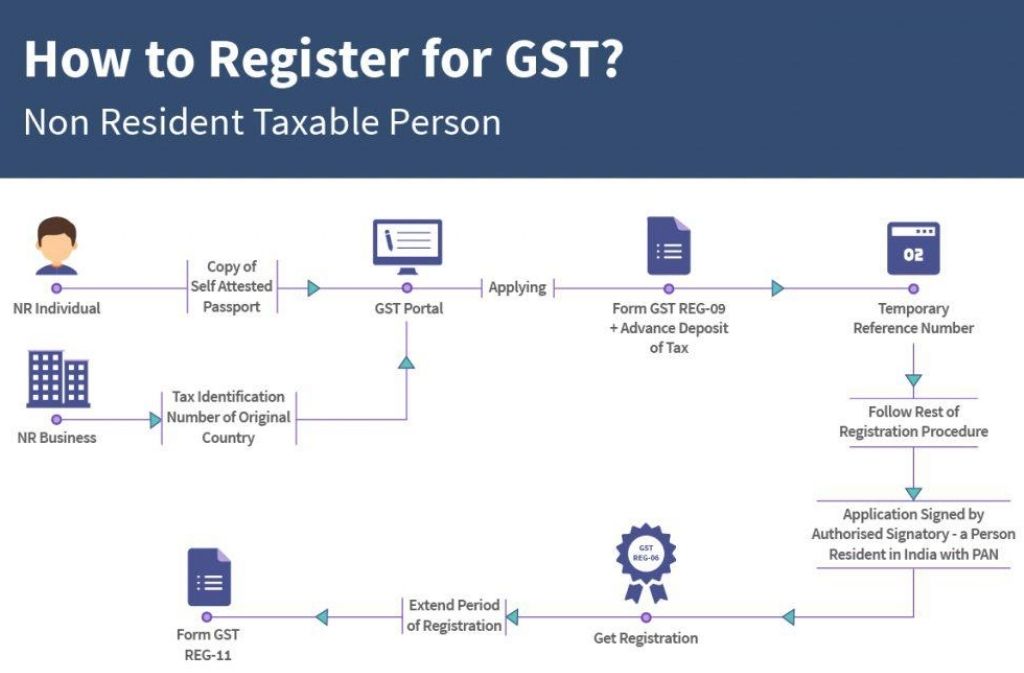
GST is levied on everyone dealing with the supply of goods and services across the country. In order for cloud kitchens to partner with food delivery platforms, they require a valid GST registration. GST Registration is required only if your aggregate turnover exceeds Rs.20 lakhs. At first, you need to file the enrollment form on https://www.gst.gov.in/. After which, you must submit the necessary documents and you will receive an acknowledgment number. The government does not charge any fees for GST Registration.
FSSAI

Shop and Establishment Act:

All commercial establishments nationwide come under the purview of this Act. You must file for this registration within 30 days of commencing your business. The registration certificate can be obtained by applying through the official website for your state. Registration fees for the same depend specifically on the location of the restaurant. It costs approximately Rs.1000 for a single registration in various cities.

Trade License:

Trade license allows you to start your cloud kitchen within a particular municipal limit. This helps in keeping up with public health concerns. Trade license fees include a fixed one-time payment along with renewal fees.

Fire and Safety License:

This license requires the kitchen owners to take precautions in case of the risk of fire. The license is issued within 7 days from the date of application. You can fill out the signup form and get started here- foodlicensing.fssai.gov.in

3.  Restaurant Software:
Restaurant Software

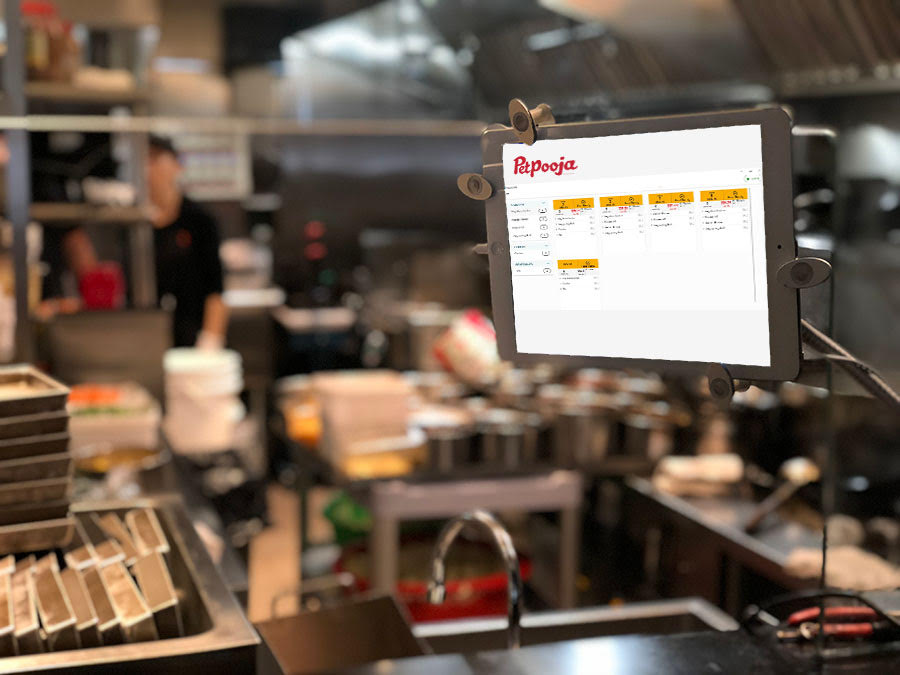
While running a cloud kitchen you ought to have a quick automated solution and smart technology. Petpooja’s cloud kitchen software is your one-stop destination for an efficient and user-friendly Point-of-Sale System(POS System). Having a restaurant POS system or a restaurant software aids in integrating online orders, inventory management, customer engagement, employee performance, and restaurant analysis. Given the current situation, it is integral for restaurants to set up their own POS System.

It goes without saying that setting up your own cloud kitchen with Petpooja is easy and convenient. Follow these 3 basic steps to set up your cloud kitchen and you are good to go. Reach out to us on 7046223344 or shivani.dad@petpooja.com for more tips and guidance. We would love to help you grow your restaurant business!

Read Also:

Content Rally wrapped around an online publication where you can publish your own intellectuals. It is a publishing platform designed to make great stories by content creators. This is your era, your place to be online. So come forward share your views, thoughts and ideas via Content Rally.

View all posts

Leave a Reply

Your email address will not be published. Required fields are marked *

Related

Improve Workplace Safety

6 Useful Tips To Improve Workplace Safety

The workplace is one of the most important places in our lives. It is where we make money, build relationships and meet new people. For us to be able to do all these things, we must have a safe environment to work in. The safety of employees should be paramount but sadly this isn't always the case as many businesses are not taking the necessary precautions when it comes to workplace safety. Below are some tips on how you can improve your workplace's safety standards. Safety Audit Conducting a safety audit is a great way to identify potential hazards and ensure that everyone in the workplace is safe. The first step in conducting a safety audit is to take stock of everything you can think of from your office building’s structure to the equipment in the kitchen, everything should be scrutinized for any risks or dangers. Keep an eye out for anything that could cause bodily harm if it were to be tripped over or otherwise mishandled. Next, it’s time for some hands-on testing! Look at every surface that might have sharp edges or jagged corners; make sure every tool has its own place where it won't get lost or forgotten about; look at staircases and make sure they're clear of clutter (or better yet, eliminate them entirely). You may even want to go around with different people who work in different parts of the building so that no one area gets overlooked—it's important not only that all employees are aware of their own responsibilities but also those around them as well! When you’ve finished checking all areas thoroughly, write down what needs improvement on pieces of paper—you’ll need these later when presenting your findings back to everyone involved so they know exactly what needs changing before someone gets hurt again due to negligence. If you are still confused, try to go for employer of record, which is a prominent outsourcing process for your business process. Safety Issues Report If you want to improve workplace safety, you need to make it easy for your employees to report problems. You don't have to be a jerk about it—just make sure they feel comfortable reporting whatever issues are on their minds so that you can take appropriate action. Don't punish people who report safety issues. It's not as simple as saying "don't ever punish someone for reporting a safety issue." Sometimes, if an employee has done something wrong and is being honest about the problem, he or she may need to be disciplined. But if an employee reports an unsafe situation because he or she feels strongly about doing the right thing in terms of workplace safety, then that person should not be punished for doing so (especially if there was no harm done). Make it anonymous—but not too much more than anonymous. In other words: allow for some anonymity (so people don't feel afraid), but also encourage them by making sure everyone knows who reported what issue and why so that everyone at least has some idea of where improvements are needed (and thus can work together on making those improvements) Safety Culture A safety culture is a set of norms and values that promote safety in the workplace. It's more than just good policies, it's how people think about and manage their own behavior. Safety culture is based on shared values, not just written rules and procedures. You can develop a positive safety culture by: Promoting a sense of ownership among employees—giving them opportunities to suggest ways to improve workplace safety and rewarding those who do so with the recognition Making sure all employees understand the importance of their role in keeping themselves safe as well as others Camera Spotter Installation Camera spotters are a great way to improve safety in your workplace. These cameras are designed to be installed in many different places, including around the perimeter of your site, underneath traffic lights and stop signs, and even on top of buildings. Camera spotters can be used for many purposes: they can help monitor people as they walk down hallways or drive through parking lots; they can help monitor traffic by recording speeding vehicles; and they can alert security when pedestrians or vehicles enter restricted areas. The camera spotter you install should be able to detect motion at long distances so that it will pick up any activity within its field of view. This way no one will ever sneak around unnoticed—you'll always know when something dangerous is happening! Drug Testing Policy It's important to have an Australian drug testing policy in place to ensure that your employees are not using drugs or alcohol at work. It can help prevent accidents and injuries, increase productivity, and improve employee morale. A drug testing policy is an important part of maintaining a safe workplace. It helps protect the health and safety of everyone who works there by setting expectations for how the company will respond when someone tests positive for drug or alcohol use. Each state has its laws governing workplace drug testing policies—which substances are allowed to be tested for (alcohol alone? alcohol with drugs?), what type of tests can be used (urine tests? hair follicle samples?), how much-advance notice employees must receive before being tested, etc. Some states even require employers who regularly employ more than five people within their jurisdiction to implement a written drug-free program that includes components such as: Work Licence Update Having a work licence lawyer working on licence updates is important. Your work licence is a legal document that allows you to work in Australia and is required for every person who wants to work in Australia, including those who are Australian citizens or permanent residents. If you are an overseas worker and have a current subclass 457 visa or a subclass 186 Regional Sponsored Migration Scheme visa, then you will need to apply for a new subclass 400 Temporary Work (Skilled) visa if your current visa expires within 12 months of the expiry date on your old subclass 457/186 visa.You need to renew your work licence every 3 years after its issue date (or 2 years after its issue date if it was issued by way of an automated process). Conclusion This is just the tip of the iceberg. There are many things that you can do to ensure your workplace is safe and healthy. At the end of the day, it’s all about prioritizing safety and making sure that everyone in your company feels comfortable at work. Read Also: Should You Be Friends With Your Co-Workers? What To Do About Discrimination In The Workplace Tips To Conduct Active Shooter In The Workplace Training

READ MOREDetails
Virtual Receptionist

4 Reasons Your Home Business Needs A Virtual Receptionist

If you’re the owner of a home business, you may often wonder if manning the phones while trying to grow your company is a good idea. Interestingly, using the phone can be one of the toughest issues involved with running a home business. While some home business owners would prefer to try and do it all themselves, there are many benefits to hiring a virtual receptionist. Being Your Own Receptionist is Tough  Family phone needs, environmental noise, and simply not hearing the phone make it a challenge when you work from home. Being your own receptionist means you’re saddled with daily responsibilities and tasks that take up a great deal of time. This is why it’s important to delegate receptionist duties to a qualified person. Here are the top four benefits of using virtual assistants for your home and business. 1. Enjoy Greater Savings : The cost of a virtual receptionist is well worth the investment for home business owners. You don’t have to hire a person to sit in your home all day doing admin and answering the phone. What’s more, a virtual receptionist can manage a range of tasks, including: Calendar management Call handling Message taking Basic customer service Scheduling appointments Delivering messages whichever way you prefer Send voicemails to your email Record calls for quality assurance Accept and also track collect calls if necessary 2. Make Your Home Business Look Even More Professional : The CEO of any company shouldn’t really be answering the phone. It’s not professional, and it shows that either you’re not particularly busy or that there might be a problem like your entire staff has quit, and you need to manage the phones yourself. It’s just a poor impression of your business. When you work with a virtual receptionist for your home business, you can give your company a much more professional look by letting callers, customers, and prospects believe you have a properly trained in-house receptionist taking care of the calls. A virtual receptionist is always available to answer the phone to your specific requirements, which also means your company is sure to make an excellent first impression on callers. 3. Provide Quality Customer Service : Virtual receptionists have expert customer service training. So, they have the necessary skills and experience to fulfill the role to the highest of standards. Each and every phone call to your home business will be handled in a professional manner to ensure your customers are always happy with your service. 4. Never Miss Out on a Call : While running your home business is extremely satisfying, it can also be stressful. A virtual receptionist can offer the support needed to ensure you never miss a work-related call and that your business is available at all times. Does Your Home Business Really Need a Virtual Receptionist? Many home businesses certainly need the assistance of a virtual receptionist. The drawbacks and hardships of trying to be your own receptionist from home tend to outnumber the benefits of hiring a virtual receptionist. Read Also : 5 Tips To Safeguard Your Home From Intruders What Are The Important Parts Of A Free Business Credit Report? Top Tips For Flipping Homes

READ MOREDetails
Upgrades Every Modern Call Center Needs

4 Upgrades Every Modern Call Center Needs

During the past decade, more customers have leaned towards online shopping for both goods and services, creating new trends in customer service needs. As last year's stay-at-home mandates dictated, many organizations used remote worker integration into the workforce, including those team members functioning as customer experience agents. With both the customer and the service agent communicating from different locations, technologies have come along to provide easier workflow and accuracy for call center solutions. Here, we will look at 4 upgrades every modern call center needs. 1. Cloud Functionality: For complete integration into the normal workflow, new innovative companies have introduced call center software platforms that include cloud functionality. This is an important aspect of any digital customer service solution, as cloud storage and operations are ideal for both remote functionality and scalability. While all contact center software includes a few of the same key features, providers such as Bright Pattern are powerful cloud contact center solutions, which is distinctly ideal for mobile app use, remote use, and the option for multiple phone lines and services agents to be connected at the same time without any loss of call quality management. 2. Multiple Phone Lines: As a perfect complement to the cloud-based structure of a good call center solution, business users should take full advantage of the ability to handle high-volume with multiple phone lines. The ease of use of the platform allows service agents to perform their duties and be on-call from home, which means a rotating schedule can give your company round-the-clock customer service and quality assurance all day (and night). With a large number of phone lines and digital channels integrated into your account, someone is always available to answer phone calls from customers in need. For the best customer experiences, multiple available agents ensure faster turnaround and troubleshooting. 3. Mobile App Capability: When weighing the pros and cons of a contact center solution, one of the greatest benefits is the potential for mobile app features. This aspect works in a few different ways. As the service agent will be plugged into the call center's interface from a remote location, their own mobile app can notify them of incoming phone calls even while they are away from their post. Likewise, the most powerful contact center software will provide admin capabilities for your organization's call center manager to troubleshoot from their own mobile device. Should there be any discrepancy with the call outcome, the service agent has true "back-up" in the form of a supervisor, who can always hop onto a call for needed assistance. For the best customer experience, an on-hand call center manager can be a necessity and with a mobile app feature, both the home office and the service agent are readily available to troubleshoot any issue. 4. Live Chat Options: Although the majority of customer issues can be solved by a service agent via audible phone calls, there are customers that find the phone inconvenient. This can be the case if the customer is at work or in a public place. For that reason, another important feature that an ideal contact center solution should include is live chat functions. The top call center in the Philippines now provides this option to customers for an easier and more convenient support experience. In a bind, a customer should be able to open their mobile device app or desktop and chat with a service agent until their problem is resolved. If that service agent is working remotely, their own laptop or desktop dashboard interface should include the option for chat or text communications. Most professional contact center platforms allow the user to access customer history and sales purchases while the call is in progress. With this option in place, a remote service agent can be enabled to meet every customer inquiry or demand without having to be at a company's brick-and-mortar location. Read Also: Why Your Business Needs Call Center Tracking Top 4 Creative Team Building Ideas for a Call Center Industry This 2020 5 Major Tips to Increase Employee Engagement in a Call Centre Industry

READ MOREDetails