










Which Was A Real “Star Wars” Based Breakfast Cereal Sold In The 1980s?

Published on: 07 August 2021 Last Updated on: 10 January 2025
Which Was A Real Star Wars Based Breakfast Cereal Sold In The 1980s

Do you know Which Was A Real Star Wars Based Breakfast Cereal Sold In The 1980s? I am sure you are looking for the answer everywhere, and that is why you are here. Well, at first, be assured that you will get your desired response to this question here. Now, let’s begin.

In the 1980s, a real breakfast, Star Wars Cereal, was sold in the market with packaging that is almost similar to boxes of any other sugary cereals. If you are from that era or have seen the box, you must have noticed the logo in front, haven’t you?

But don’t you want to know which brand used to manufacture “star wars” based breakfast cereal in the 1980s? The answer, along with several other facts about the brand, is waiting in the section below. So take a quick look right now. 

Which Was A Real Star Wars Based Breakfast Cereal Sold In The 1980s?
A Real Star Wars Based Breakfast Cereal Sold In The 1980

“Star Wars” is an emotion in the kids of the 1970s. Indeed, it is one of the best creations in the history of American films and on a global scale. So aren’t you interested to know which Star Wars-based cereal dominated the market in the 1980s? 

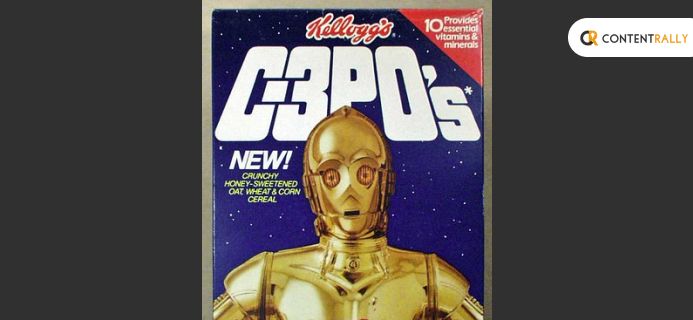
Well, the answer is C-3PO

Wait, are you confused about what it is and from where it suddenly came? Relax, here is all you are looking for!

Have you come across the brand Kellogg’s? Of course, you have; who doesn’t know the producer of yummy,  crunchy Chocos? In 1984, Kellog’s introduced a product named C-3PO, which was considered to be a fresh force at breakfast.

Kellog’s used to manufacture single-serving packaged boxes of C-3PO cereal as a segment of multi-pack grains. However, the box of this real breakfast cereal was super exciting as it used to come with Star Wars Trading cards and Stickers along with Rebel Rocket. In addition, it had Star Wars masks of plastic as well as a cool offer with real Star War Figures. 

By any chance, are you wondering if you can get to see one now? Unfortunately, at present, these boxes have reached the path of extinction. Even if you search for them across the corners of the world, there are no chances that you would find a single one. 

Hey, did you get disheartened? Alright, we have found another way through our research that would help you bring the antique box of C3PO to your possession. You can buy crates of 30-year-old C-3POs from eBay sellers at $75/quantity.

Some Fast Facts Regarding Kellog’s C-3PO You Cannot Miss

Some Fast Facts Regarding Kellog’s C-3PO You Cannot Miss

You are not satisfied merely knowing the product name – right? It’s pretty natural now to have more queries or questions about the particular breakfast cereal. So let yourself dive into some more exciting facts about which was a real star wars based on breakfast cereal sold in the 1980s?

There are so many informative details about this Star Wars-influenced breakfast cereal that you have not heard before. But I am sure you will love to listen to these now! 

Thus I will be taking you now through some more exciting particulars about C-3PO in the following segment.

  • When Kellogg’s showed C-3PO is one of the market-leading commercials, fans were fascinated to see such an advertisement like this. 

It is because Anthony Daniels, the lead actor of Star Wars, reiterated his role as the iconic golden protocol Droid in advertisements.

Another reason for this delight was his movie character image that appeared on the body of the jet-propelled cereal box. So naturally, this made the then fans too thrilled.

  • After its arrival in the market in 1984, it got the tag “A New Force At Breakfast.” In addition, the shape of the cereals inside the box was like two look-alike rings intertwined with each other. As a result, it created a shape of 8.   
  • Which Was A Real Star Wars Based Breakfast Cereal Sold In The 1980s? it will no longer be a big question for you after this article you read.

You may wonder why the name is C-P3O when it looks like 8; there is nothing like “3” or “O.” Believe me, it’s just the brand’s product decision regarding physical attributes; nothing else. 

  • Later, its name changed to Pro-Grain after the brand’s tie with Star Wars loosened due to internal troubles. Hence, they started marketing it in partnership with sports commercials. 
  • Only a few know about a green edition of the C-P3O. It had printed pictures from Return Of The Jedi at the back.
  • Cut-out masks of Star Wars figures like Luke Skywalker were included in the cereal packages. To the kids and teenagers of that time, it was truly an added slice of joy.
  • Unexpectedly, during this 21st century, the Internet’s fixation with cereals has gone on the wrong track. Consequently, C3PO has gradually obsoleted.
  • The breakfast cereal C-3PO served was really delicious. The 3 key gold ingredients were – Oats, wheat, and corn. Nevertheless, here is not the end! You will also find 10 micronutrients in it crucial for physical and mental well-being.
  • Actually, what was more important than the cereal inside was the Box. The box was everything to the kids of that time! As an add-on, the box had all kinds of actions, sensations, and joy of the 20th century’s popular hype – Star Wars.

Are you satisfied with the answer to which was a real star wars based breakfast cereal sold in the 1980s? Or still, have questions?  – Shower them in the comment area, and we would respond to them quickly. Which Was A Real Star Wars Based Breakfast Cereal Sold In The 1980s? It can make things easier for you. 

Summing It Up

I hope you have your answer to the query – which was a real star wars based on breakfast cereal sold in the 1980s? No wonder that famous brands like this have some specific trivia or fast facts. However, most of the time, they remain unexplored. Undoubtedly, these facts are not only entertaining but also capable of optimizing your general knowledge. 

So if you feel that you have benefited from this post, make sure to hit the Like button and spread the word amongst others.

Do you want to add any of your valuable opinions to this? Put them in the comment section; we are listening!

Read Also:

Everything you need to know about glamming your home with curtains

Content Rally wrapped around an online publication where you can publish your own intellectuals. It is a publishing platform designed to make great stories by content creators. This is your era, your place to be online. So come forward share your views, thoughts and ideas via Content Rally.

View all posts

Leave a Reply

Your email address will not be published. Required fields are marked *

Related

hbo maxtv sign in

HBO Max/TV Sign In: Everything You Need To Know About Using HBO Max On TV

Hey there, fellow TV and streaming enthusiasts! Ready to dive into the world of HBO Max? Well, hold onto your remote because we're about to explore one of the most convenient ways to unlock all that HBO Max goodness on your television – the HBO Max/TV sign-in. No more fumbling through endless menus or missing out on your favorite shows. In this article, I will walk you through the simple steps to get you binge-watching your favorite HBO Max content right on your big screen. So, grab your popcorn, find that comfy spot on the couch, and let's get your TV tuned in for some serious streaming action! What Is HBO Max/TV Sign In?   HBO Max/TV sign-in refers to the process of logging into the HBO Max streaming service or app using your TV or cable provider's credentials. Many HBO Max users have the option to access the service by authenticating with their cable or satellite TV provider's information. This typically grants access to HBO Max content as part of their TV subscription package. To sign in with HBO Max/TV, you would typically follow these steps: Open the HBO Max app or go to the HBO Max website. Look for the "Sign In" or "Log In" option. Select the option to sign in with your TV or cable provider. You may be prompted to enter your TV provider's username and password. Once you've successfully signed in, you should have access to HBO Max content through your TV subscription. How To Use HBO Max/TV Sign In?   Using HBO Max/TV sign-in to access HBO Max content with your cable or satellite TV provider's credentials is relatively straightforward. Here's a step-by-step guide on how to do it: 1. Install The HBO Max App (If Not Already Installed): If you don't already have the HBO Max app, download and install it on your preferred device, such as a smartphone, tablet, smart TV, or streaming device. 2. Launch The HBO Max App: Open the HBO Max app on your device. 3. Find The Sign-In Option: Look for the "Sign In" or "Log In" option on the app's main screen. It's typically located at the top right or bottom right corner of the screen. 4. Select Sign In With TV Provider: Tap on the option that allows you to sign in with your TV provider. This may be labeled as "Sign In with TV Provider" or something similar. 5. Choose Your TV Provider: You'll likely be presented with a list of TV providers. Scroll through the list and select your TV provider from the options provided. 6. Enter Your TV Provider Credentials: You will be prompted to enter your TV provider's username and password. These are the credentials you use to log in to your cable or satellite TV account. 7. Sign In: After entering your TV provider credentials, tap the "Sign In" or "Log In" button. 8. Access HBO Max: Once you've successfully signed in, you should gain access to HBO Max content based on your cable or satellite TV subscription. You can now browse and watch HBO Max movies, TV shows, and original content. Please note that the specific steps and appearance of the HBO Max app may vary slightly depending on the device you're using and any updates made to the app. If you encounter any issues or have trouble signing in, you may need to contact your TV provider's customer support for assistance or visit the HBO Max website for troubleshooting guides specific to your provider. How To Get HBO Max On TV?   Now that you know about the HBO Max/TV sign in option, you might be thinking about the ways to get the app or platform on your television. Well, I have you covered! To get HBO Max on your TV, you can use several methods depending on your TV's capabilities and your preferences. Here are some common ways to access HBO Max on your TV: 1. HBO Max App On Smart TVs:   Many smart TVs come with an app store where you can download the HBO Max app. Simply go to your TV's app store, search for "HBO Max," download the app, and follow the on-screen instructions to sign in or subscribe. 2. Streaming Devices:   If your TV isn't a smart TV or doesn't have the HBO Max app available, you can use a streaming device such as Roku, Amazon Fire TV, Apple TV, Google Chromecast, or similar devices. Plug the streaming device into your TV's HDMI port and set it up. Then, download the HBO Max app from the device's app store and sign in or subscribe. 3. Game Consoles:   Some gaming consoles like Xbox and PlayStation also support the HBO Max app. Go to your console's app store, search for HBO Max, install the app, and sign in or subscribe. 4. Cable or Satellite TV Subscription:   If you have an existing cable or satellite TV subscription that includes HBO, you may have access to HBO Max. Use the HBO Max/TV sign-in method mentioned earlier in this conversation to log in to HBO Max using your TV provider's credentials. 5. Casting Or Screen Mirroring:   If you have a smartphone or tablet with the HBO Max app, you can cast or screen mirror content to your TV if it supports these features. This typically involves using technologies like Google Cast (for Chromecast) or Apple AirPlay (for Apple TV). 6. HDMI Cable From A Computer:   If you have a computer with an HDMI output, you can connect it to your TV using an HDMI cable. This allows you to play HBO Max content from your computer's web browser onto your TV screen. 7. HBO Max on Set-Top Boxes:   Some cable or satellite TV providers offer HBO Max as part of their set-top box services. Check with your TV provider to see if they offer HBO Max and how to access it through your set-top box. Remember that the availability of HBO Max on different devices may vary by region and is subject to change. Always check the HBO Max website or consult your TV's user manual for specific instructions on how to get HBO Max on your particular TV model or device. Can You Scan The HBO Max QR Code On TV?   Unlocking HBO Max on your TV via QR code is a breeze. To get started, follow these simple steps: 1. Launch The HBO Max App: Open the HBO Max application on your TV device and select 'Sign In.' 2. Prepare Your Phone or Computer: While keeping the screen displaying the QR code on your TV visible, grab your smartphone or computer. 3. Choose Your Method: QR Code Scan - Use your smartphone's camera to scan the QR code displayed on your TV screen. Manual Entry - If you prefer, visit max.com/signin on your phone or computer. Then, enter the 6-character sign-in code shown on your TV. If the code doesn't work, don't worry! 4. Sign In: Once you've completed the QR scan or entered the code, proceed to enter your HBO Max account email and password on your phone or computer. Then, select 'Sign In.' 5. Tailor Your Experience: Head back to your TV and choose the user profile you'd like to use, and you're all set to start streaming your favorite content. Wrapping It Up!   In case you want to know about HBO Max/TV sign in and other details related to the same, I hope that this blog has been of help to you. If there are any other queries related to the same, feel free to let me know. All that you need to do is scroll down till you reach the bottom of the age. Then leave your comments and queries in the box below. And I will be there to answer them all for you! Learn More About: How To Stream On YouTube Effectively? A Perfect Guide To Cancel HBO Max In 2023   Movie Streaming Website Putlocker ch is Down; Here Are the Three Top Alternatives

READ MOREDetails
slider-img

8 Things You Can Do With Your Smart TV Besides Watching Movies

Televisions have come a long way — from mechanical televisions, color televisions, to smart televisions. They have progressed not only in terms of appearance and features but also in terms of viewing experience. The latest LED televisions come with a wide range of features. They offer great video and audio quality. They also consume much less energy compared with the traditional televisions. People have been investing in these televisions because of the amount of money they can save with electricity bills. Once you have made the decision to get a new television, let's say a smart television, what other things can you do with it besides just watching movies? It's called a smart TV for good reason, right? Here are few other things that let you take advantage of your smart TV besides merely watching movies. Try any of these things, and you are sure to look at your new television in a completely different way. 1. Access the Internet Smart TVs are integrated with Internet connectivity. Now, you can access media services and applications with the use of your wide-screen TV. There are two ways that let your smart TV connect to the Internet. First, you can use its built-in Wi-Fi by connecting it to your home network. Second, you can use a direct wired Ethernet connection. You can check details on wgtvboxes.com. Most smart TVs in the market are Wi-Fi-enabled. Just make sure to check this feature before you get one. 2. Surf the web Surfing the web is always made better with a wider TV screen compared to your regular computer screen. You can do this by hooking your computer to your smart TV with the use of an HDMI cable. This cable is capable of mirroring your computer activity directly to your TV including web browsing and viewing YouTube videos. Check out the site cnet.com for some tips on buying the perfect HDMI cable. Hooking up your computer to your smart TV just takes two steps. First, set your TV input to “HDMI” with the use of your remote control. Second, attach the special cable to both devices. Just keep in mind to use a special cord or adaptor that is compatible with both your devices. A lot of smart TVs already come with built-in Internet browsers. As long as you have a fast Internet connection, you can now surf the web by only using your remote control and no longer your computer. 3. Stream videos and live feeds If you cannot find a good show that is currently being aired, you now have the choice to stream videos straight to your TV. With your smart TV's Internet connectivity, you can watch videos from several applications such as YouTube. You can also watch images and videos by simply plugging in your USB memory stick. Live feeds have also become one of the most fascinating videos to be featured on the Internet. You can now get a glimpse of the mouth of an active volcano on your 60-inch screen. Try downloading the Ustream app from ustream.tv to get free access to countless live video streams across the globe. This app lets you view some obscure places of the world such as aquariums and deep wilderness and even some sporting events. 4. Play video games without any console Smart TVs now come with casual and fun mini-games that you can play without the need of any console. You can easily download these games from their corresponding app stores. You can play them with the use of your remote control. It may be hard at first, but you will eventually get used to it in the long run. 5. Stay fit If you don't have any time to go to the gym, then your smart TV can help. Currently, a lot of smart TVs have built-in fitness and training apps. Take, for example, Samsung's Fitness VOD app that comes with hundreds of bodybuilding, yoga, and aerobics videos. It also comes with a personal trainer that guides you through every workout routine. The good thing about this is no gym memberships or special equipment is needed. 6. Check detailed weather reports Now, you can get hourly weather forecasts and satellite images with your smart TV. To get detailed reports on the weather and put it on your TV, download weather apps such as The Weather Channel, The Weather Network, and Accuweather (play.google.com). Some even offer live streams of weather reports across the globe. 7. Access your social media accounts If you can't live without checking your social media accounts, then you are in luck. Most smart TV providers like LG, Sony, and Samsung have dedicated social media apps such as Facebook and Twitter compatible with their respective platforms. Now, you will no longer have problems being left behind the latest trending news and gossip. 8. Listen to live AM/FM radio stations With your smart TV, you can now easily listen to your favorite talk show and music stations. To stream live AM/FM radio stations, get a radio app such as iHeart Radio and TuneIn. If you are not more of a radio person, then you can play podcasts directly on your smart TV with the use of Google Play or iTunes. Television experience for users has tremendously improved throughout the years. A remarkable improvement has been seen as regards its features and appearance since its first launch. And honestly, its development will never stop. There is still a lot to come in the near future, that's for sure.

READ MOREDetails
pool party

Why should you go to a pool party in Vegas?

The saying "What happened in Vegas, stays in Vegas" is probably familiar to everyone. Las Vegas, with its diversity, has much to offer. After all, we are talking about the world's entertainment center and gambling capital.  When tourists from all over the world come here, everything seems to be allowed. Of course, there are some limitations, but a city is definitively a place for every life of the party.  Entertainment awaits for you at every step, but what you should never miss out are pool parties. Amazing atmosphere The real fun is the best way to relieve stress, recharge with positive energy, and spend time with friends. Pool parties are also an excellent opportunity to make new contacts and friends. Such a list of possibilities has to work on your imagination.  Do you know what is most attractive in all of this? At the pool parties, you can make fun and enjoy yourself during the day as much, or even more than on the night parties in the clubs Bluewater and tanned skin Pool Parties in Vegas is a time of real fun. But how can you feel best? Yes, definitely in the presence of water, sun, and hot temperatures. If you are fed up with classical club parties or festivals, you should undoubtedly choose the Vegas pool parties. It will be a great escape from traditional events and will allow you to look at entertainment from a completely different perspective. Good music Good music is the basis of every party. But at Vegas pool parties the music steps up its game. Signature DJs will make you feel so great that you will not want to stop dancing and having fun.  Summer, light songs stimulate the atmosphere of the party and make people come back again and again. Refreshing drinks What else will you find on lively pool parties in Las Vegas? Yes, you guessed! Cold drinks with colorful straws and snacks. The pool party staff will take great care of them. Parties last for many hours, so you'll need extra reinforcement. A great idea will be fruit cocktails and smoothies with lots of ice. The point is to make it colorful and tasty so that you can not get such drinks anywhere else. If you want to enjoy your and your friends time, even more, you can contact the Las Vegas pool party bottle service on our website. What you will get is expedited entry, daybeds, and cabanas. You will also get access to the places where the public guests cannot go so that you will feel special. Delicious snacks We can define the snacks that you will find on pool parties in Vegas only- "colorful, healthy and tasty." Although during the party you will more eager to drink than eat, the service provides partygoers with delicious snacks. What else you need? It's simple: a good mood that you will infect everyone around. There is nothing left but to go for the best parties in the world- pool parties in Vegas. Read Also: Hairstyles For Wedding Party And Braid For Wedding Reasons To Hire Cotswolds Party Planners

READ MOREDetails