



Process Mining and Data Privacy – Key Points to Remember

Published on: 21 April 2023 Last Updated on: 12 September 2024
privacy-security-ethics-process-mining

The global pandemic of 2020 was challenging for frontline workers, the public, and businesses. Besides a dwindling economy, governments and organizations suffered various setbacks, including exponential data thefts. Security incidents became more costly and harder to contain for the latter due to a drastic operational shift. As per experts, the cost of a data breach reached a record high, shelling $4.24 million per incident on average from affected ventures.

As more businesses migrate to the digital world, data security becomes a reason for severe migraine for owners. Keeping the incidents and the present situation in mind, the European Union introduced the General Data Protection Regulation (GDPR) for improved data privacy controls for EU citizens. GDPR requires a thorough evaluation of every software application before its implementation to prevent possible data breaches and loss of customers, employees, and corporate data. Automatically, business process management solutions, like process mining, RPA, automated process discovery, and others, fall under the tight scrutiny of GDPR data privacy guidelines.

Process Mining in Business Process Management – A Brief Overview
Mining

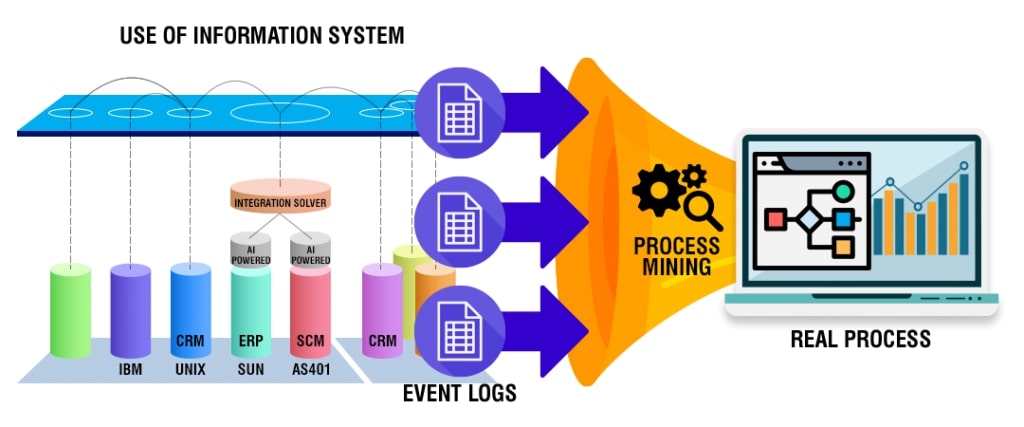
Process mining is an intelligent technology solution enabling owners to build a reliable visual map of business processes elaborating how every task within a process is executed. It captures employee-software system interactions and converts data into event logs. This provides an overview of end-to-end processes.

Process mining tools provide task and process insights to evaluate task executions for scaling improvement opportunities. These insights also support informed decision-making pertaining to process efficiencies and complexities.

Process mining bridges the gap between traditional model-based processes and data-centric processes for further analysis. There are three basic types of process mining; namely, process discovery to discover a process model capturing the behavior in an event log (collection of events), conformance checking for identifying commonalities and discrepancies between a process model and an event log, and process re-engineering to improve a process model using event logs. In a human-centric process, each event comprises a case identifier, an activity name, a timestamp, and optional attributes such as resources or costs. Usually, a case identifier refers to individuals and includes much personal data. And herein lies the significance of improving data security.

The Importance of Data Security in Process Mining

Automated process mining relies heavily on enterprise data and captures confidential information about the company or the clients. Data collected during the mining of processes are categorized under the following datasets:

Key identifiers: These datasets contain unique information identifying individuals, such as their full names and social security numbers.

Quasi-identifiers: These datasets are considered indirect identification of individuals—for example, gender, age, and postal code.

Sensitive attributes: Information related to salary, payment, financial statements, and others are private and sensitive for individuals or companies.

Insensitive attributes: These datasets contain general or non-risky information not covered by the other features.

Given the confidential and sensitive nature of the above-mentioned data, attention to cybersecurity in process mining has gained momentum recently. Also, third parties can offer the latter; therefore, choosing providers with secure products and processes is equally crucial. Any breach in data security can prove costly for the company owners and tarnish customer/client/partner relationships.

But the shared responsibility of protecting critical information should rest upon employees. After all, it is said that the usual source of security incidents are current employees and, in certain instances, ex-workers.

Respective teams, while handling information, should protect sensitive data at every step of task execution. In order to achieve the same, decisions regarding data transparency and usage should be made aforehand. Most specifically, such decisions involve the type of data used, data extraction methods, data accessibility, data protection, and compliance requirements.

On the other hand, process mining can be leveraged to detect silent internal attacks on data. It can quickly identify abnormal behavior in the company’s internal network and indicate apparent security breaches.

Therefore, data is integral to process mining, and the security of which should be the core objective of software applications and associated teams.

Key Privacy Metrics in Process Mining

In order to evaluate the privacy of specific data, owners should decide on particular metrics for measurement. These privacy metrics tally the security level of each data in terms of disclosure and are broadly categorized under the following sub-heads:

Bounded knowledge: Data is restricted with specific rules to avoid disclosing confidential information.

Need to know: The unnecessary data is eliminated from the system to prevent any breach. This metric controls data access.

Protected from disclosure: Data confidentiality is observed during data mining using the classification method.

Data quality metrics: These metrics measure the loss of information/benefit, while the complexity criteria validate the efficiency and scalability of different techniques within this scope.

Process Mining and Data Capture – Key Points to Consider

Since process mining extracts granular data at the process level, care is taken to ensure that any new process doesn’t come into conflict with personal data policies. Owners should also ascertain that software solutions for mining processes comply with the specific data security requirements. Therefore, people involved with the entire system must consider a few data capture points.

Access to raw data: The process mining team requires access to corporate data to understand what’s most important for analysis. Here, the company can choose and grant access to specific datasets for further research.

Choose the right strategy: Besides mining processes for raw insights, the team also translates the raw data into broad terms and updates it into dashboards. Later on, the respective team can decide what features to focus on.

Filter: Occasionally, the company tracks information that doesn’t require further analysis for specific processes. In this case, the data can simply be omitted from the system. Datasets that are sensitive or do not directly impact the business analysis outcome are deleted to maintain the focus only on valid and relevant data.

Pseudonymization: Encrypting the information to protect the confidentiality of sensitive information prevents users from correlating them to real data specific, like specific names, addresses, or other PII data. For instance, if the company wishes to maintain secrecy about employees directly involved with process-related tasks can follow this approach. Here, the case identifier’s name is replaced with numbers.

Anonymization: This is similar to pseudonymization, where the names are replaced with unique pseudonyms instead of numbers. Hence, unauthorized users cannot identify individuals’ names or confidential information about them from the available data.

Conclusion

Besides handling data in bulk daily, enterprises using online systems leave behind their digital footprints. These footprints are valuable data captured by process mining to examine how employees execute each process and sub-tasks. Needless to say, mining for such insights is done with the company’s best interests in mind, namely, to optimize operations and resources and derive maximum value.

However, such datasets carry sensitive information of various interested parties, any breach of which can prove highly hazardous for all. Therefore, data is the primary source for process miners to carry out their objectives, but the company must ensure the data is handled with care. Hence, data security is a significant factor in process mining.

Have A Look :-

  • How to Get Copy of a Divorce Decree
  • 7 Secrets To Make Your Baby Fall Asleep Faster
  • All That You Need To Keep In Mind Before Selling On Facebook

Content Rally wrapped around an online publication where you can publish your own intellectuals. It is a publishing platform designed to make great stories by content creators. This is your era, your place to be online. So come forward share your views, thoughts and ideas via Content Rally.

View all posts

Leave a Reply

Your email address will not be published. Required fields are marked *

Related

Managing Peak Call Volumes

Effective Strategies For Managing Peak Call Volumes In Inbound Call Centers

In the fast-paced and dynamic world of Business Process Outsourcing (BPO), managing peak call volumes in inbound call centers is a critical challenge. Peak call volumes can arise due to various factors, such as seasonal fluctuations, marketing campaigns, or unforeseen events. To ensure seamless customer service and maintain operational efficiency during these high-demand periods, BPOs must adopt effective strategies. In this article, we will explore non-promotional approaches to address the challenges associated with managing peak call volumes. Data-Driven Forecasting and Planning One of the key pillars of effective call volume management is accurate forecasting. BPOs should leverage historical data and advanced analytics tools to predict peak call times accurately. By identifying patterns and trends, BPOs can proactively allocate resources, adjust staffing levels, and streamline operations to meet the expected surge in call volumes. Implementing a data-driven forecasting model enhances the overall responsiveness of the call center, minimizing the risk of being overwhelmed during peak periods. Flexible Workforce Management Creating a flexible workforce is essential for managing peak call volumes. BPOs can implement strategies such as cross-training agents on multiple skill sets, enabling them to handle a variety of inquiries during high-demand periods. Additionally, adopting a flexible scheduling system that allows for real-time adjustments based on call volume fluctuations empowers call centers to efficiently manage resources. This approach ensures that staffing levels align with demand, preventing overburdened agents and long customer wait times. Technology Integration for Efficiency Embracing cutting-edge technologies can significantly enhance the efficiency of inbound call centers during peak periods. Implementing Interactive Voice Response (IVR) systems, chatbots, and virtual assistants can help address routine inquiries, freeing up human agents to focus on more complex customer issues. Furthermore, cloud-based solutions enable scalability, allowing BPOs to quickly adapt to changing call volumes without the need for extensive infrastructure investments. Empowering Self-Service Options Encouraging customers to utilize self-service options can alleviate the pressure on inbound call centers during peak times. Providing easily accessible FAQs, online knowledge bases, and tutorials empowers customers to find answers to common queries independently. By promoting self-service options, BPOs not only enhance the overall customer experience but also reduce the influx of routine inquiries, enabling agents to focus on more intricate customer interactions. Real-Time Monitoring and Adjustments Real-time monitoring is crucial for managing peak call volumes effectively. BPOs should invest in monitoring tools that provide insights into call queue lengths, average wait times, and agent performance. With this data at their fingertips, call center managers can make informed decisions and implement on-the-fly adjustments to ensure optimal service levels. Constant vigilance and adaptability are key components of successfully navigating peak call volume scenarios. Conclusion In the ever-evolving landscape of BPOs, managing peak call volumes is a critical aspect of delivering exceptional customer service. By employing data-driven forecasting, fostering a flexible workforce, integrating technology for efficiency, promoting self-service options, and implementing real-time monitoring, BPOs can navigate high-demand periods seamlessly. These non-promotional strategies focus on improving operational resilience and customer satisfaction, ultimately contributing to the long-term success of inbound call centers in the BPO industry. Read Also: Top 4 Creative Team Building Ideas for a Call Center Industry This 2020 Cloud-Based Call Centers Vs. On-Premises Call Centers Why Your Business Needs Call Center Tracking

READ MOREDetails
audio renderer error

How To Fix Audio Renderer Error In Windows 10

Are you getting an “audio renderer error, please restart your computer” error message in your Windows 10 system? In case you still have not restarted your computer, then you can start by clearing your browser cache. And then restart your computer. If the audio renderer error on YouTube still persists, there are several other tactics or troubleshooting steps that you can try to eliminate this issue. Causes Of Audio Renderer Errors Here are different reasons why you might face audio renderer Errors – Driver Issues One of the reasons why you face audio renderer errors is because the driver is getting corrupted or outdated. When the drivers aren’t working properly, it can cause communication errors Between the hardware and the operating system. Most users report that updating the drivers or rolling them back often resolves the issue. Hardware Conflicts Hardware complex can also cause the audio devices to Trigger these errors. Got example would be when a computer has both the headphones and the speakers connected. This can cause a struggle within the computer to determine which device should deliver the output. In this case, it's best to disconnect one of the devices. Software Conflicts The software conflicts in the computer can also interfere with the audio playback. This happens when the web computer has installed different extensions or third-party audio and has enhancement tools. Sometimes, the system updates also in advertently affect the audio setting, causing conflict within the software and audio rendering processes. Updating Windows Operating System Sometimes, updating the Windows operating system can also disturb the existing audio on the favorite configuration, leading to audio issues. In many cases, it's best to check if the audio is working after major operating system updates. Corrupted Systems Corrupted system files can also lead to audio-rendered errors. It's best to run system file checks for or troubleshoot utilities to identify and solve these issues. Fixing Audio Renderer Error In Windows 10 Here are the ways to techniques that will help you fix the YouTube audio renderer error in Windows 10. If you are getting no sound on YouTube Windows 10, you should definitely try these steps and check whether the issue is solved or staying. 1. Replug Or Unplug The Sound Device In case you have any external wired audio device connected with your system, like a pair of earphones, headphones, or speakers, then unplug the device and start the youtube video. If the audio is playing, then connect the device again and check for the issue. Sometimes, when you connect too many external devices to your computer, this audio renderer error may occur. At that time, connect only the default audio device and disconnect the rest to solve the issue. If this error is still showing, try the next suggestion. 2. Close The Audio Mixing programs Audio mixing programs, like Mixcraft, often take exclusive control of your system’s audio drivers and prevent your browser from using them. In case you have a program like this, and it is running in the background before you start watching Youtube, completely exit the program. On the other hand, you also can prevent those programs from taking control of your audio devices. For example, let’s go through the steps for Mixcraft. Open File. Go to Preferences. Go to Sound Device. Search for Exclusive Mode. Now, uncheck the box or turn off the switch. 3. Disable And Enable Sound Devices While trying to fic audio renderer error in Windows 10, you can disable and then again enable sound devices to fix the issue. Here are the steps to do that.  Right-click on the Start Button. Now select the Device Manager. Expand the option Audio inputs and outputs. Now, right-click on your default audio device name. Suppose you are unable to figure out where to click, as there are a lot of options. Right-click on the volume icon. Choose Disable device. Select the Yes option to confirm. Again, right-click the Audio device. Now, Enable the device. 4. Run The Audio Troubleshooter Now you have done with the three fixing techniques, but the audio renderer error is still there. You can try to fix the issue by using the audio troubleshooter in your Windows 10 system. It will not only be able to detect the underlying problems but also help to fix the issue. Follow the below steps to do that. Open the Start menu. Now, type troubleshoot settings. Now select Open. Select the option named Additional Troubleshooters. Select Playing Audio. Now select Run the troubleshooter. Now follow the on-screen suggestions or instructions to solve the issue of the YouTube sound cutting out. 5. Rollback Audio Drivers Are you facing the audio renderer error just after updating any sound card or audio playback device-related driver? If yes, then try rolling them back. But in case there is no update, you can not try to roll back them. Audio Playback Device Right-click the Start button. Select Device Manager. Expand the option Audio inputs and outputs. Now, right-click on your default audio device name. Choose Properties. Switch to the tab named Driver. Now select Roll Back Driver. Audio Card Drivers Open the Device Manager. Expand the options for Sound, videos, and game controllers. Right-click on the Audio card driver. Now select Properties. Switch to the tab named Driver. Then Select Roll Back Driver. In case you are multiple audio drivers, repeat steps 2 to 4. 6. Update Audio Drivers What if you can not rollback your audio drivers to fix the audio renderer error issue? You can try updating them instead. Audio Playback Device Right-click the Start button. Select Device Manager. Expand the option Audio inputs and outputs. Right-click on the default output device. Choose the Update driver. Select the option named Search automatically for drivers. Now apply the last driver updates if you get the option. Audio Card Drivers Open Device Manager. Expand the option Sound, videos and game controllers. Right-click on the Sound card driver. Select the Update Driver. In case you see multiple devices, repeat the third and fourth steps.  7. Update Windows 10 An outdated system often becomes the reason for many technical glitches and abnormalities to crop up. Updating your Windows 10 may eliminate the audio renderer error. So, update it now. Open the Start menu. Now type there Windows Update. Hit Enter. Now select Check for updates. If any update is available, install it. Just below the Check for Updates option, there will be another option named Optional Updates. Select it in order to install any updates related to audio. Update Web Browser An outdated web browser can also be the main reason behind audio renderer errors. Though popular web browsers such as Firefox and Chrome are designed for automatic updates, there is no harm in double-checking. And if there is, any update is available. Install it. 8. Disable Hardware Acceleration Hardware acceleration is used by your browser in order to speed up things. But this feature also can cause audio renderer errors in Windows 10. So, you can disable hardware acceleration to avoid this issue. Google Chrome Open the Chrome menu. Select Settings. Expand Advanced. Choose System. Search for Use hardware acceleration when available. Turn the switch off. Mozilla Firefox Open the Firefox menu. Select Settings. Scroll the General tab down. Search for the Performance section. Search for Use hardware acceleration when available. Uncheck the box. Final Tips All the tactics that are mentioned above are more than enough to solve the audio renderer error in Windows 10. But if it persists, you also can update the bios and check whether the issue is solved or not. If you have any other technique to solve this issue, you can share that with our readers. Read Also: How Many Jobs Are Available In Real Estate Investment Trusts? 2021 How to Download Game Of Thrones Putlocker Online for Free? How to Plant Grass Seed on Hard Dirt? – Latest Update 2021  

READ MOREDetails
Heat Pump

10 Benefits & Drawbacks Of Purchasing A Heat Pump

A heat pump Nz is a system that can give your home both warm and cold air. It is usually set up outside and runs on either heat from the ground or heat from the air around it.  Depending on where you live and how cold it gets, heat pumps can be a great alternative to furnaces. We have made a long list of the pros and cons of installing a heat pump system in your home to help you choose a new heating system.  What Are The Benefits Of Using A Heat Pump? The five benefits of a heat pump are:  1. Efficiency Heat pumps are more efficient than other ways to heat and cool your home. They use less energy and fuel to heat and cool your home, and some water pumps are up to 600 percent more efficient. They can also live for as long as 50 years.  2. Vents Let Warm And Cold Air In And Out. Getting a heat pump is a good idea because it can move both hot and cold air around your house. This could save you money because you won't have to pay to install two separate systems. 3. Great System Also, it takes up less room because there is only one system with two functions instead of two.  4. Advantages For Health Most heat pumps make less noise than a dishwasher when they are running. They also help improve the quality of the air around you by filtering the air and removing moisture. Good indoor air quality is important because it can help keep people from getting sick or having other health problems.  5. Reducing Harmful Emissions Is A Suggestion One of the best things about a heat pump is that it is good for the environment. Since the heat pump doesn't use fossil fuels, it doesn't release any harmful gases into the air.  Less carbon in the air is good for the environment. This also helps people who use their own homes save about $459 a year. What Are The Drawbacks Of Using The Heat Pump? Even though heat pumps have a lot of good points, they also have some bad ones. Here are 5 bad things about heat pumps:  1. Family With Little Upkeep Heat pumps only need a little work to keep them working. They need to have the system checked once a year, but the homeowner doesn't have to pay a professional to do it.  A heat pump's low maintenance needs are good for homeowners who want to save money on expensive home repairs. In the long run, this helps save money. But it actually does not work for homeowners who are living in extensive cold and harsh winter weather.  2. Higher Bills For Utilities Air-source heat pumps work with electricity. This means that even though you use less fuel overall, your electricity bill could still be high because of your heat pump and everything else you use electricity for.  This is especially important if you live in a place where the cost of electricity is very high. You can calculate the fuel charges, but you actually can't count the electricity bills or the utility bills.  3. Money: High Cost Up Front Heat pumps are some of the most expensive to buy at first. This could make people less likely to buy them. The cost of hardware equipment and other instruments costs are pretty High. Due to this cost, heat pump installation and maintenance are pretty costly. The price is so high because of the quality of the equipment, the complexity of the installation, the type of system, the labor, and more. 4. High Costing If you look at the pros and cons of buying a heat pump, you will see that the average cost of this type of system ranges from $12,000 to $20,000. On the other hand, it usually costs $5,000 or more to install a furnace. The average cost of installing the heating pump is high. Your heating pump may not require repeated maintenance. But if the equipment costs are pretty high, the overall cost will increase. 5. Excess Uses Of Electric Power Even though it's better for the environment if you heat your home with electricity instead of fossil fuels, electricity comes with its own risks. You won't be able to use your heat pump when the power goes out. If you live in an area where the power goes out often, you might want to avoid getting a heat pump. If you are staying in a place where frequent power cutting is experienced. You have to face immense trouble due to these issues. Wrapping Up: If you are purchasing a heat pump, these are the advantages and disadvantages of using the heat pump. But heating pumps also have limitations. These limitations are associated with the cost and the environment. Heating pumps are not suitable for harsh cold climates. I hope you get ideas about the pros and cons of purchasing the heating pump. Are you planning to purchase it or not? Additional: 5 Uses of Natural Gas Signs Your Air Conditioner Might Be Dying The Many Uses of Industrial Vacuum Ovens Tips on Keeping Your Furnace Room Up-to-date

READ MOREDetails