



Top Pages Report: Web Pages With Most Traffic and Engagement

Published on: 03 August 2021 Last Updated on: 10 January 2025
What Report Shows Which Web Pages Get The Most Traffic And Highest Engagement

What report shows which web pages get the most traffic and highest engagement? Google Analytics is the treasure trove of information, and with the help of this, marketers analyze the performance of their website from time to time. 
Web Pages Get The Most Traffic And Highest Engagement

In this article, I will explain in detail how Google Analytics Page Reports helps you access the performance of your content and the actions visitors take on your site. 

What Report Shows Which Web Pages Get The Most Traffic And Highest Engagement?

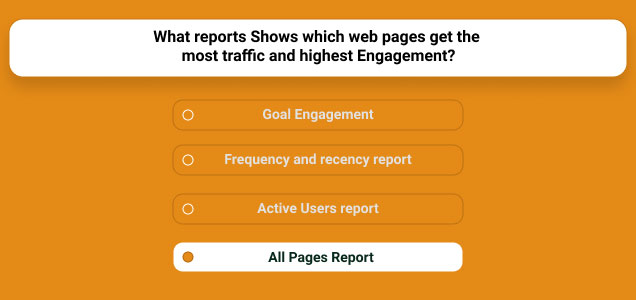
The answer to your question What report shows which web pages get the most traffic and highest engagement? is All Pages Report

This ‘Pages Report’ displays the top pages on your website based on traffic, page value, % exit, bounce rate, entrances, average time on page, unique page views, and each page’s page views.

At the same time, this report is going to help you to find quick and low-performing or low-quality pages that should be upgraded to enhance your content marketing strategies in the long run. 

Now, you need to understand that there is some difference between landing pages and all pages in Google Analytics. All Pages Report will show you the entire performance of your website, whereas landing pages will show you how people entered your website. 

How Can Pages Report Help You To Optimize Your Content?

Pages Report Help You To Optimize Your Content

Pages Report will help you to quickly view the top content along with the average amount of revenue each page makes. In addition, this report helps you determine what content performs best on your website.

At the same time, you will be able to view the top content section via this report. Keep in mind that this report will help you know where visitors are interacting with the events. This way, you will be able to determine both low quality and top pages on your website.

The low-quality or outdated pages can be improved with dates, images, videos, or even you can add the latest infographic to make the content more useful for the audience. Thus, this way, Pages Report can help you to optimize your content to a great extent.

Sample Site Content Report In Google Analytics

The site content reporting sections contribute unique content-focused views revealing how users can interact with your site content. 

1. Exit Pages Report: 

Report that highlights data related to where users leave your site form. This report is useful in calling the attention pages which should be given the most priority to drive traffic to your website.

On the other hand, it’s excellent that some pages should be left often that include high traffic pages, goal confirmation pages, order confirmation pages, etc. 

2. Landing Pages Report: 

Landing Pages Report

This report focused on examining landing page metrics and behavior. It analyzes pages from the view of how often your visitors are landing on your website and what their duration is. 

Moreover, landing pages are great for distinguishing which pages have the highest and lowest bounce rates. You can also identify conversions from this report. 

3. All Pages Report: 

Report that provides behavioral stats on every single page of your site. This includes page value, exit, entrances, time on page, page views, etc.

All Pages Report is one of the most important portions of Google Analytics that helps to improve the performance reports of your website. 

The Final Thoughts 

All Pages Reports is the answer to your question what report shows which web pages get the most traffic and highest engagement. I have tried my best to explain to you in detail about Google Analytics Page Report and its uses for your website. Besides, if you come across any doubts, please don’t hesitate to mention them in the comment section below!

More Resources:

Content Rally wrapped around an online publication where you can publish your own intellectuals. It is a publishing platform designed to make great stories by content creators. This is your era, your place to be online. So come forward share your views, thoughts and ideas via Content Rally.

View all posts

Leave a Reply

Your email address will not be published. Required fields are marked *

Related

WordPress Developer

Guide to Hiring a WordPress Developer

Website development and management are but two of the many aspects related to digital marketing which every business today invests time and resources in. For convenient and efficient content building, WordPress provides an open and free platform for companies to take advantage of. Due to the popularity of WordPress, many website developers specialize in creating content for WordPress. On that note, how do you select a WordPress developer to work with? Freelance vs web development agency: The first factor you need to consider before hiring a web developer is whether to hire an agency or look for a freelancer. These options represent two ends of a spectrum with distinct advantages and drawbacks. A freelancer is typically cheaper and more flexible with time, while a web development agency is perhaps best for large-scale projects. In any case, consider the scope of your project as well as the long-term value of each option. Look for someone local: Freelance web developers work from home and location is not always a significant consideration. Nevertheless, there is an advantage to hiring a WordPress developer who is within your area. For example, Tim’s Solutions developed by Tim Oxendale, who is based in Wolverhampton, not only works remotely but also works extensively with local businesses. The advantage of working with someone local is the greater understanding of the business landscape, which translates to an easier collaboration and better outcome. Reputation and track record: Experience and skills in creating high-quality content are next in your line of priorities when searching for a WordPress developer. Apart from knowledge of the latest techniques, a good WordPress developer is equally knowledgeable about strategies you need to employ to ensure that you are meeting the goals you have set. A website is not a mere tool to expand your company’s online presence. It needs to increase brand recognition and generate leads that will translate to revenue. A WordPress developer can work beyond creation and management, and could also help provide you with vital insights on website performance and analytics. Responsive to updates and communicates promptly: One of the marks of an excellent web developer is responsiveness. This is especially true if you are working with a freelance developer. Apart from being able to adjust to schedule requirements, a reputable freelance WordPress developer responds to your queries promptly. The right developer does not shy away from feedback and criticism but instead welcomes your input on how to improve the results. Expert knowledge and use of open-source software: The quality of your website depends on how well the developer harnesses WordPress features and uses them to your advantage. An excellent WordPress website uses tools such as SEO and programming language like Python to increase its effectiveness. The site does not only need to look good, but it also has to be fast, user-friendly, and content-rich. By choosing a developer who understands your needs, you can fully take advantage of the free features of WordPress in realizing a website that reflects your brand’s values and objectives.

READ MOREDetails
Service Delivery Website

Winning Tactics To Build A Competitive Service Delivery Website

People usually search online when they require some services. To succeed as a service provider, one cannot afford to lag in this globally competitive market and increasingly innovative environment. The traditional marketing method cannot match up with the increasing global consumers' demand for quality and professional Service Delivery Website; hence, the need for an efficient service_based website. A quality and professional website does not just reflect information concerning a company's brand but a platform where consumers (customers) can relate adequately to any business organization. A well-articulated and professionally designed service_based website is capable of drawing online traffic to a business. This is due to desirable and emotionally appealing features which satisfy the yearnings and expectations of customers. Whether as a product_based website or service_based website, a professionally designed website plays a significant role as a global selling point. To get more information about a professionally designed website, check out  this  link: https://careerfoundry.com/en/blog/web-development/what-is-a-full-stack-web-developer A Service Delivery Website: A service_based website is a website designed for service rendering and not for product rendering purposes. It is intended for convincing and attracting internet users toward services rendered by a business organization. A professionally designed website for service delivery is to sell the individual or individuals behind the organization to the world. Since organization rendering services do not produce physical products but services such as finance, legal, hospitality, or entertainment, a service_based website presents the concepts and ideas of the man behind the business. The following principles can promote a professional website designed for service delivery; though some of them can as well support product_based site; Foundation Laying and Background Design: A professional business website will target the right customers; this forms the bedrock or foundation for designing a service_delivery website. The professionalism behind any service delivery website design will address the uniqueness of customers for which it was intended. The layout feature of a service_based website can have a single_pager or multi_pager outlook depending on the choice of the business owner. A single or one_pager design has one menu item leading to different sections or categories of the same page. The multi_pager design has different unique pages for each part of the website. However, the single or one_pager design has been found and recommended for new businesses or service delivery organizations due to its simplicity and secure management. Website Branding: A professional service delivery website speaks much about the individual or individuals driving the organization and not any physical product. So, a service_driven website must have useful concepts that relate to certain features of an organization such as domain name, logo, and visual representation. The domain name of a professional service delivery website must be very strategic to the principle and the mission of a business organization. The business logo as small as it may be, speaks volumes and should be reflected on the website design because it is a good selling point. The visual and color representation of a service delivery firm should be attractive and appealing to the emotions of online visitors who visit the site. Inclusion of Relevant Pages: A service delivery website can have many contents, but it should be professionally managed and structured to contain only essential and relevant pages. This section is highly critical and demanding because this is where the visitors interface and interact more with a business on the web. For instance, the home page is the first point of contact with a business organization online. It should be inviting and appealing to would_be customers but must pass the necessary information about the organization to the visitors. Though the number could be many, the relevant pages associated with a service_based website are; About page. This shows the personal description and background of oneself and the organization. The contact page is also vital as it is dedicated to reaching the business or the company's representatives through phone numbers,e_mails, fax, and social media channels. Service and Booking Feature: This is a very crucial part of service delivery website design because it's a section that requires customers to take individual decisions as regards the service rendered by a business organization. This requires that the services be well analyzed with necessary action to be made by clicking some service buttons. This includes negotiating prices, types of services rendered, and booking an appointment with the organization. Payment options available to customers and; how, when, and where the service will be provided are also spelled out. Testimonial and Quality Ratings: This is a section where satisfied previous customers express their views and assessments concerning the services rendered by the organization. They reveal their experiences with the services, which can also be star_rated based on what they got. Positive testimonials from previous customers will encourage new ones the organization for its services.  Feedback Channels: Feedback channels such as FAQ and the client's chat menu are essential in service delivery websites. Businesses can welcome customers' complaints and views and take proper actions to address them. Also, building a host community of loyal customers through social media outlets such as Facebook, Twitter, Instagram, and blog is essential to expand the scope of the service. Mobile Compliant Website: A professional service_based website should be mobile-friendly. It should be designed to work not only on PC's and laptops but with mobile phones. This creates unlimited access to a business by customers at any point in time. Website Promotion: It is not enough to launch a service delivery website, but it should be promoted to drive it towards the target customers. Although this can require the cost of promotional fees to be paid by the business owner. However, there are website promoters who offer low-cost promotional fees online. In conclusion, service delivery organizations do not sell physical products but ideas and concepts which require critical thinking to launch and promote online services. It is imperative, therefore, for service rendering organizations to pay more attention to building professional websites that can best promote their services. Read Also: What Are the Common Causes of Catastrophic Injuries? Top 5 Sites Like Solarmovie To Watch Movies Online Do I Have To Pay Out Of Pocket For Wisdom Teeth Removal?

READ MOREDetails
Practices for Visual Regression Testing on Cloud

A Beginner’s Guide To Playwright Inspector

As the world continues to shift towards a more digital landscape, the significance of quality web applications has become progressively apparent. Given the vast array of tools and technologies at the disposal of web developers, determining an appropriate starting point can prove challenging. Debugging is the method of identifying and fixing bugs or errors in software. It is a vital aspect of web automation testing as it contributes significantly to the dependability and precision of the automated test results. Playwright is an open-source cross-browser testing framework released by Microsoft in 2020. As stated by Systems Sciences Institute, the expenditure of addressing an error or bug discovered after product release was 4 to 5 times higher than pinpointing it during the configuration phase. The detected value during the maintenance phase can be exceeded by up to 100 times. Playwright developers operate at the API level and offer comprehensive tooling through the integrated Playwright Inspector. Playwright Inspector is a powerful tool that authorizes developers to efficiently test and debug their web applications. Also, it facilitates creating automation scripts by furnishing auto code generation capabilities. Playwright Inspector allows you to inspect the Document Object Model (DOM) structure of a webpage, interact with web elements, and inspect CSS styles utilizing the Playwright API. It authorizes stepping through tests, picking locators, editing live locators, and seeing actionability logs. This blog will dive into the basics of Playwright Inspector and explore its many features. So if you're ready to take your web development skills to the next level, buckle up and dive into the world of Playwright Inspector. Before that, let's have a brief understanding of Playwright. What is Playwright? Developed by Microsoft, Playwright is an end-to-end open-source web testing and browser automation framework. Playwright offers outstanding cross-browser compatibility and convenient features. This makes it a perfect choice for automation and quality assurance purposes. The playwright is a flexible, robust, and efficient framework. It supports multiple languages like JavaScript, Java, Python, C#, and TypeScript. Playwright utilizes a single automation API. This makes it steadfast and quick and produces consistent outcomes while running cross-browser testing. It provides a powerful set of testing features. These features can be utilized to simulate end-user interactions with the web application. Also, the framework authorizes testing complex scenarios such as file uploads, login flows, and other interactions. These test scenarios can be tough to test with other testing frameworks. The software platform furnishes developers with a comprehensive selection of standard and personalized locators. This facilitates the straightforward and effective identification of elements on web pages. These locators can pinpoint elements based on a variety of attributes, including text content, position on the page, and other distinguishing features. With Playwright locators, developers can confidently identify elements on the DOM, ensuring the creation of substantial and steadfast test suites. What is a Playwright Inspector? Playwright Inspector is a Graphical User Interface based tool that helps testers and developers record scripts and debug Playwright tests. The tool helps generate boilerplate code. This can be a suitable starting point for building codes. Also, it assists developers and the Quality Assurance teams save time when writing the test script from scratch. Software developers can utilize the time saved to comprehensively understand the codebase and make informed modifications, as required, to enhance the efficacy of the testing suites. The Playwright Inspector simplifies the process of debugging web applications. It is a browser-based development tool that facilitates developers to inspect, debug, and troubleshoot web applications. The tool authorizes developers to record user interactions, capture screenshots, and inspect HTML elements, CSS styles, and JavaScript code. Playwright Inspector furnishes a console for developers and testers to run arbitrary JavaScript code in the context of the inspected page. To scale Playwright Inspector, an AI-powered test orchestration and test execution platform like LambdaTest offers an online farm of 3000+ browser and OS combinations to execute the Playwright test. You can effortlessly test your application as its scalable cloud infrastructure enables parallel test execution where you can run test cases altogether. It can also integrate with your existing testing infrastructure. It effortlessly plugs into your Playwright tool, eliminating the need for complex configurations. LambdaTest's Playwright Inspector  empowers you to debug and analyze Playwright scripts effortlessly. Inspect element properties, verify page behavior, and optimize automated tests using this user-friendly tool. Installation and Setup Instructions Installation and setup instructions are crucial for any software tool, and Playwright Inspector is no exception. As a beginner, it's essential to follow these instructions carefully to ensure that you can start using the tool without any issues. To install Playwright Inspector, first, you need to make sure that you have Node.js installed on your computer or laptop. Once you have Node.js, you can install Playwright Inspector through npm by running the command "npm i -g playwright-inspector" in your terminal. Upon successful installation, the tool can be initiated by executing the command "playwright-inspector" in your terminal. You can also use Playwright Inspector with other browsers like Firefox and Safari by installing the corresponding browser extensions. Following these instructions will give you a smooth and hassle-free experience of using Playwright Inspector, authorizing you to debug and troubleshoot your web applications with ease. How to Inspect Elements in Playwright Inspector If you are new to Playwright Inspector, you may be wondering how to inspect elements within your web page. Fortunately, Playwright Inspector comes equipped with a number of useful tools and features to assist you in efficiently identifying and inspecting elements on your web page. To start, simply launch Playwright Inspector and navigate to the web page you want to inspect. Once you are on the page, right-click on any element within the page and select "Inspect element" from the context menu. This will bring up the Playwright Inspector pane, where you can view the HTML and CSS code for the selected element. You can also view any associated styles and properties. From there, you can use the various tools and features within Playwright Inspector to further inspect and manipulate the element, making it easier than ever to identify and troubleshoot any issues within your web page. Benefits of Playwright Inspector The Playwright Inspector tool presents lots of benefits. Let us consider a few pivotal benefits of the Playwright Inspector: 1. Easy Debugging: Playwright Inspector facilitates the process of debugging Playwright scripts by furnishing a visual interface. This authorizes developers to inspect the page, make alterations to its state, and swiftly identify the cause of issues. 2. Record and Replay: The tool presents a record and replay feature that authorizes testers and QA teams to record end-user activities on the page and replay them for debugging purposes. The record and replay feature can help pinpoint issues that may occur only during specific user interactions. 3. Robust Logging: Playwright Inspector presents robust logging abilities that authorize testers and QA teams to outline the execution flow of the test script. This helps swiftly determine issues and fix them, thereby enhancing confidence in the code and application itself. 4. Intuitive Interface: The Playwright Inspector boasts an intuitive and user-friendly interface that is simple to navigate and operate, even for testers and QA teams who are new to the Playwright platform. 5. Cross-Browser Support: The Playwright Inspector facilitates the testing and debugging of applications across various platforms as it supports multiple Chromium-based browsers such as Chrome, Edge, and Firefox. This enables developers to ensure their applications perform optimally on different browsers. 6. Breakpoints: The Playwright Inspector tool is designed to enhance the testing process for software testers and QA teams. With this tool, users can set breakpoints in their test scripts, enabling them to pause test execution at specific points and thoroughly investigate the page's state. This increased level of control and visibility allows for improved efficiency and effectiveness in the testing process. Best Practices for Using Playwright Inspector The Playwright Inspector tool furnishes developers with an intuitive solution for testing web applications at scale. With the help of Inspector, developers and testers can debug their web automation scripts, view page elements and attributes, and pinpoint issues that may be causing the tests to fail. To make the most out of this tool, it is paramount to follow the best practices for using it. Here are eight best practices for using Playwright Inspector: ●        Familiarize yourself with the Inspector UI. ●        Utilize the search feature to swiftly pinpoint page elements. ●        Utilize the highlight feature to visually locate elements on the page. ●        Utilize the console to test JavaScript code and interact with the page. ●        Utilize the network tab to inspect network requests and responses. ●        Utilize the performance tab to pinpoint performance issues. ●        Utilize the snapshot feature to capture a snapshot of the current page state for later analysis. ●        Utilize the playback feature to replay test scripts and identify errors. By following these best practices, you can utilize Playwright Inspector to its full potential and optimize your web automation testing process. Conclusion Playwright Inspector is a powerful tool that can help developers troubleshoot issues and enhance the quality of their web applications. With its user-friendly interface and wide range of features, Playwright Inspector is a prominent addition to any developer's toolkit. By following the steps outlined in this beginner's guide, you can start utilizing Playwright Inspector today and take advantage of its many benefits. Whether you are a seasoned developer or just starting out, Playwright Inspector is a must-have tool for anyone looking to enhance their web development skills. Read Also: Mobile Testing With Appium On Lambdatest 10 Reliable Free Currency APIs For Your Business Using Tracking Code, Google Analytics Can Report On Data From Which Systems?

READ MOREDetails